


Updated on 8 October, 2026 by Robert Abela
How to Hide WordPress Usernames and Protect Against User Enumeration
In many cases, usernames of WordPress user accounts are surprisingly easy to find. WordPress does not treat usernames as secret information, so they can be exposed on author archive pages, via the REST API, and elsewhere on the site.
On their own, exposed usernames are not usually a major security problem. However, they do remove one obstacle for anyone trying to gain unauthorized access to an account. If an attacker already knows a username, they only need to focus on obtaining or guessing the password.
Fortunately, there are several WordPress hardening techniques you can use to make usernames more difficult to discover. In this guide, you’ll learn how WordPress username disclosure works, how to hide usernames from common enumeration methods, and why stronger controls such as passwords, two-factor authentication, and login protection should remain your primary focus.
Table of contents
How WordPress usernames are discovered
WordPress usernames can often be easily found, and a known username makes an attacker’s job easier, especially in the case of a targeted brute-force attack. There are several ways usernames can leak from a default installation.
Author archive URLs
Attackers can use a tool such as WPScan to enumerate your usernames, or simply enter a URL such as the following:
http://www.example.com/?author=1
If the author ID is valid, WordPress redirects them to the author archive URL, for example:
http://www.example.com/author/admin
This works even when you have changed the WordPress user IDs. For example, if you changed the user ID to 1000, then by requesting http://www.example.com/?author=1000, the attacker can still discover the username. Changing the ID delays the guessing attack, but it does not eliminate it.
The source of your posts and pages
WordPress usernames can also be found in the source of blog posts and pages, which is why you should hide the username and never publish anything using the WordPress administrator account. In the screenshot below, highlighted in orange, is the username of the author: in this case, ruby.

Melapress tip: Create separate editor or author accounts for content work, and reserve administrator accounts for site management tasks.
The REST API
WordPress also exposes a REST API endpoint at /wp-json/wp/v2/users that lists the accounts that have authored published content, along with each account’s slug. If that slug still matches the login name, as it does by default, it hands an attacker the same information at a glance. You can also easily enumerate the WordPress usernames with WPScan, which automates several of these techniques at once.
Note: this endpoint returns only users with at least one published post, not all registered accounts.
How to hide WordPress usernames
Hiding usernames will not stop a determined attacker, but it can help to reduce the number of automated attacks you face and, in our opinion, is worth doing as part of a layered approach. The procedure below explains how to do it step by step.
Set a safe public display name
- Navigate to the WordPress user’s profile page and make sure the First Name, Last Name, and Nickname fields are populated.
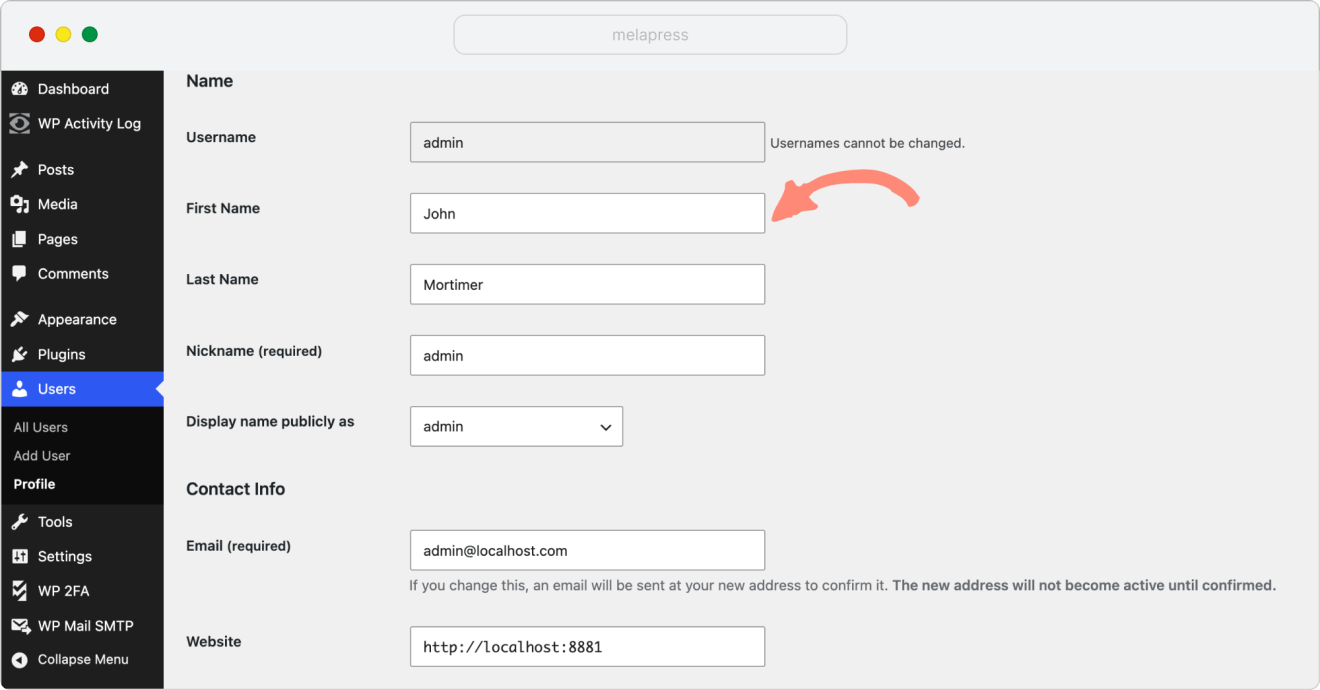
Note: the nickname is typically auto-populated with your username. The nickname exists to give you the option to set the display name to something other than your username or first and last name, so you do not need to fret much about it from the security point of view.
2. From the Display name publicly as drop-down menu, select how the user’s name should appear in blog posts, pages, etc. Choose something that is different from the WordPress username.
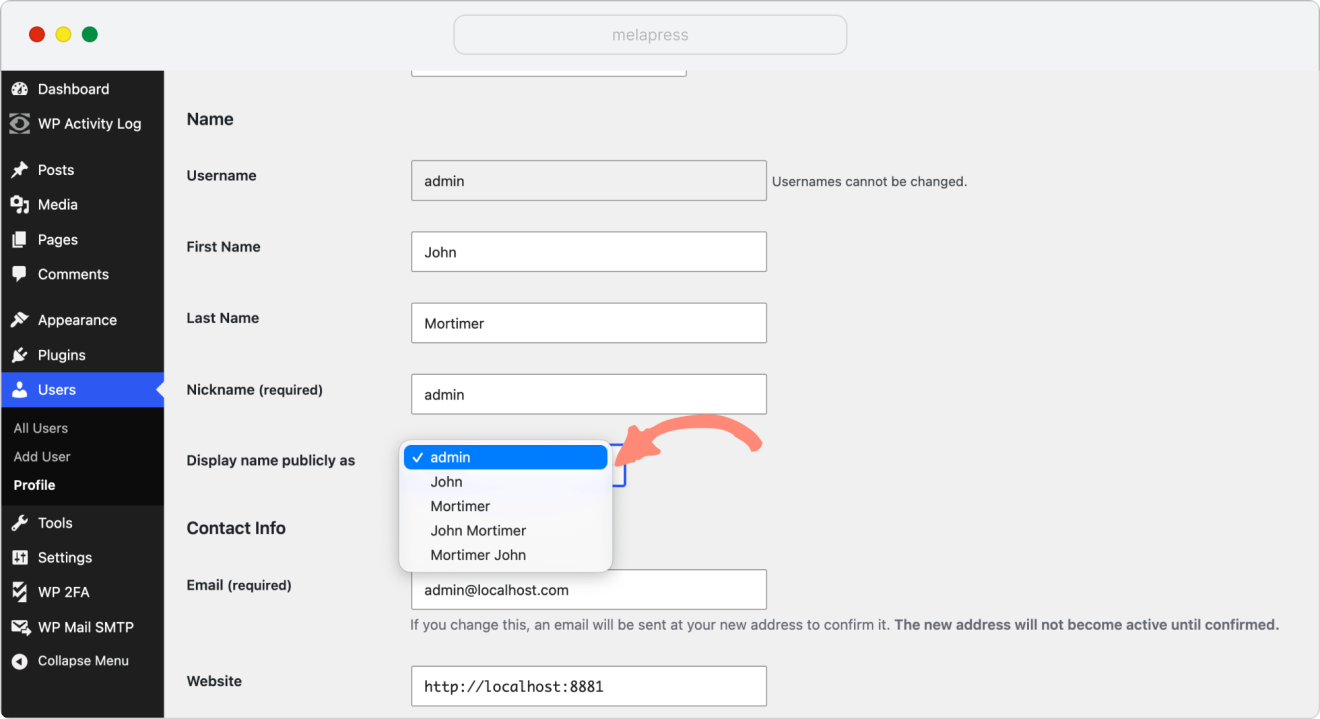
3. The next step is to change the user_nicename entry for that particular username in the WordPress database. To do so, follow either of the procedures below.
Change the user_nicename entry via phpMyAdmin
- Log in to your hosting provider’s cPanel and click phpMyAdmin from the Databases section.
- Click on your WordPress database and click on the wp_users table (if you changed the prefix, the table’s name should be [yourprefix]_users).
- Click the Edit button next to the user you would like to edit, as highlighted in the screenshot below.

- Modify the user_nicename entry to something different than the username, as highlighted in the screenshot below.
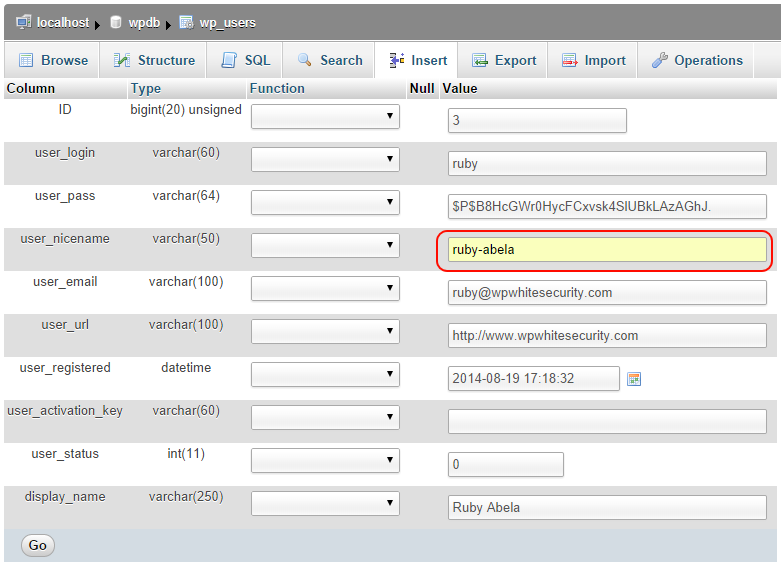
- Click Go to save the changes.
Change the user_nicename entry via the MySQL command line
Log in to MySQL using the command line and issue the following command. For the example below, we will use an account with these details: username ruby, First Name Ruby, Last Name Abela:
UPDATE `wpdb`.`wp_users`
SET `user_nicename` = 'ruby-abela'
WHERE `wp_users`.`ID` = 3;
Below is a syntax explanation of the above command:
UPDATE `[WordPressDatabase]`.`[UsersTable]`
SET `user_nicename` = [NewNicename]
WHERE `wp_users`.`ID` =[User'sID];
Test if the WordPress usernames are hidden
Prior to changing the WordPress user_nicename, if you click on the author’s name in a blog post, WordPress redirects you to the author’s archive page, where the last parameter in the URL is the username itself:
http://www.example.com/author/ruby/
After changing the user_nicename, if you click the author’s name in a blog post, or try to enumerate the username using WPScan or via a specific URL, you will be redirected to the URL below, which includes the user_nicename rather than the WordPress username. The login username is therefore not disclosed:
http://www.example.com/author/ruby-abela/
Because the REST API and author archives both surface the slug rather than the login name, setting a distinct user_nicename also reduces what those routes leak.
Is WordPress username disclosure really a vulnerability?
This is a long-running debate. Many large companies, including big ones such as Microsoft and Cisco, have had this same problem in the past. Most of them addressed it because many security professionals consider it to be a security flaw. This debate is not new, as back in 2009, username disclosure was formally reported as a security issue. In fact, back in 2009, login behaviour that allowed attackers to distinguish valid from invalid usernames was reported as a security issue in WordPress under the CVE number – CVE-2009-2335.
WordPress core contributors have consistently declined to address this, stating that usernames are not considered private information and that user-friendliness takes precedence over disclosure concerns. This position has been documented in multiple WordPress Trac tickets over the years (for example, this one from 2020). It was also reported on the WordPress Trac in a ticket. In that ticket, one of the WordPress core developers explained that there are so many other ways to reverse engineer a WordPress username that they would not address the issue. As the enumeration methods above show, that position is not unreasonable, closing one route still leaves several others open.
So is this really a security issue? It can certainly be considered one, especially since it was treated as an issue by other vendors. But the more useful way to look at it is this: a username on its own is not a credential. Username disclosure only matters if knowing a username gets an attacker meaningfully closer to breaking in. What actually protects an account is everything that sits behind the username, and that is where your effort is best spent.
Better ways to protect WordPress user accounts
It is worth being honest about what hiding a username achieves. As many in the security industry will tell you, there is no security solution that works 100%, and hiding usernames is no exception. It can reduce unnecessary exposure, but it does not make an account secure.
Our Melapress Security Survey 2025 found that 32% of site owners concerned about defacement and data theft still have no user account security controls in place: no 2FA, no login restrictions, no password policies. That is a far bigger security risk than exposed usernames.
The controls that genuinely keep accounts safe are the ones that make a known username useless to an attacker.
Enforce strong passwords and limit login attempts
Weak or reused passwords make username disclosure more dangerous. If a bad actor knows the administrator username and the account uses a weak password, the site is exposed to unnecessary risk. The same applies if your site allows unlimited login attempts, since attackers have more room to test username-password combinations.
For better control, enforce minimum password lengths and limit the number of failed login attempts.
As WordPress security expert Tim Nash said on The Melapress Show, in our episode on advanced WordPress security: “I’d say force people to use long passwords. WordPress will warn you that a password is weak, but it will still let you set it. Enforce a minimum of 16 or 32 characters.”
Login restrictions are the next layer. Limiting failed login attempts helps reduce brute-force and credential-stuffing attacks by slowing repeated login attempts. It also gives administrators a clearer signal when something suspicious is happening.
Our Melapress Login Security plugin can help enforce WordPress password policies and limit login attempts across users and roles when you need more control.
Enable two-factor authentication
Two-factor authentication adds a second step to the login process. This means that even if an attacker knows a valid username and password, they still need the second factor to access the account.
Given the quick setup and relatively low friction to users, we tend to recommend 2FA be applied to all WordPress user accounts.
2FA works best as part of a broader approach to account security rather than as a standalone measure. WordPress security consultant Kathy Zant highlighted in our episode on why every website is a target: “These are security principles that apply to every aspect of a business: unique passwords, making sure everybody in your business uses a password manager, the principle of least privilege, two-factor authentication, and making sure somebody is responsible for auditing the site every once in a while.”
Our WP 2FA plugin can help you enforce two-factor authentication across your site, including for specific users or roles.
Monitor login and user activity
If someone is trying to guess passwords, logging in from unusual locations, changing user roles, or modifying important settings, you need a way to see it.
An activity log plugin provides administrators with a record of important user and system activity, including logins, failed login attempts, user changes, content changes, plugin changes, and settings changes.
This is useful for day-to-day administration and for investigations after a suspicious event.
That’s where our WP Activity Log can help you monitor activity across your WordPress site and keep a record of important changes. This does not replace strong authentication, but it gives you the visibility needed to detect and respond to issues faster.
With strong passwords, 2FA, login protection, and monitoring in place, username disclosure is no longer something worth losing sleep over.
Focus on the controls that matter most
Over the years, I’ve seen plenty of discussions about whether WordPress username disclosure is a vulnerability. But, when it boils down to it, knowing a username is rarely what results in a website getting compromised.
Hiding usernames is still worth doing because it removes some low-effort enumeration techniques that automated tools and opportunistic attackers rely on. This can potentially reduce the number of automated attacks you face, if done as part of a broader hardening strategy.
However, think of username hiding as the finishing touch rather than the foundation of your WordPress security. Strong passwords, two-factor authentication, login protection, and activity monitoring should always come first. Once those controls are in place, hiding usernames can help reduce unnecessary exposure, making username disclosure a minor concern rather than a significant security risk.
FAQs
Is WordPress username disclosure a security vulnerability?
People often disagree on this, but if it is, it is at the very least a minor one. A username alone is not enough to access an account, but it can make brute-force and credential-stuffing attacks easier. The practical approach is to reduce username exposure where possible, but focus most of your effort on passwords, 2FA, login protection, and monitoring.
Does hiding WordPress usernames stop brute-force attacks?
No, hiding usernames can reduce some automated brute force attacks, but it does not stop them completely.
What is the user_nicename in WordPress?
The user_nicename is the public-friendly version of a user’s name that WordPress uses in author archive URLs. If it matches the login username, the username may be exposed through URLs such as /author/username/.
Should I change the WordPress administrator user ID?
Changing the administrator user ID can make one enumeration method less convenient, but it is an advanced hardening step and can cause problems if done incorrectly. If you do it, create a full database backup and test the change on a staging site first.
What matters more than hiding WordPress usernames?
Strong authentication and login protection matter more. Enforce strong passwords, limit failed login attempts, require 2FA for privileged users, and monitor login and user activity.