


Published on 9 November, 2026
How to use WP Activity Log with Atarim
WP Activity Log integrates with Atarim to help you monitor changes made to your WordPress website through Atarim’s AI assistant.
With WP Activity Log Premium and Enterprise, you can identify changes made by Atarim’s AI directly in the activity log. You can also view website activity in Atarim dashboard and ask its AI assistant, Claro, about recorded events.
Table of contents
Connect WP Activity Log with Atarim
To get started, you need to install and activate WP Activity Log on your WordPress website and connect your website to Atarim.
Step 1: Install WP Activity Log
If you haven’t installed WP Activity Log yet, you can install it directly from your WordPress dashboard.
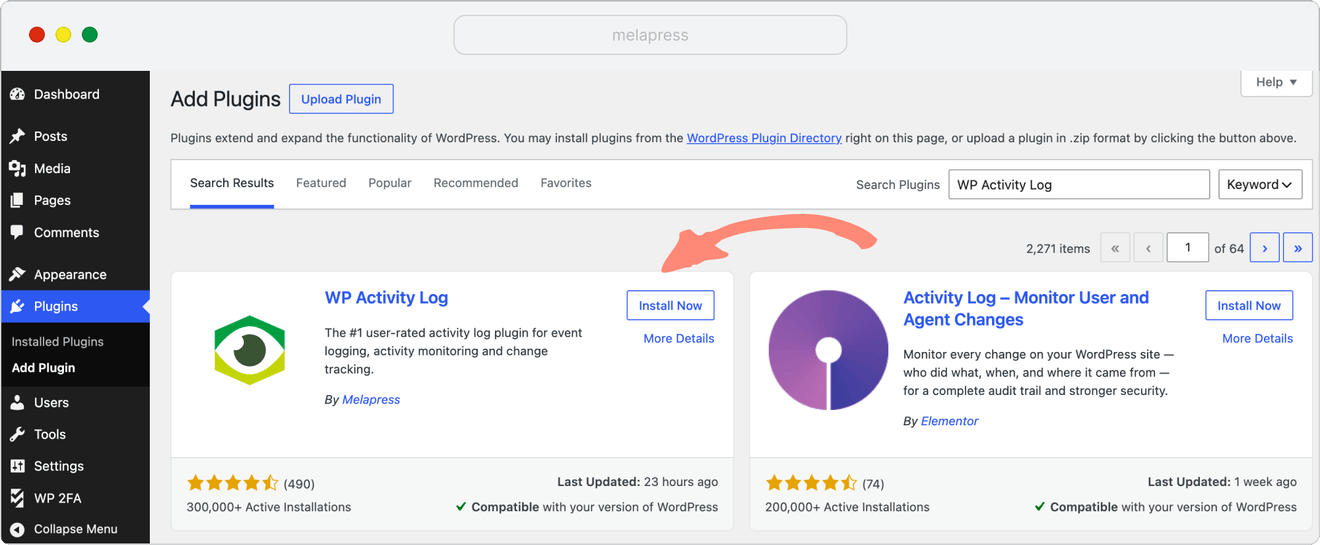
Alternatively, you can install it through Atarim dashboard:
- Open your website’s project in Atarim.
- Click Settings and navigate to The Stack section.
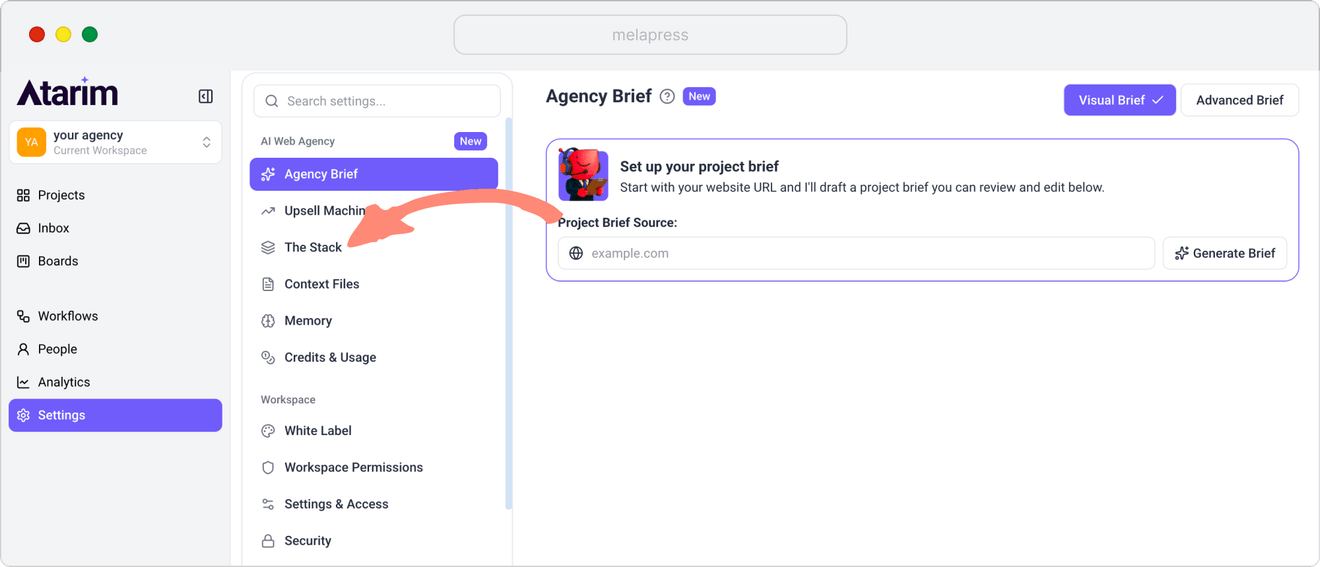
- Find WP Activity Log under the Activity and Logs category and approve the installation if the plugin isn’t already installed.
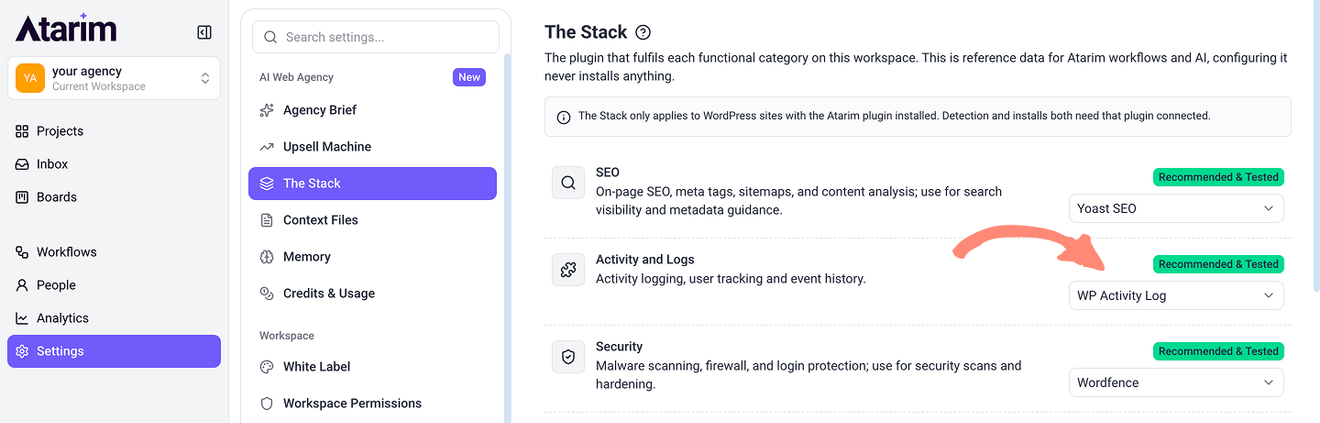
Note: WP Activity Log is the default recommended plugin in Atarim's Activity and Logs category. Atarim will not install it without your approval.
Step 2: Connect your WordPress website to Atarim
To connect your WordPress website to Atarim, you need to install the Atarim connector plugin on your website.
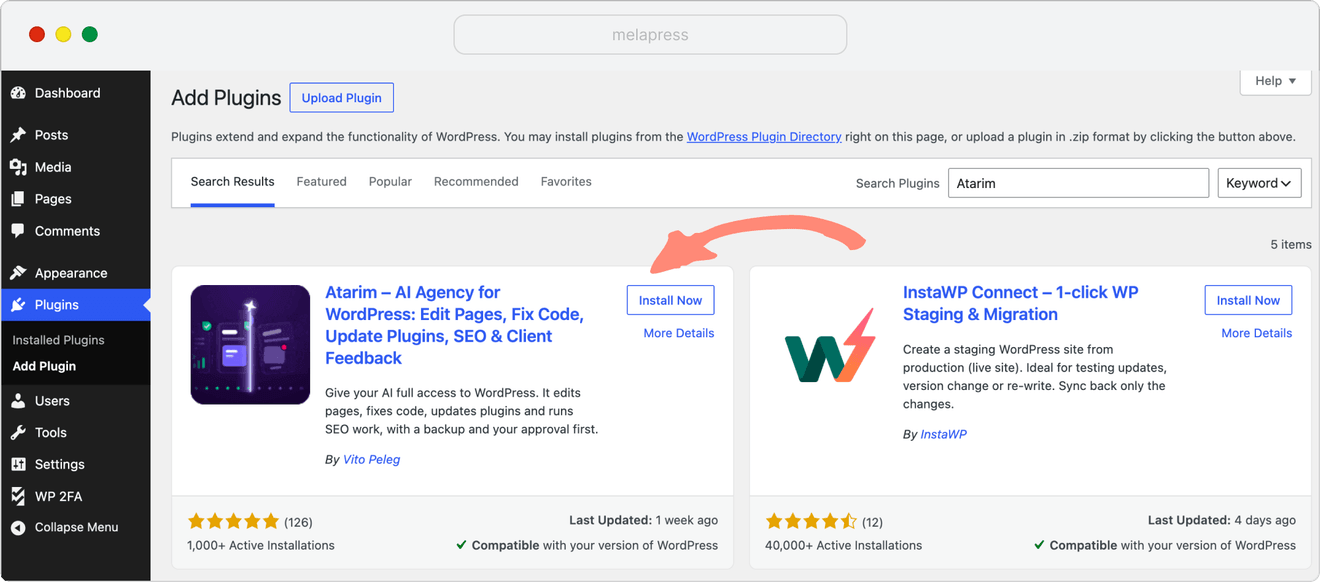
After installing and activating the plugin, authorize the connection to your Atarim account to complete the setup.
No additional configuration is required in WP Activity Log for it to record supported changes made through Atarim.
What you can do with the WP Activity Log and Atarim integration
View website’s activity in Atarim
When you’re using WP Activity Log Premium, Atarim can display a summary of your website’s activity directly on its project card.
To view this information:
- Log in to your Atarim account.
- Navigate to Projects.
- Find your WordPress website and hover over its project card.
- Click the WP Activity Log icon to view the activity summary.
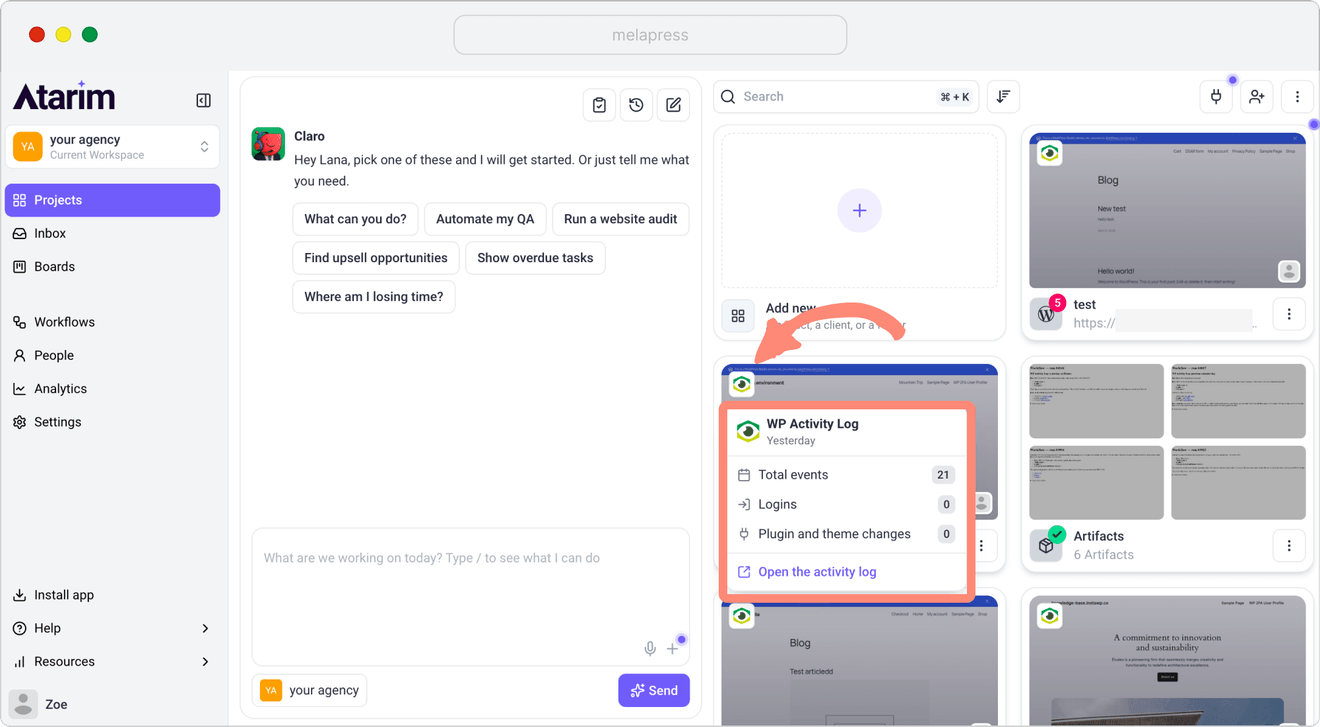
The summary includes:
- Total events: The number of activities recorded.
- Logins: The number of login events.
- Plugin and theme changes: The number of recorded plugin and theme changes.
Atarim retrieves the previous day’s activity once a day. You can also see when the data was last retrieved.
Click Open the activity log to access your WordPress activity log and review individual events.
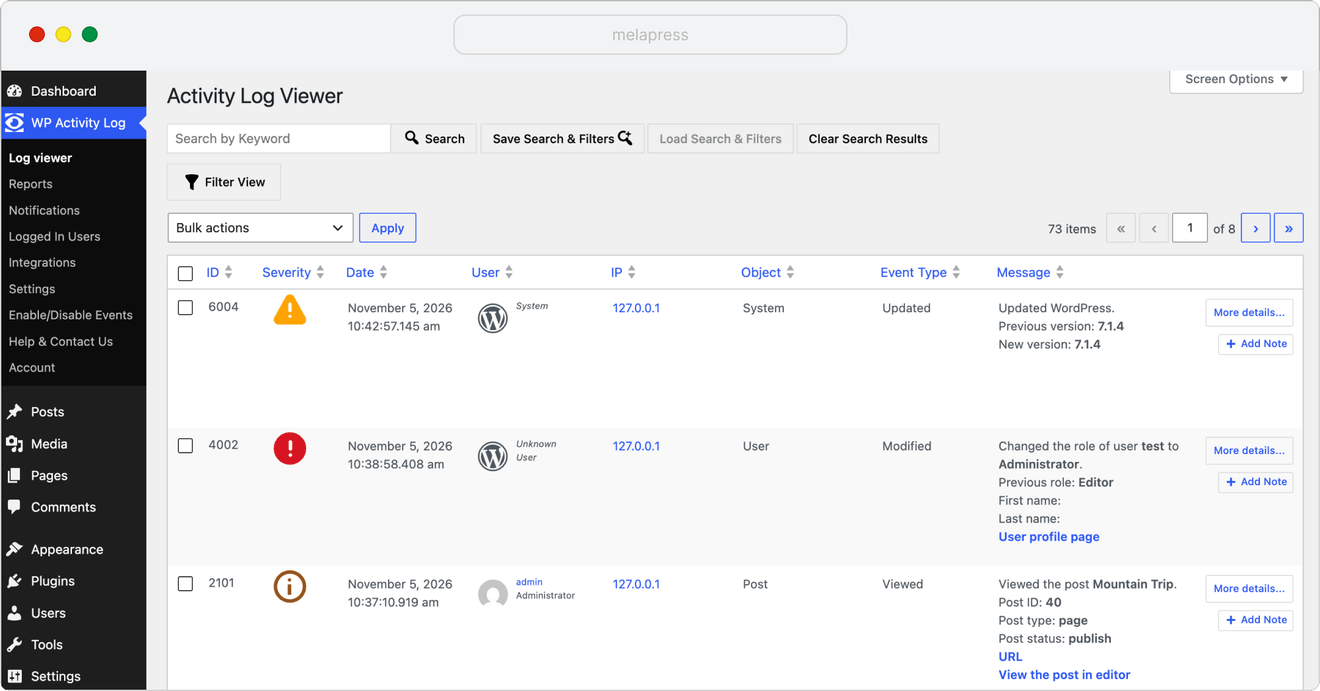
Ask Claro about activity on your WordPress website
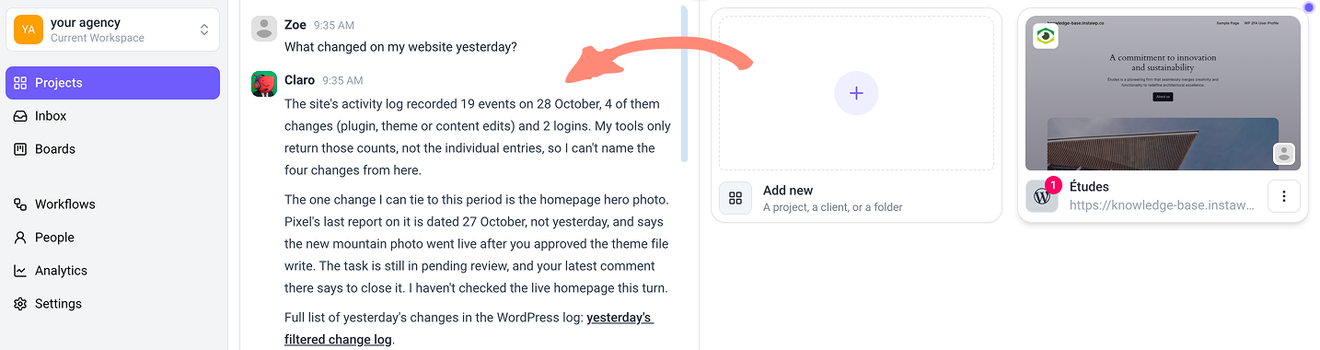
You can also use Atarim’s AI assistant, Claro, to ask questions about activity on your WordPress website.
To do so:
- Open Atarim and access the Claro chat.
- Ask a question such as What changed on my website yesterday?
- Claro retrieves the available activity information and provides a summary.
In our example, Claro returned the total number of events, changes, and logins recorded for the requested day. It also provided a link to the corresponding filtered activity log in WordPress, where you can review individual events.
Track changes made by Atarim’s AI in WP Activity Log
WP Activity Log records supported changes made through Atarim’s AI assistant alongside other activity on your WordPress website.
For example, when you ask Atarim to create or modify WordPress content, the corresponding events are recorded in WP Activity Log.
To view these events:
- Log in to your WordPress dashboard.
- Navigate to WP Activity Log > Activity Log viewer.
- Find the events associated with Atarim AI in the User column.
- Review the event details to see what was changed and when.
The User column shows Atarim AI as the source of the activity, alongside the WordPress administrator account used to perform the actions.
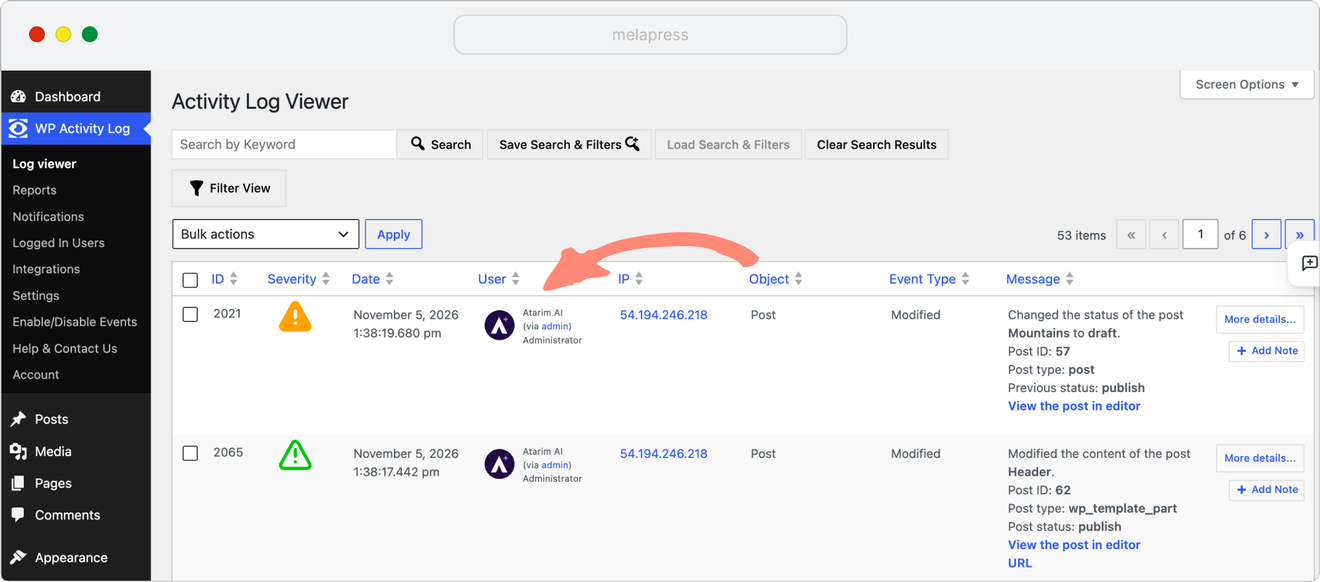
The activity log also includes information such as the event date and time, event type, and description of the change.
Example: Tracking WordPress changes made through Atarim
For example, you can ask Atarim’s AI assistant to create a new homepage, modify existing content, and publish the page.
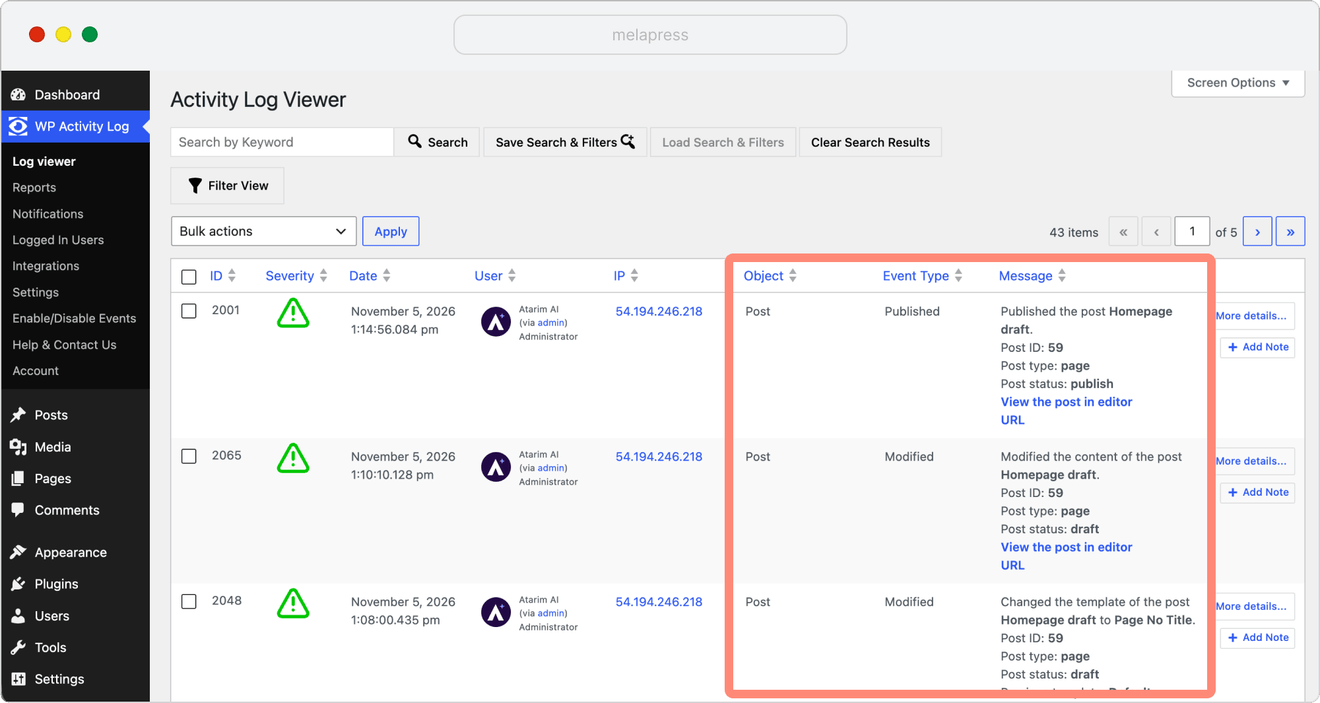
Note: WP Activity Log records supported WordPress activities performed through Atarim. The events recorded may vary depending on how changes are made, including when using external AI assistants connected through Atarim MCP.
Monitor Atarim AI activity on your WordPress website
With WP Activity Log and Atarim, you can keep track of changes made to your website by both WordPress users and Atarim’s AI.
You can review recent activity directly from your Atarim projects, ask Claro assistant about changes to your website, or open the WP Activity Log viewer to inspect individual events of each client site.
Do I need WP Activity Log Premium to use the Atarim integration?
WP Activity Log free version can record regular WordPress activities, including supported changes made through Atarim. However, identifying those changes specifically as Atarim AI requires WP Activity Log Premium or Enterprise.
The paid editions also provide additional activity information and integration functionality in Atarim, including detailed activity summaries and filtered activity log links.
Do I need to configure additional settings in WP Activity Log?
No. Once WP Activity Log is installed and activated and your WordPress website is connected to Atarim, no additional configuration is required to record supported changes made through Atarim.
Will Atarim automatically install WP Activity Log on my website?
No. Atarim recommends WP Activity Log when you need an activity logging plugin, but it won’t install the plugin without your approval. You can also install WP Activity Log directly from your WordPress dashboard.
How often does Atarim retrieve activity data?
When using WP Activity Log, Atarim retrieves the previous day’s activity totals once a day, including recorded events, logins, and plugin and theme changes. You can see when the data was last retrieved in the activity summary on your Atarim project.
Can I identify changes made by Atarim’s AI in WP Activity Log?
Yes, with WP Activity Log Premium or Enterprise. Changes performed through Atarim’s AI are identified as Atarim AI in the User column, allowing you to distinguish them from other WordPress activity.
Can I undo changes made through Atarim?
Atarim provides rollback options for supported changes through its platform. You can also use Atarim to make further changes, such as changing a published post back to draft. WP Activity Log records these actions so you can review what changed and when.


