


Updated on 13 July, 2026
How to reset users’ 2FA configuration?
If a user got locked out of their account, or for some reason you want to reset a user’s account 2FA configuration, you can easily do so by following the procedure below.
Before you reset: If the user only needs a single login without 2FA, you do not need to reset their 2FA. You can use Remove 2FA temporarily instead. This grants a one-time 2FA bypass for 1 hour. After the first login or after 1 hour, 2FA prompts resume automatically.
- Login to your WordPress website using an administrator account.
- Navigate to the user’s profile page (click Users > All Users in the WordPress admin menu and click Edit under the user’s username).
- Scroll down to the WP 2FA settings section in the user’s profile page (almost at the bottom)
- Click the Reset 2FA Configuration button.
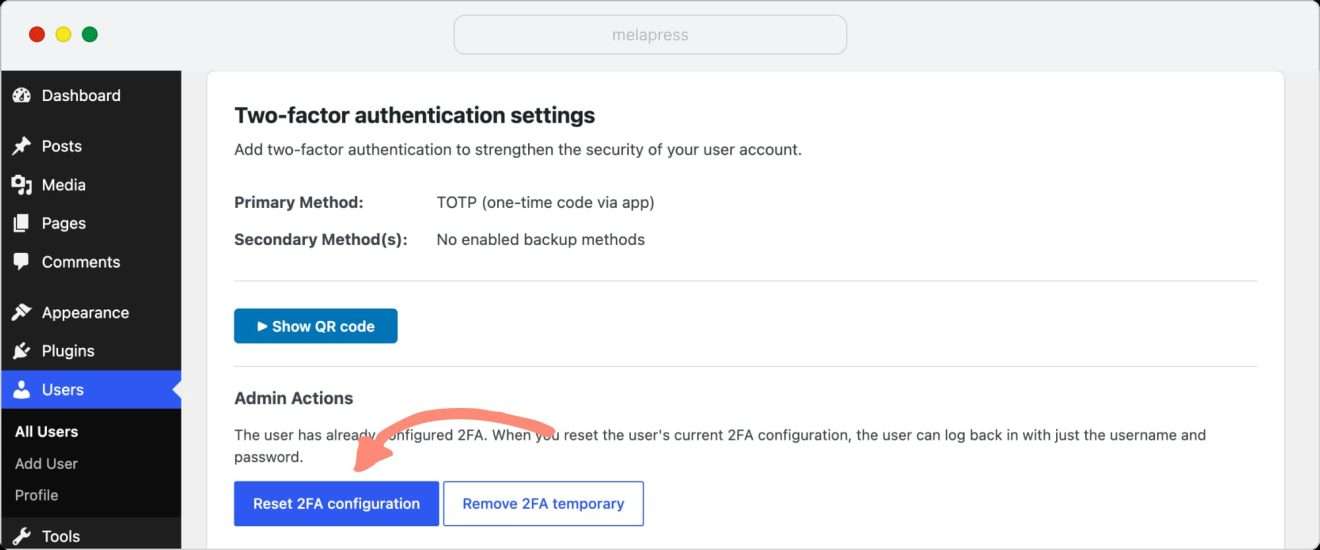
Once you reset the user’s two-factor authentication configuration, the user can log in without 2FA. If you have configured 2FA policies and those policies apply to the user, the user will be prompted to configure two-factor authentication again.
Difference between One-time 2FA bypass vs 2FA configuration reset?
If the user permanently lost access to their 2FA method(s), proceed with a full reset so they can reconfigure 2FA.
If, for example, access is needed urgently and the user will recover their 2FA device soon, it makes more sense to use Remove 2FA temporarily.
