Updated on 7 October, 2026
How to unlock WordPress users locked by WP 2FA
When someone does not configure two-factor authentication (2FA) within the configured grace period, their user account is either locked or the user is prohibited from accessing the dashboard until 2FA is configured. When an account is locked, the plugin sends an email to the owner of the user account advising them that the account has been locked. The user cannot log in to the website until their account is unlocked.

Who can unlock locked WordPress user accounts and how?
Only the administrator can unlock locked WordPress users who did not configure 2FA within the grace period. There are two places from which you can unlock locked users:
Option 1: WordPress dashboard
You can do so from the users list in the WordPress dashboard. Simply hover over the username and click Unlock user. The option is highlighted in the screenshot below:

Option 2: User profile page
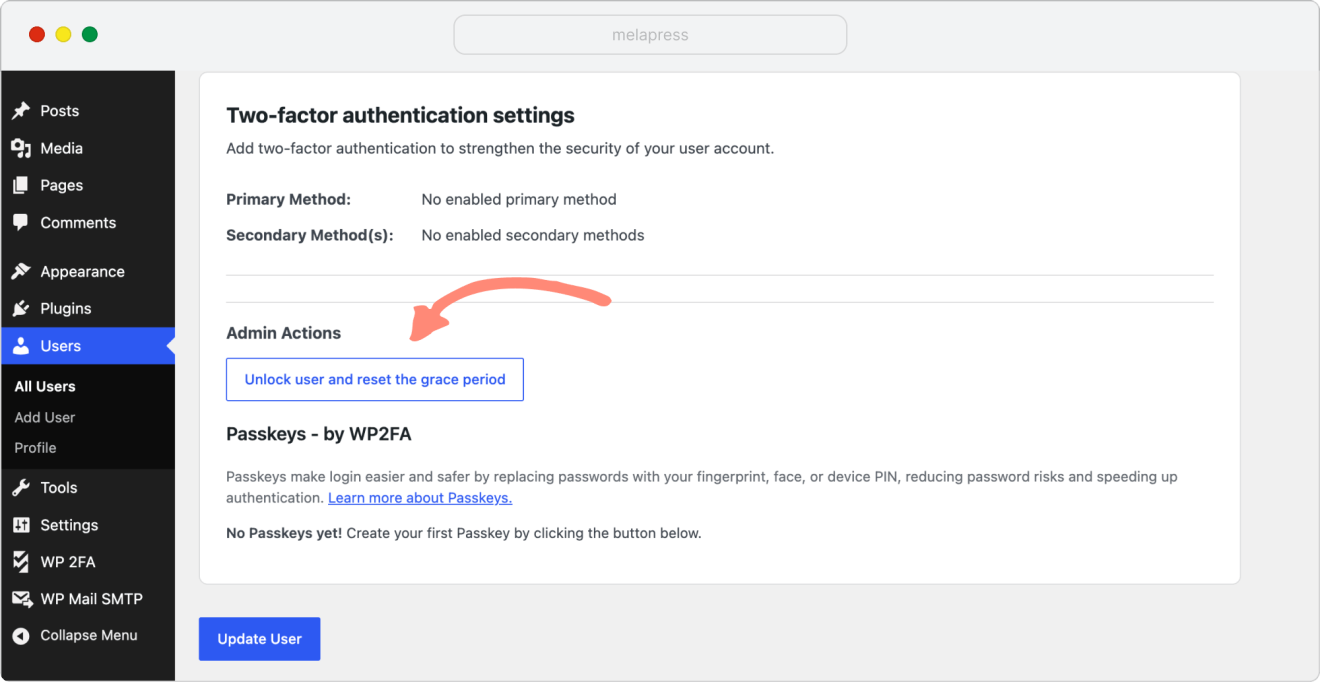
You can also unlock locked WordPress users by clicking the button Unlock user and reset the grace period in the WP 2FA settings at the bottom of the user profile page.
What happens when a WordPress user is unlocked?
When a WordPress user is unlocked, the user account’s owner can log back into the website. The grace period is also reset, allowing the user to configure and use 2FA within the configured period.