



WP Activity Log version 1 release notes
WP Activity Log release notes for all version 1 builds and releases.
Update 1.5
Exclude WordPress Users and Roles from User Monitoring
From this version of WP Activity Log onwards, you can exclude WordPress users or roles from monitoring. To exclude users, it is very simple; navigate to the plugin’s settings, and in the Excluded Objects tab, specify the users or/and roles you would like to exclude from monitoring, as shown in the below screenshot.
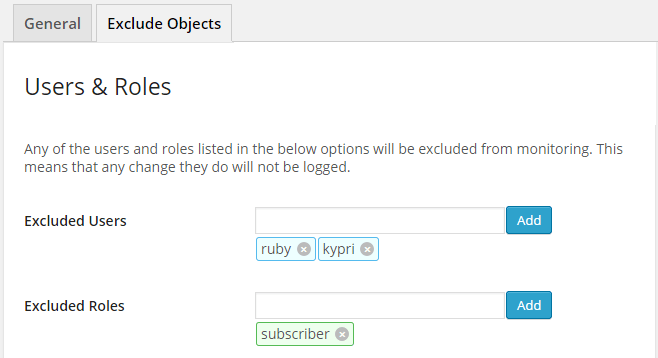
Once you exclude a user or role, any change the excluded user does will not be logged in the WordPress activity log. We are not exactly fans of excluding objects, ideally everything should be logged. Though the option is still there for anyone who might need it.
Exclude Specific Custom Fields from WordPress Monitoring
By default, WP Activity Log keeps track and logs all of the custom field changes in blog posts, WordPress pages, and also in custom post types. Although this is a very handy feature for many, some plugins update custom fields each time a visitor accesses a post; hence the WordPress activity log is polluted with the same alerts.
From this version onwards, you can now exclude the monitoring of specific custom fields. There are two ways how to exclude custom fields from WordPress monitoring:
Manually Exclude Custom Fields in the Plugin’s Settings
Similar to excluding a user or role, click on Excluded Objects in the plugin’s settings and specify the custom fields you would like to exclude.
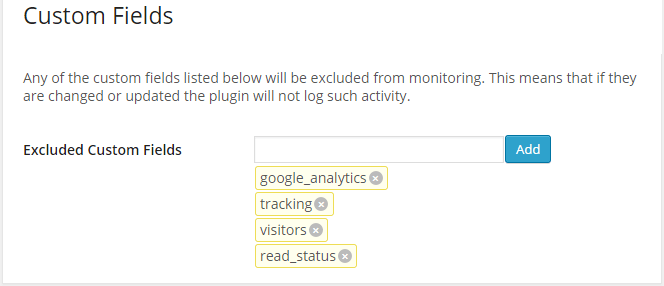
Exclude Custom Fields From Audit Log Viewer
You can also exclude a custom field from being monitored by the WP Activity Log plugin from the WordPress security alert itself in the Audit Log viewer. As seen in the screenshot below, in a custom field WordPress security alert, you can exclude the custom fields from monitoring. Just click the link, and it will be excluded.

Once a custom field is excluded from monitoring, any changes applied to that custom field will no longer be logged in the WordPress security activity log.
New Plugin Settings Table
In version 1.5 of WP Activity Log, we also introduced a new table in the WordPress database called wp_wsal_options (wp_ is the WordPress database prefix. If you changed your WordPress database prefix, it will be the same as your database prefix). This table will be used to store all of the plugin’s settings.
The plugin’s functionality is growing, and with time we are introducing more options; hence it makes more sense to centralize all of the plugin’s options in one central table.
Update 1.4
Accurate Monitoring of Failed WordPress Logins
By monitoring WordPress failed logins, you can take the necessary evasive action at an early stage, thus avoiding any of your WordPress users being hacked. In version 1.4 of WP Activity Log, the plugin reports for which WordPress username there are failed logins, thus allowing you to know which WordPress username might be under attack, as shown in the below screenshot.

If there is a failed login for a non-existing WordPress username, Alert 1003 is generated, as shown in the below screenshot.

Refer to the complete list of WordPress security alerts for more information about each alert.
Email Alerts for Failed WordPress Administrator Logins
You can use the Email Notifications premium add-on to configure email alerts for when there are failed logins for the WordPress administrator or any other user for that matter. As seen in the below screenshot, I configured a new trigger to send me an email notification each time Alert 1002 (failed login) is generated, and the user has an administrator role.
Other Plugin Improvements for Version 1.4
New Translation – Romanian
WP Activity Log is now available in Romanian thanks to Artmotion secure services.
IP Address Validation Checks
We also improved the IP validation checks. From now onwards, if the IP address validation check fails, the plugin reports “incorrect format” rather than “unknown”. This functionality will help us troubleshoot IP address retrieval issues.
Alert Pruning Options Configured Upon Plugin Activation
The WordPress security alerts pruning options are now configured in the WordPress database upon activation. Previously they were only saved once the user saves the setting page, hence creating some problems.
Plugin Removes Database Tables Upon Uninstallation
We included a new option in the plugin settings so that when enabled, the WordPress database tables the plugin creates are deleted upon uninstallation.
Update 1.3.2
Plugin Automatically Retrieves Originating WordPress User IP Address
WP Activity Log is being used by a good number of large organizations, which typically have their WordPress website installed behind a reverse proxy, a web application firewall, or even behind load balancers. In this update, we included a new option that, if enabled, the WP Activity Log plugin will automatically retrieve and record the originating IP address of the WordPress user. WP Activity Log is retrieving the IP address from a number of HTTP headers, as explained in How WP Activity Log Retrieves Originating WordPress User IP Address.
Removed the Sandbox from WP Activity Log
Earlier this year, we introduced the Sandbox in WP Activity Log. The scope of the sandbox was to allow WordPress developers directly interact with the WordPress database and also execute code for troubleshooting purposes. Considering how powerful the sandbox is and how it can be misused, we removed it from the plugin completely. Should you wish to use the sandbox, contact us so we can provide you with the extension.
Other Improvements and Bug Fixes in WP Activity Log 1.3.2
In this version of WP Activity Log, we also addressed some bugs. Refer to the WP Activity Log change log on the WordPress repository for more detailed information on what is new in this version.
Update 1.2.7
In this version, we included a few updates, improvements, and fixes that allow the plugin to work better on large WordPress installations and enable administrators to have more control over who can access the plugin.
Much Faster Log Viewer
We have completely rewritten the way the Audit Log Viewer retrieves WordPress security alerts from the WordPress database; we made it more efficient so it will be much faster, and it consumes fewer resources. Therefore when you open the Audit Log Viewer to see the activity on your WordPress, you will be able to see the WordPress security alerts instantly without any overheads on the web server and its resources.
If you monitor a small WordPress blog or website where only a few WordPress security alerts are generated, most probably, you won’t notice a difference. But if you own a large WordPress multisite installation, you will definitely notice a difference in both the resource usage and performance of the plugin itself.
Restrict Administrator Access to Plugin Settings
When WP Activity Log is installed on a WordPress blog or website, all the administrators can view the WordPress security alerts and manage the plugin from its menu. When installed on a WordPress multisite, by default, all super administrators on that network can view the WordPress security alerts and manage the plugin while the site administrators can view the WordPress security alerts of their site, as explained in WP Activity Log plugin features for WordPress multisite.
Though this is not always what WordPress administrators want, especially in large implementations of WordPress. Hence we introduced a few new settings that allow you to specify who can access the WordPress activity log and even configure who can change the settings in the WP Activity Log.
New WP Activity Log Menu Position
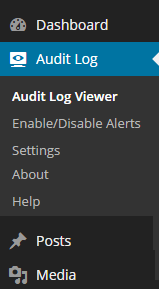
Many WordPress administrators access the Audit Log Viewer on a frequent basis to keep an eye on the activity of their WordPress. Though sometimes, especially in a WordPress multisite environment where lot of plugins are typically installed, the Audit Log Viewer is not so easily accessible. So we moved the WP Activity Log plugin menu Audit Log exactly underneath the Dashboard in the WordPress administrator pages, thus making it easily accessible.
For a quick overview of the latest changes on WordPress, administrators can also refer to the dashboard widget, which shows the five latest critical alerts in the dashboard, as soon as you log in to WordPress.
WP Activity Log Plugin Change Log
We also implemented several other minor fixes to the plugin in this release. For more details about what was fixed in this version of WP Activity Log, refer to the WP Activity Log change log on the WordPress repository.
Update 1.2.3
This version of the plugin ships with an improved database structure which allows better and more efficient monitoring of large WordPress and WordPress multisite websites with high traffic.
More Robust Database Structure & Better Monitoring
Lately, we received some support tickets related to the database structure and performance of the plugin, especially when running on very busy WordPress and WordPress multisite websites. We have taken action upon these support requests and addressed the issue by building a more robust database structure for the plugin that allows it to work much better and more efficiently on high-traffic WordPress websites.
Improved Settings Page
We also noticed that many users were enabling the developer options, hence if they had a theme, plugin, or any other WordPress component that was generating errors, the plugin was generating large numbers of alerts, thus increasing the load on the WordPress database.
Therefore we have moved the developer options behind a link and added a warning that developer options should only be enabled on testing, staging, and development websites and not on live websites. During the plugin update process, such options will also be disabled.
WP Activity Log Plugin Available in German
WP Activity Log is now also available in German, thanks to Mourad Louha.
Update 1.2.2
This is a minor release in which we addressed a number of bug fixes reported to us via email and enabled the translations on the plugin. WP Activity Log is already available in Italian thanks to Leonardo Musumeci.
Update 1.2
Unlimited Alerts & Optional Auto Pruning Options
In previous versions of WP Activity Log, administrators could store up to 5000 alerts. In this new version of the plugin, administrators can keep as many alerts as they like. The alerts auto pruning options in the new version can also be enabled or disabled as desired.

WordPress security alerts pruning options in WP Activity Log
More Accurate Alert Timestamps
The WordPress security alert timestamps in this new version of WP Activity Log will also include the milliseconds, as highlighted in the below screenshot.

Timestamp in WordPress Security Alerts
Hide Plugin from WordPress Plugins Page
Administrators can now hide the WP Activity Log plugin from the WordPress plugins page from the plugin’s settings. This feature comes in handy should the WordPress site be hacked; if a malicious user manages to gain access to the admin dashboard, he cannot see the enabled plugin and disable it; hence malicious activity will still be recorded and logged.
Multisite Auto Complete Site Search
If there are more than 15 sites enabled on a WordPress multisite installation, the site selection drop-down menu is replaced with an auto-complete site search box for a more practical site selection. Read the documentation WP Activity Log WordPress Multisite Features for more details about WordPress multisite support and features.
New WordPress Security Alerts
Like in every other version, in this new version, we introduced a number of WordPress security alerts that enhance the security monitoring of WordPress and WordPress multisite blogs and websites. The new alerts introduced in this version of the plugin are:
- Alert 5007: User uninstalled (deleted) a WordPress theme
- Alert 5008: Super administrator network activated a WordPress theme in multisite
- Alert 5009: Super administrator network deactivated a WordPress theme in multisite
For a complete list of WordPress security alerts and WordPress activity that WP Activity Log can monitor and keep an audit of, refer to the Complete List of WordPress Security Alerts.
Update 1.1
New Features
- The user avatar is shown in the alert allowing administrators to easily recognize users
- The user role is reported in the WordPress security alert so administrators can get a better overview of all of the users’ activity
- The username in the alerts is clickable, allowing WordPress administrators to easily access the user’s profile should they need to
- New alert is generated when a user uses the file editor to modify a plugin file. The alert will report both the file name and location of the changed file, making it easy to track back any source code changes
- PHP version checker; if the plugin is installed on a system running a version of PHP is older than 5.3 the plugin will notify the user and won’t install.
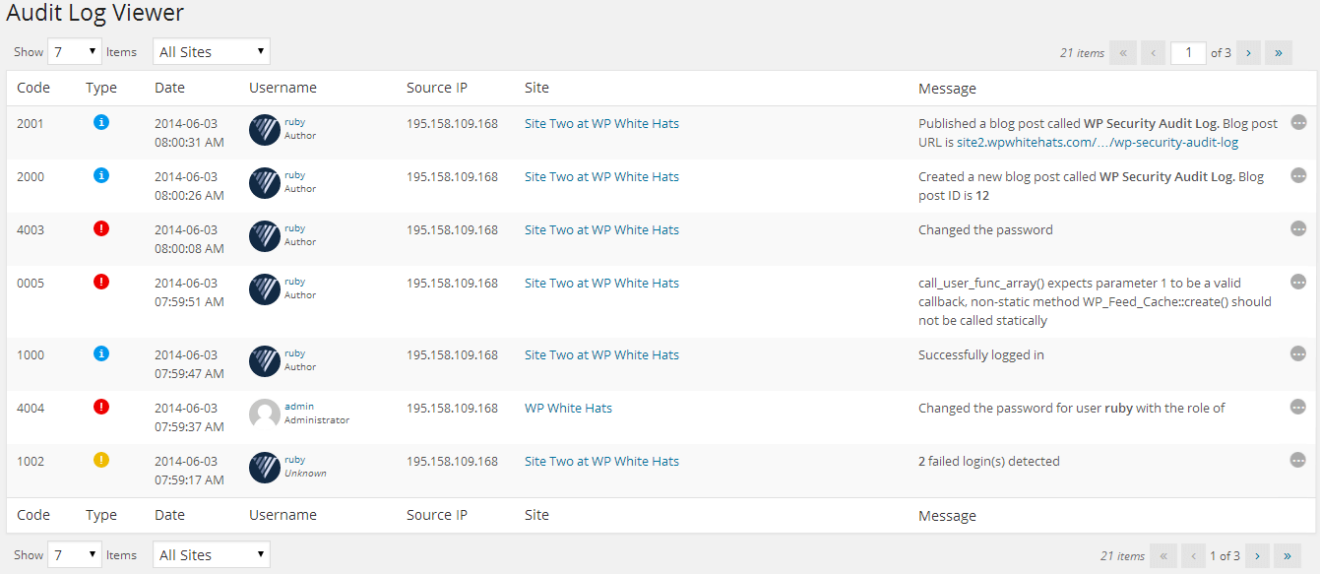
Audit Log Viewer displaying WordPress users’ roles and avatars
New WordPress Security Alert
Alert 2051: User changed a plugin file using the plugin editor
For a complete list of WordPress security alerts and WordPress activity that WP Activity Log can monitor and keep an audit of, refer to the Complete List of WordPress Security Alerts.
Bug Fix
Fixed the wrapping problem in the alerts dashboard widget
Plugin Upgrade & Release Notes
1. With the release of version 1.0 of WP Activity Log, we changed the database tables and structure. This allows the plugin to work more efficiently and allows us to better scale the plugin. During this upgrade, the old tables used in version 0.6.3 were not deleted. Therefore if you successfully upgraded to version 1.0 or later versions, such as this one, delete the following tables from your WordPress database:
- wp_wordpress_auditlog
- wp_wordpress_auditlog_events
2. Since version 1.0 of WP Activity Log, we started supporting PHP 5.3 and more recent versions only. There are a number of reasons from the development and security point of view why we only support installations that are using PHP version 5.3 or later, but in simple terms, if PHP themselves are no longer supporting anything older than version 5.3, neither are we.
Update 1.0
WordPress Security Monitoring Just Got More Robust and Better
We have learned a lot since we launched the first version of the WP Activity Log plugin nine months ago, and we decided to put what we have learned into practise. Version 1.0 of WP Activity Log is a complete rewrite of the plugin. Version 1.0 is much more stable and robust when compared to its predecessors. Version 1.0 also allows us to scale the plugin much better, so expect a number of new and cool features in the near future, such as searching, filtering, alerting, and reporting.
Granular WordPress Monitoring and Detailed Security Alerts
With this new version of WP Activity Log, we take WordPress monitoring to the next level. Unlike other WordPress monitoring plugins, WP Activity Log reports extensive details in the WordPress alerts. For example, while other plugins will alert you that a page was changed, WP Activity Log will alert you about what was changed in the page, such as the author, date, template, and much more. Such details are really important, especially if you need to trace back suspicious behavior or a malicious WordPress hack attack.
Monitor Themes and Plugin File Code Changes
Version 1 of WP Activity Log keeps a record of who is using the WordPress in-built editor to modify theme and plugin files. The modified filename will also be reported so you can easily track down any website breakdowns, plugin or theme code modifications, malicious code injection, and other similar WordPress hacks.
Monitor WordPress Settings
WordPress security alerts will be generated when WordPress is updated or when the WordPress permalinks are changed. WP Activity Log also monitors several other WordPress settings changes, as explained in WordPress Settings and System Security Alerts.
Monitor WordPress Themes
In this new version of WP Activity Log, WordPress administrators can also monitor the WordPress themes; WordPress security alerts are generated when a new theme is installed or when a theme is activated on WordPress.
Granular Monitoring of WordPress Pages
An alert advising you that a WordPress page was modified is not enough. The new version of WP Activity Log alerts WordPress administrators even when a page’s template or parent is changed.
For more detailed information about WordPress pages monitoring alerts, refer to the WordPress Pages Activity Security Alerts KB document.
New Audit Log Viewer
The Audit Log Viewer has also been revamped. It will auto-refresh upon new activity; hence administrators do not have to click the refresh button to view the latest alerts generated by the latest activity.
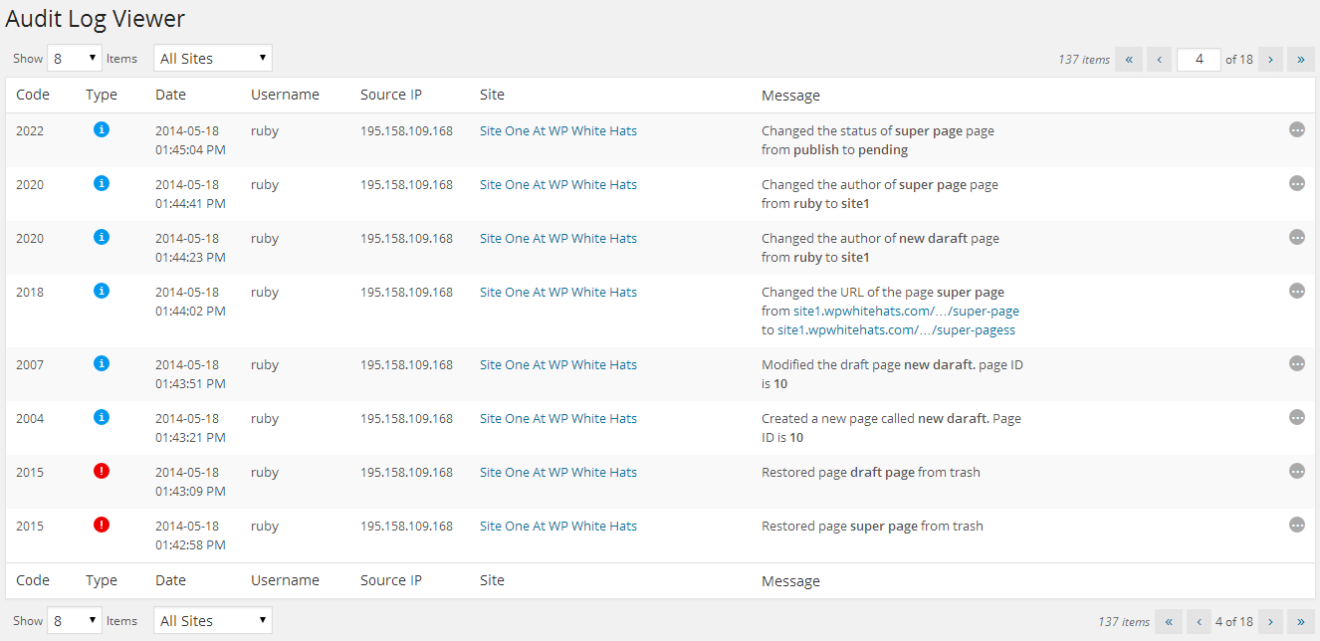
Audit Log Viewer in WordPress user monitoring plugin
New Developer Tools
The new version of the WordPress monitoring plugin is also shipped with a number of new developer tools which allow WordPress developers and administrators to get more information about the alerts, monitor and get alerted of WordPress and PHP errors and much more.
WordPress Security Alert Data Inspector
Once enabled from the settings, the Alert Data Inspector allows developers and administrators to see more detailed information about each alert generated by the plugin, such as the user-agent string, the user ID, and more, as seen in the below screenshot.
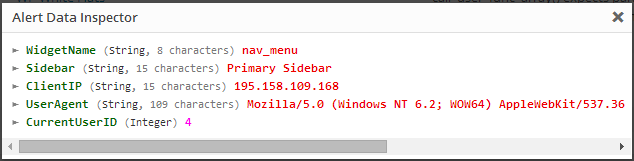
WordPress Security Alert Data Inspector
PHP Errors
By enabling the developer option PHP errors from the plugin settings, WP Activity Log will also generate an alert about all the PHP errors, warnings, notices, exceptions, and shutdowns. Such features come in handy for anyone developing a theme, plugin, or other extension on WordPress. A screenshot of a PHP shutdown alert is shown below.

PHP Error reported in WP Activity Log
Request Log
Enable the Request Log from the plugin settings to log all the HTTP GET and POST responses sent to your WordPress and WordPress multisite websites to a log file. The log file Request.log.php is created in the plugin directory and is using a PHP extension for security reasons; if someone guesses the log file name, it cannot be downloaded like a normal log file, thus exposing sensitive details about the WordPress blog or site.
List of New WordPress Security Alerts Introduced in this Version
Below is a list of new WordPress security alerts that are generated by the plugin when such activity is noticed:
- Alert 2046: User modified a file using the editor
- Alert 2047: User changed parent of page
- Alert 2048: User changed template of page
- Alert 2049: User set post as sticky
- Alert 2050: User removed post from Sticky
- Alert 5005: User installed a new theme
- Alert 5006: User activated a theme
- Alert 6004: User upgraded WordPress
- Alert 6005: User changed the WordPress permalinks
As explained in the previous section, the new version of WP Activity Log can also monitor PHP activity and errors, thus making it a handy tool for WordPress developers. Below is a list of alerts that monitor PHP errors:
- Alert 0000: Unknown error
- Alert 0001: PHP error
- Alert 0002: PHP warning
- Alert 0003: PHP notice
- Alert 0004: PHP exception
- Alert 0005: PHP shutdown error
For a complete list of WordPress security alerts and WordPress activity that WP Activity Log can monitor and keep an audit of, refer to the Complete List of WordPress Security Alerts.
Update 0.4
Support for Custom Post Types
The new version of WP Activity Log supports custom post types; WordPress administrators can now monitor all activity of posts with custom post types, for example, who created new ones or modified and deleted existing ones.
Enable, and Disable WordPress Security Alerts
WP Activity Log version 0.4 also allows WordPress administrators to switch on or off specific WordPress security alerts. For example, if the administrator does not want to be alerted via the Audit Log Viewer when another WordPress administrator upgrades a WordPress plugin, the administrator can disable the WordPress security alert from the new plugin’s node Enable/Disable Alerts.
Translate WP Activity Log Plugin
The new version of WP Activity Log supports translations. If you are interested in contributing a translation, drop us an email at [email protected].
New WordPress Security Alerts for Custom Post Types
WP Activity Log plugin is now able to generate and log a security alert in the Audit Log Viewer when any of the below actions related to posts with custom post types happen on your WordPress installation:
A new post with a custom post type is created and saved as draft (Alert 2029)
- A new post with a custom post type is published (Alert 2030)
- A published post with a custom post type is modified (Alert 2031)
- A draft post with a custom post type is modified (Alert 2032)
- A post with a custom post type is permanently deleted (Alert 2033)
- A post with a custom post type is moved to trash (Alert 2034)
- A post with a custom post type is restored from trash (Alert 2035)
- The category (or categories) of a post with a custom post type is changed (Alert 2036)
- The URL of a post with a custom post type is changed (Alert 2037)
- The author of a post with a custom post type is changed (Alert 2038)
- The status of a post with a custom post type is changed (Alert 2039)
- The visibility of a post with a custom post type is changed (Alert 2040)
- The date of a post with a custom post type is changed (Alert 2041)
Other WP Activity Log Plugin Improvements
WP Activity Log version 0.4 also includes the following improvements:
- Updated the Settings page to use the standard WordPress format and improve the ease of use.
- Updated the Audit Log Viewer to support further resolutions, especially those of tables (iPad, etc) and phones.
- A new Security Alerts widget that displays the latest 5 WordPress security alerts is added to the WordPress dashboard. The WordPress administrator can switch it on or off from the plugin’s settings page.
- Improved the upgrade functionality for a smoother (less problematic) upgrade of the WP Activity Log plugin.
Update 0.3
New WordPress Security Alerts
WP Activity Log plugin will now generate and log a security alert when any of the below actions take place on your WordPress:
- The Anyone can Register option in WordPress settings is changed (Alert 6001)
- The default use role in WordPress settings is changed (Alert 6002)
- The Administrator notification email in WordPress settings is changed (Alert 6003)
- The visibility of a blog post is changed (Alert 2025)
- The visibility of a page is changed (Alert 2026)
- The date of a blog post is changed (Alert 2027)
- The date of a page is changed (Alert 2028)
WordPress Plugin Improvements
- Links to the Audit Log Viewer and Settings in the plugin summary
- Time of Failed Login alerts now reflects the time of last failed login attempt
Bug Fixes
- Fixed: Incorrect alerts generated when the author of a page was changed from quick edit mode
- Fixed: Conflict with WP Mandrill and other plugins using pluggable.php
- Fixed: Incorrect alerts generated when the plugin is installed via a zip file/upload method
Update 0.2
Better WordPress Monitoring & Security
A new update of the WordPress security plugin WP Activity Log plugin is available. It has been almost three months since the first release, but the long wait was well worth it. The new version of the WP Activity Log plugin is compatible with the latest version of WordPress 3.6 and also includes a truckload of new features, several performance improvements, and of course, a truckload of bug fixes!
New Features & Updates in WP Activity Log v 0.2.0.0
- Support / Fully compatible with WordPress 3.6
- Restricted plugin options and WordPress Audit Log Event Viewer only to WordPress administrators
- Improved failed logins events (events generated from the same IP, or same username will be grouped to avoid mass flooding of security events)
- Security Events pruning now uses wp-cron functionality (improved stability and reliability of events pruning)
- Applied several performance improvements (faster loading of events etc)
- Added support for permalinks; now events will include page or blog post URL rather than ID
- New alerts for when a page or blog post status is changed from draft, pending review or published
- New alert for when a page or blog post URL or author is changed
- New alert for when a blog post category is changed
- New alerts for when a user creates or deletes a category
- New alert for when the author of a blog post or page is changed
- New plugin alerts for when a plugin is installed, uninstalled or upgraded
- Updated navigation menu to use standard WordPress dashboard icons etc
Upgrade Notice
Since we have added several new features in the plugin the database structure had to be changed. Therefore upon upgrading the plugin, all the events generated by version 0.1 of this plugin will be purged. This is just a small price to pay for the upgrade. The upgrade is definitely worth it!
Beta release
We are proud to announce the first-ever BETA release of our new WordPress security plugin WP Activity Log. The plugin is available for download from the official WordPress plugin directory.
What is WP Activity Log?
WP Activity Log is similar to the Windows Events Log or Linux Syslog. It keeps a log of what is happening on WordPress, such as who logged in or out, who deleted a blog post, who published a page, and much more.
The WordPress administrator can use the Audit Log Viewer, which is part of the plugin, to see all of the logged activity. Below is a screenshot of the Audit Log Viewer.
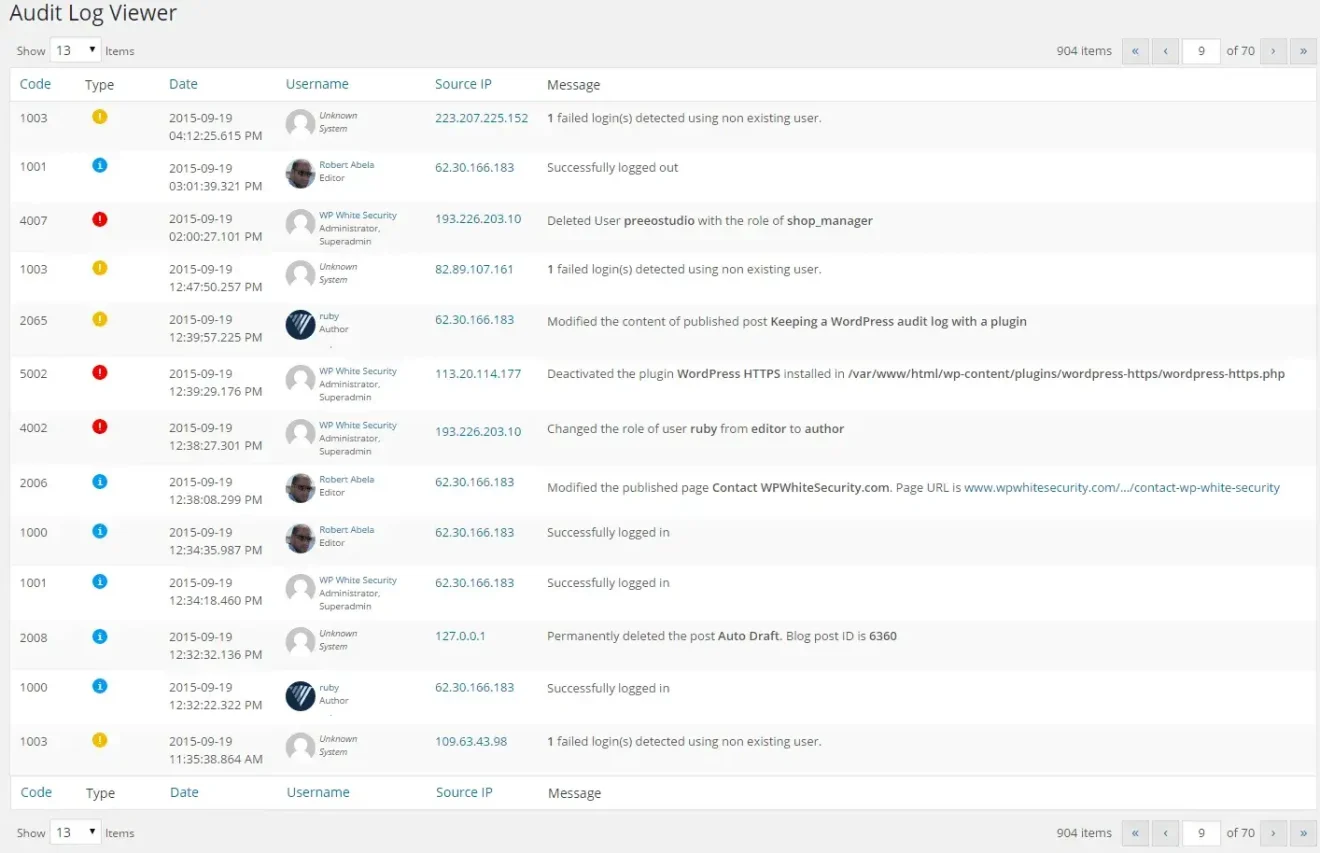
From the above screenshot of the Audit Log Viewer, we can see that for each action that the plugin logs, an Event is created. For more information about such events, please refer to the WP Activity Log list of WordPress Security Alerts.
Why and who should use WP Activity Log?
Ideal for every type of WordPress installation, especially for multi user business blogs and websites, with WP Activity Log you can:
- Detect suspicious activity, e.g. if users roles or passwords are changed, if a plugin is activated without your concent etc
- Monitor WordPress users activity and productivity
- Detect a hacker’s hacking preliminary activity
- Monitor the content of your WordPress blog or website
- Identify issues before they become a problem, such as a hacking attack
Extensions and Add-Ons
Extension update – February 2023
WP Activity Log is well known for its ever-expanding list of activities it can track and log. Thanks to plugin extensions, it also supports third-party plugins such as WooCommerce. These extensions have been a great success, extending the functionality of WP Activity Log to include some of the most popular plugins on the market. Today, we are proud to announce the 13th addition to the extension library – The WP Activity Log MemberPress extension.
MemberPress is an extremely popular plugin that allows WordPress owners to offer courses, paid digital downloads, and membership subscriptions, among other things. This new extension gives owners the ability to gain invaluable insight into the management and operation of their MemberPress.
With 18 individual trackable MemberPress activities available straight out of the box, the MemeberPress extension will ensure you hit the ground running from day one. Check out our list of WordPress activity tracking to learn more about the activities WP Activity Log can track (including the brand-spanking new MemeberPress plugin).
Extensions updates – November 2022
Since the new version features some major updates, we needed to update the WP Activity Log extensions to ensure they are compatible with the new update. To this end, updates are available for the following extensions:
- Activity Log for WPForms
- Activity Log for bbPress
- Activity Log for Gravity Forms
- Activity Log for WooCommerce
Improved WooCommerce coverage in the latest extension update
We took this opportunity to improve the coverage of the Activity Log for WooCommerce extension. This update introduces 15 new event IDs to keep a log of:
- Changes to the WooCommerce store shipping options,
- User account changes customers or subscribers do from the WooCommerce customers portal, WooCommerce store privacy settings changes,
- And several others
Refer to the list of activity log event IDs for a complete list of all the user changes and activities, the latest versions of these extensions, and the WP Activity Log plugin can keep a log of.
Extension updates – May 2022
Today, we have released the latest version of the extension Activity Log for WooCommerce. This update features several new additions, improvements, and fixes, but the highlight is the improved coverage of changes in WooCommerce orders, which gives you a much better view of how the team is handling the orders on your WooCommerce store.
Highlight: better coverage of changes in WooCommerce orders
Undoubtedly, the highlight of this release is the expanded coverage of changes in WooCommerce orders. In addition to the wide coverage of changes in WooCommerce store and products already available, the extension can now also keep a log of the following changes in WooCommerce orders:
- A product is added or removed to an order
- The product quantity in a placed order is changed
- A fee is added, modified, or removed from an order
- Order tax is added, modified, or removed
- Order refund is reversed
- Shipping is added or removed from an order
Furthermore, the activity log extension is now also able to keep a log of:
- Changes to currency settings
- Changes to WooCommerce WebHooks
- Products’ Low stock threshold changes
Other important improvements
Apart from the ability to keep a log of many more changes, version 1.4.0 adds several improvements and fixes, ensuring smoother operations.
The codebase has now been aligned with the WP coding standard, ensuring better code maintainability and upgrades as we continue to develop the extension.
Also, a number of existing event IDs have been fine-tuned for more accurate logging, and the product SKU will now be included in all events that contain product information.
Extension updates – March 2022
In this month’s update, we are releasing the following updates:
- Activity Log for Yoast
- Activity Log for Gravity Forms
- Activity Log for WPForms
All updates include improved coverage, with the extensions now able to log more activities than ever before. We have also updated the code across the board to ensure it meets the WordPress coding standard.
New activity log events
As previously mentioned, we have increased the number of activities that the extensions are able to track. This addition improves the scope of logs, ensuring a more comprehensive picture of changes. Below is the list of new event IDs:
Activity Log for Yoast
- 8849: Enabled / Disabled a third-party integration.
- 8850: Changed the Breadcrumb title of a post.
- 8851: Changed the Page type in the Schema settings of a specific post type.
- 8852: Changed the Article type in the Schema settings of a specific post type.
- 8853: Changed the Default Page Type setting in the Content Type Schema settings.
- 8854: Changed the Default Article Type setting in the Content Type Schema settings.
- 8855: Added a new redirect.
- 8856: Modified a redirect.
- 8857: Deleted a redirect.
- 8858: The redirect method has been changed.
Activity Log for Gravity Forms
- 5714: Added/deleted note from entry (lead).
- 5717: Entry (lead) was modified.
- 5718: Exported entries from a form.
- 5719: Imported/exported a form.
Activity Log for WPForms
- 5513: Enabled / disabled anti-spam protection on a form.
- 5514: Enabled/disabled dynamic fields population setting on a form.
- 5515: Enabled/disabled dynamic fields population setting on a form.
- 5516: Renamed a notification.
- 5517: Changed the property of a notification.
- 5518: Added/enabled/deleted a confirmation from a form.
- 5519: Changed the confirmation type of a form confirmation.
- 5520: Changed the confirmation page in a form confirmation.
- 5521: Changed the redirect URL in a form confirmation.
- 5522: Changed the message in a confirmation form.
- 5523: User/website visitor submitted a form on the website.
For more detailed information about the changes, the WP Activity Log plugin can keep a log of, refer to the list of WordPress activity log event IDs.
Other notable improvements
Aside from the addition of new events, we also fixed a number of bugs and refactored some of the code in the WPForms extension.
We are also working on a major update for the Activity Log for WooCommerce extension, so make sure you watch this space to be the first to know.
Extension updates – September 2021
Today, we are updating the three most popular activity log extensions. Even though these are mostly maintenance updates, we have also improved the coverage of Yoast SEO plugin settings changes and WooCommerce orders changes.
Let’s dive right in to see what is new and improved in these updates.
Activity Log for WooCommerce 1.2.3
With this update, the WP Activity Log plugin can now keep a log of changes stores owners and their team do to the product reviews settings, Checkout and Account endpoints, and products’ tax status and tax class.
Below is a list of the new event IDs that the plugin will be using to keep a record of the above-mentioned WooCommerce store and product changes:
- ID 9100: User allowed / disallowed product reviews on WooCommerce store.
- ID 9107: User enabled/disabled the “Show verified owner label on reviews” setting in the WooCommerce store.
- ID 9108: User changed the status of the “Reviews can only be left by verified owners” setting in the WooCommerce store.
- ID 9109: User changed the status of the “Star rating on reviews” setting in the WooCommerce store.
- ID 9110: User changed the status of the Star ratings should be required setting in the store.
- ID 9111: Changed a Checkout endpoint on the WooCommerce store.
- ID 9112: Changed an Account endpoint on the WooCommerce store.
- ID 9113: The Tax status of a product was changed.
- ID 9114: The Tax class of a product was changed.
Refer to the list of activity log event IDs for WooCommerce for a complete list of all the WooCommerce store, products, orders, and other changes the WP Activity Log plugin can keep a log of.
In this update, we have also:
- Made sure that all of the extension’s strings are translatable.
- Improved the WooCommerce orders activity log sensor to detect and keep a log of new products added to an existing order.
- Fixed a number of bugs.
Activity Log for Yoast SEO 1.2.0
In this update of the extension for the most popular SEO plugin, we focused on improving the coverage of the social media settings in the plugin. This means that with this update, WP Activity Log can keep a log of changes done in the social media account settings pages. For example, the plugin will now keep a log when the default image used for Facebook posts is changed.
Below is the list of the new event IDs the plugin is now using to keep a log of these changes:
- ID 8844: The setting “Add Open Graph metadata” in the Facebook settings page was changed.
- ID 8845: The “Default image in the Facebook” settings page was changed.
- ID 8846: The setting “Add Twitter card metadata” in the Twitter settings page was changed.
- ID 8847: The “Default card type” setting in the Twitter settings page was changed.
- ID 8848: Changed the Pinterest confirmation meta tag in the Pinterest settings page.
In this update, we have also removed more obsolete code and have fixed a few reported issues, making this the most stable and reliable version of this extension.
Refer to the list of activity log event IDs for Yoast SEO for a complete list of all the WooCommerce store, products, orders, and other changes the WP Activity Log plugin can keep a log of.
Activity Log for WPForms 1.1.2
This extension’s update is a real maintenance update. In this update we have updated the extension’s core to the latest and most stable version of the activity log extensions core mode, which is used by all the other extensions.
We have also fixed a number of issues with the sensor of this extension. For example, in some cases, multiple activity log events were reported incorrectly when a new form is created in WPForms plugin. We’re happy to say that with this update, there are no more known issues for this extension.
Refer to the list of activity log event IDs for WPForms for a complete list of all the WooCommerce store, products, orders, and other changes the WP Activity Log plugin can keep a log of.
Update your activity log extension for optimum performance and activity log coverage
In these three updates, we have included a number of new event IDs and core improvements. Therefore, by upgrading the extensions you use to the latest version, you benefit from both better performance and also better activity log coverage.
Extension updates – April 2021
In this update, we have increased the coverage of the changes that can be done in plugin settings and also the multisite network plugin settings.
Let’s dive right in to see what’s improved in the Activity Log extension for Yoast SEO.
Improved activity log coverage
The main highlight in this update is the improved activity log coverage. This means that the plugin now keeps a log of many other changes that previously it did not. Here is the list of the new activity log event IDs the plugin is using:
- ID 8841: Added / changed / removed a search engine webmaster tools verification code.
New event IDs for multisite networks:
- ID 8838: Changed the setting of who should have access to the Yoast SEO plugin settings on a multisite network.
- ID 8839: Changed the setting from where new sites on the multisite network should inherit the SEO settings.
- ID 8840: User has reset the SEO settings of a site on the multisite network to default.
- ID 8842: Disabled a plugin feature at multisite network level.
- ID 8843: Allowed site administrators to toggle a plugin feature on or off at site level on a multisite network.
Refer to the complete list of activity log event IDs for more information on which WordPress and Yoast SEO plugin changes can WP Activity Log keep a log of.
For more information on activity log for third-party plugins, check out our activity log extensions page.
Extension updates – April 2021
You might have noticed that by now, we have developed quite a few activity log extensions for third party plugins. We have an activity log extension for WooCommerce, Yoast SEO, WPForms, Gravity Forms, MainWP, and a few others.
To manage all these extensions, and the many others that we have planned, we have created a code core template, so all these extensions can be easily maintained.
In this release, we focused on updating the core code that all the extensions use, which is more efficient, and uses the new activity log events definition system in the main plugin: WP Activity Log.
So without wasting any more time, let’s dive right in to see what’s new and improved in this update.
Improved events’ text & more efficient / better-performing code
With the new events’ definition we also improved the text in the events. Now the messages in the events for each extension are better written. This change improves the readability of the WordPress activity logs, therefore making it easier to understand when scrolling through the Activity Log Viewer.
New refactored code that is much lighter and way more stable
This update not only introduces better events and logs, but also a number of performance improvements, much more efficient code, and a number of bug fixes.
With the new code the extensions use much less resources, yet it is easier for us to troubleshoot any issues users might encounter.
Extension updates – November 2020
In this update, we focused mostly on improving the coverage of the activity logs. Now the WP Activity Log and this extension can keep a record of the software download settings changes, and can also keep a log of WooCommerce software downloads!
Let’s dive right in to see what are the new event IDs in the WooCommerce plugin.
Activity logs for software downloads via WooCommerce
WooCommerce has a variety of features. One of them is to allow you to sell software downloads.
If you are selling software via WooCommerce now, you have the ability to keep a log of who has downloaded your product(s), regardless if they are logged in or not! The plugin also keeps a log of the software download settings changes. For example, in the below screenshot, you can see event ID 9099 (visitor/user downloaded the software), and event IDs 9097 and 9098 (user Martin changed the download limit and download expiry settings).
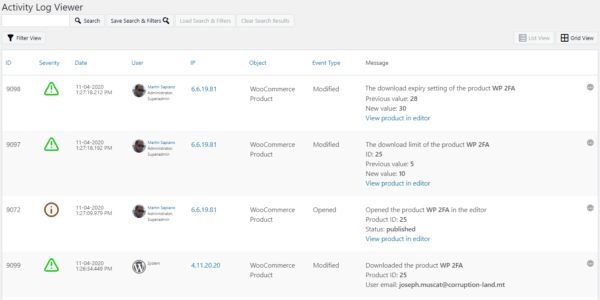
These are the new event IDs the plugin uses in the activity log to keep a record of the above mentioned changes:
- ID 9097: the download limit of a product was changed
- ID 9098: the download expire setting of a product was changed
- ID 9099: a software product was downloaded
Refer to the complete list of event IDs in the WordPress activity log for more details about each event ID and what change it represents.
Performance & the other major change in this update
In the last few updates, we have released several WP Activity Log plugin extensions, so the plugin can keep a log of changes that happen in other popular plugins such as Yoast SEO and WPForms.
To manage all these extensions, and the many others that we have planned, we have created a code template, so all these extensions can be easily maintained. This code was developed with performance and reliability in mind, so you, the user can keep a log of everything that happens on your website without having to lift a finger.
In this update of this WooCommerce extension, we have replaced the old code with this new, better-performing, and more reliable code. As a result, this new update is way better than its predecessors!
Extension updates – September 2020
We are excited to announce a new update of Activity Log for the WPForms. With this extension for the WP Activity Log plugin you can keep a log of changes your team does on forms and the WPForms plugin settings.
In this update, we focused mostly on improving the coverage of the activity logs; WP Activity Log keeps a record of when a user integrates or removes an integration with a third-party service, changes the currency, or installs, activates, or deactivates an addon in WPForms.
Let’s dive right in to see what are the new event IDs for changes in the WPForms plugin and forms.
Activity logs for third-party service integrations & addons changes in WPForms
WPForms has a variety of add-ons. These allow site administrators to integrate the plugin with third-party services such as MailChimp, PayPal, and many more. These types of changes in the plugin are very important and can affect the functionality of the forms and the plugin itself.
Hence why we are happy to release this update with which you can keep track of all the installed, activated, and deactivated add-ons, and when third-party service integrations are added or removed. And as usual, the activity log of our plugin does more than just keep a simple log that shows something was changed. It shows you the name of the addon and its status, and the same to third-party service integrations, giving you a more granular insight about your website.
Below are the new event IDs the plugin uses in the activity log to keep a record of the above-mentioned changes:
- ID 5509: the currency used in the plugin has changed
- ID 5510: a third-party service was integrated / an integration was removed
- ID 5511: an addon was installed/activated/deactivated
Refer to the complete list of event IDs in the WordPress activity log for more details about each event ID and what change it represents. Below is a screenshot of some of the new event IDs reported in the activity log.
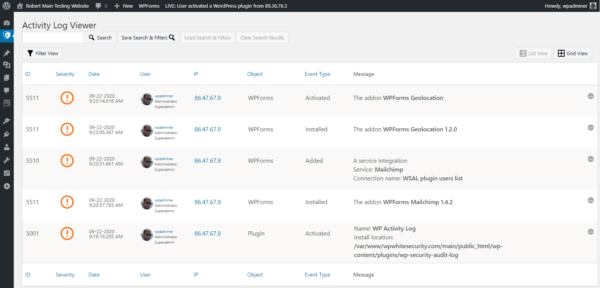
All this is helpful when it comes to troubleshooting. For example, a simple change to the MailChimp integration setting could lead to a disaster. That’s why a comprehensive and detailed WordPress activity log is needed when it comes to troubleshooting and to improve your team’s accountability and productivity.
Other Changes in this update
You might have noticed that by now, we have developed quite a few activity log extensions for third-party plugins. We have an activity log extension for WooCommerce, bbPress, MainWP, Yoast SEO, and a few others that are currently being developed.
The easiest way to maintain all these extensions is to have one core code template that is used by all the extensions, so when there are problems, or we need to update all the extensions we only have to update the core template. The newly refactored code is also much lighter and way more stable. In this update of this extension we have included the latest version of this code, making this extension much more stable and efficient.
Extension update – July 2020
Activity log for WPForms update
Keep a log of entry edits in WPForms
“Getting accurate data and having control over your form entries should be simple.” – WPForms
That is why we improved the plugin’s logging coverage. With our plugin you can now keep a record and know who changed an entry, when, from where. The plugin also keeps a log of both the old and new values, so you can know exactly what was changed.
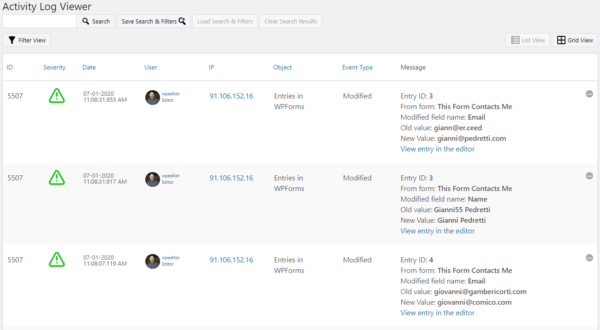
Activity log for access control settings changes in WPForms
WPForms has a number of built-in access control settings. These allow site administrators to give specific privileges to users without an admin role. For example, you can allow a user with a contributor role to create new forms, and edit entries, or forms.
Access controls are sacred in security. As a site administrator, it is important that you know when these change.
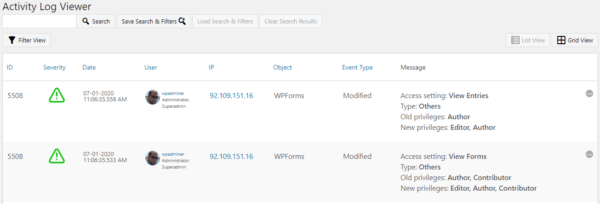
In this update of our activity log extensions for WPForms, we have also added the coverage of access control settings. Therefore when you or another user changes any of these settings, the plugin keeps a log of the changes.
When the access control settings are changed, WP Activity Log keeps a record in the activity log of who did the change, when and from where, and most importantly of all, what were the access control changes. Refer to the complete list of WPForms changes the plugin can keep a log of.
Keep a log of changes your team does on WPForms
Leads are the bread and butter of every business. Therefore it is of utmost importance to keep a log of all the changes done to your business’ leads and also to the forms and the leads generation systems that you use.
Extension update – March 2019
The main highlights of this MainWP extension update are:
Infinite Scroll for the Activity Log Viewer
We have added a new view mode for the activity log viewer, the infinite scroll. The infinite scroll view mode is much faster and less resource hungry than the old pagination view mode. Also, you do not have to configure the number of events to show per page or navigate through the pages to find the event you are looking for.
You simply scroll down, and the events are automatically loaded, as can be seen in the below screenshot which highlights the differences between the two view modes.
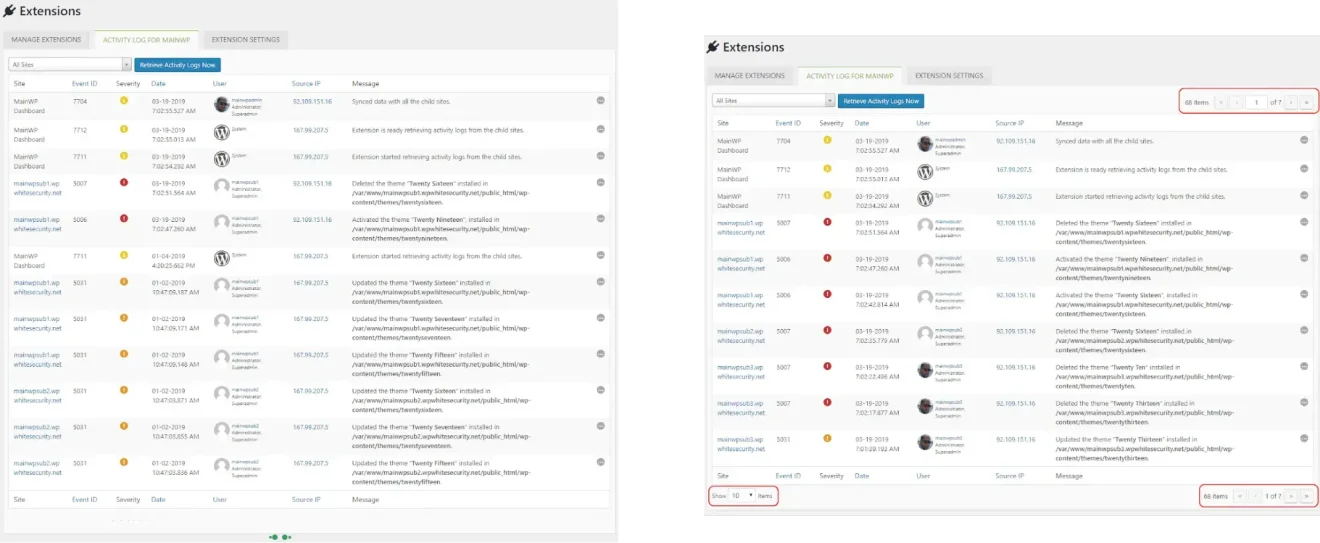
We have also added a new option in the MainWP extension setting that you can use to switch between the two view modes. By default, however, the plugin will use the infinite view mode.
Major Performance Updates in the Activity Log Viewer
In the last few updates of the WP Activity Log plugin, we have really focused on improving performance. We’ve learned a lot, and we are applying what we’ve learned to the Activity Log for MainWP extension as well.
As a matter of fact, when using the infinite scroll and this update of the MainWP extension, the activity log viewer is around 500% faster.
Integrated the Freemius SDK
The news all MainWP extension users have been waiting for! We are currently working on the premium features for this extension. We will be implementing the Search & Filters, Reports and other functionality.
So we implemented the Freemius SDK in preparation for the premium features and licensing module. Stay tuned with us and subscribe to our newsletter so you are alerted when the premium features are available.
Add-On updates – April 2018
We are happy to announce version 1.1.0 of the External DB Add-On, which allows you to store the WordPress audit trial in an external database. In this new updated version of the plugin, we introduced the new migration mechanism built with AJAX. This new mechanism allows you to migrate as much as many alerts as you want between the WordPress database and vice versa. Therefore now the migration process does not have an impact on the web server’s performance and is not limited by the allocated hardware resources, such as memory.
Add-On updates – August 2017
This update took quite some time to finish, but finally, it is here. We are happy to announce the new Search 2.0 Add-on, which adds search functionality to WordPress’ most popular and widely used activity log plugin WP Activity Log. This update which features new functionality and also a completely revamped, new UI. Let’s see what is new in this exciting update of the Search Add-On.
New Search Filters
Prior to this update, you could only search for a specific change done by a user by using the username filter. Now you can use the filters to search for activity from a user with a specific First Name and Last Name.
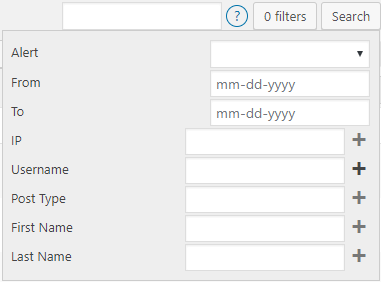
We also included a new search filter for Post Type. So if, for example, you have a blog post and a post of a custom type (such as a movie from a movie database) with the same name, you can easily filter the search results for changes that happened on that particular post type.
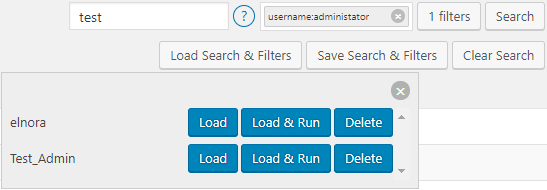
Save and Load Search Term and Filters
In this update of the Search add-on, we also included the ability to save the search term and filters. Therefore if, for example, you have to search for something specific from time to time, you can save both the search term and filters and reload them whenever you need to do the search again.
Other Notable Updates in Search 2.0 Add-On
Apart from a number of add-on performance improvements, we have also:
- Added a new button to clear search results,
- Included hover-over functionality to filter activity log either by IP address or username.
Add-On updates – July 2017
Today, we released an updated version of the Reports Add-On. This is a minor release, and in it, we:
- Moved the Reports upload directory to /wp-content/uploads/wp-security-audit-log/reports/
- Removed all of the wp_session cookie code (no longer needed)
- Improved the code that loads wp-config.php
- Removed the error log function.
Add-On updates – March 2017
Today, we released an update for the Email Notifications Add-on, which allows you to configure your own rules so you are instantly alerted via email of important changes on your WordPress. With this update, you can now:
- Use custom WordPress user roles when creating a rule
- Use Custom Post Types with prefix
In previous builds of the Email Notification Add-on, both of the above were not supported.