


Published on 13 October, 2026 by Bram Vergouwen
Corporate WordPress Security Benchmark 2026: Data from 141 Corporate/Brand Site Respondents
Corporate and brand websites are often the public face of a business. This means that, if something goes wrong, an organization’s reputation is on the line.
In our 2026 WordPress Security Survey, we got 141 responses from people who work, at least partially, on corporate/brand websites. It’s important to mention that this is not an enterprise-only sample, but they are all people working on corporate or brand sites, so they form an interesting group for a benchmark.
Their responses reveal a contrast. They report widespread use of security controls, particularly activity logs and login policies. Yet many have experienced incidents, while recovery planning, as with other groups in the survey, remains much less common.
In this post, we’ll look more closely at their security concerns, the controls they use, how they discovered incidents, the impacts they experienced, and who manages security.
Want to read the full report? Explore the main findings from the 2026 WordPress Security Survey.
Table of contents
- Corporate and brand security at a glance
- Corporate and brand WordPress teams take security seriously
- What does the typical corporate and brand WordPress security stack look like?
- The maturity gap: technical controls are ahead of organizational preparedness
- Security incidents are the norm, not the exception
- How corporate and brand WordPress incidents are discovered
- The real impact of corporate and brand WordPress incidents
- Who actually manages corporate and brand WordPress security?
- What to do with this information
- Who we surveyed and methodology
Corporate and brand security at a glance
- Respondents working on corporate or brand websites rated their security concern at an average of 8.06 out of 10.
- 64.5% said website defacement or reputational damage was a concern, compared with 46.1% of respondents who did not work on corporate or brand websites.
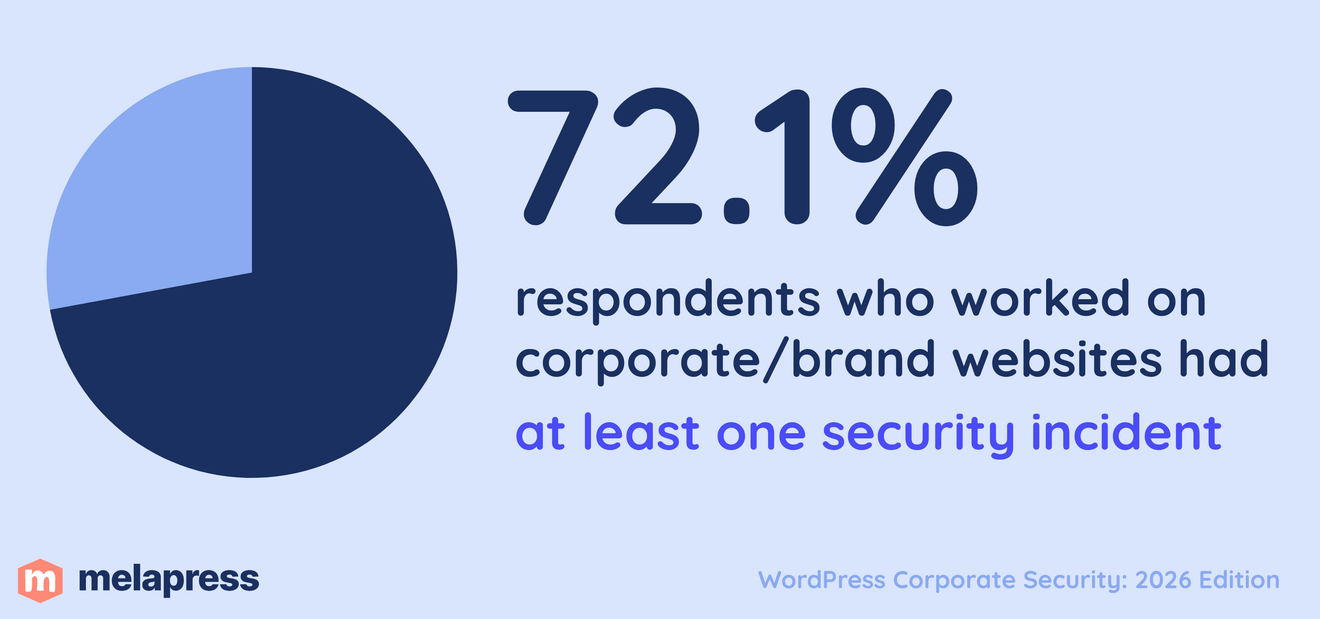
- 72.1% had experienced at least one security incident.
- 70.2% reported using activity logs or monitoring, compared with 46.6% of respondents outside the group.
- 67.3% of those who had experienced a security incident did not report having a current breach recovery plan.
- 26.3% of those who answered the incident-impact question reported a loss of client trust, compared with 14.9% outside the group.
- 51.5% of respondents whose security was managed by an in-house developer or systems administrator reported team security training, compared with 24.4% of those who managed security themselves.
Corporate and brand WordPress teams take security seriously
Security concern is particularly high among respondents working on corporate and brand WordPress websites.
On average, this group rated their concern at 8.06 out of 10. More than four in five (81.2%) scored their concern at 7 out of 10 or higher, while 52.9% placed themselves at the very top end of the scale with a score of 9 or 10.
Interestingly, that concern is not focused on a single type of threat. Corporate and brand website respondents reported a broad mix of concerns, but one stood out above the rest.
Reputation is the leading concern for corporate and brand websites
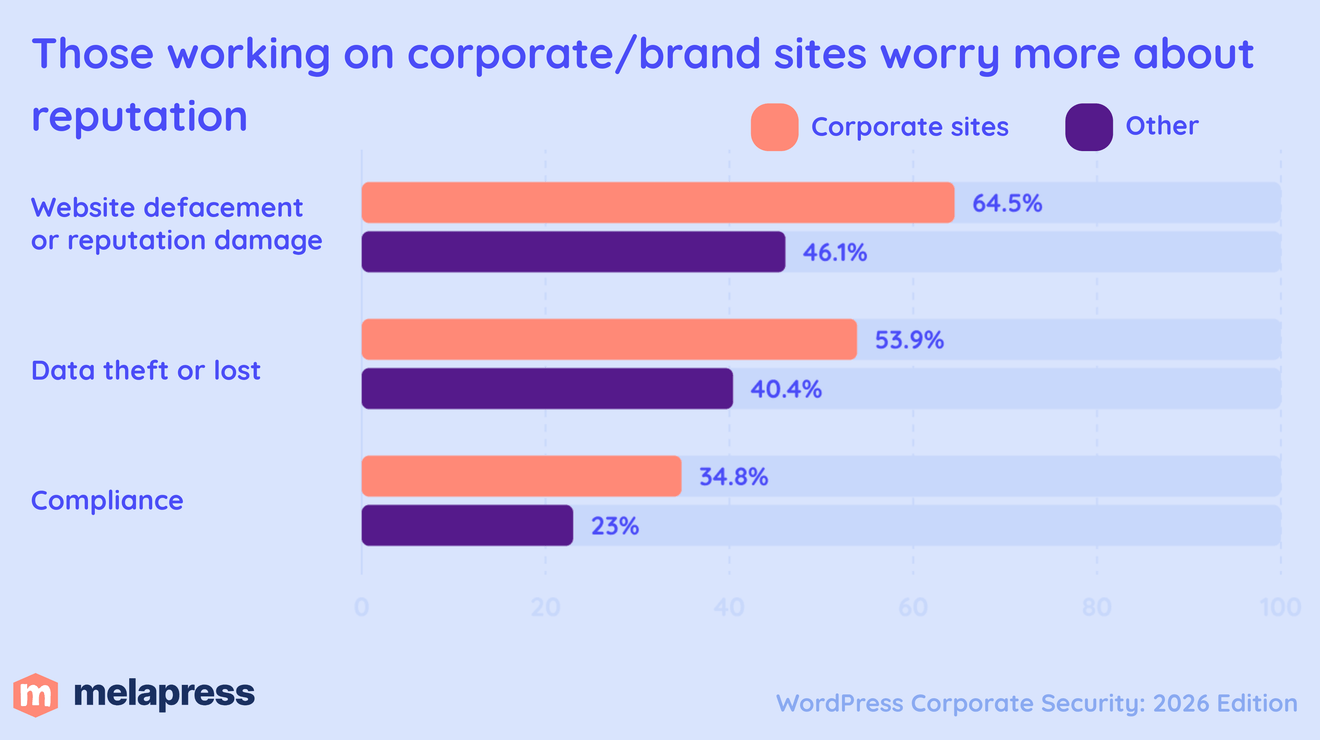
Website defacement or reputational damage was the most commonly selected concern, cited by 64.5% of respondents working on corporate or brand websites.
That was followed by website availability at 58.2% and data theft or loss at 53.9%.
Compliance was selected by 34.8%, while 24.8% identified direct financial loss as a major concern.
The emphasis on reputation is somewhat expected for corporate and brand websites, where the website is often an important part of the organization’s identity. A compromised website can create problems beyond the technical incident itself, affecting how customers, partners, and other visitors perceive the organization long-term.
The comparison with the rest of the survey makes this difference even clearer.
Respondents working on corporate or brand websites were 18.4 percentage points more likely to identify website defacement or reputational damage as a concern than respondents working on other website types.
They were also 13.5 percentage points more likely to worry about data theft or loss, and 11.8 percentage points more likely to identify compliance as a security concern.
This suggests that corporate and brand WordPress teams are not simply more concerned overall. Their risk profile is also more heavily weighted toward threats that can affect reputation, sensitive information, and organizational accountability.
What does the typical corporate and brand WordPress security stack look like?
Respondents working on corporate and brand WordPress websites reported an average of 4.74 of the eight security controls measured in the survey.
However, adoption was far from even. Some controls have become standard across most corporate and brand WordPress environments, while others are much less common.
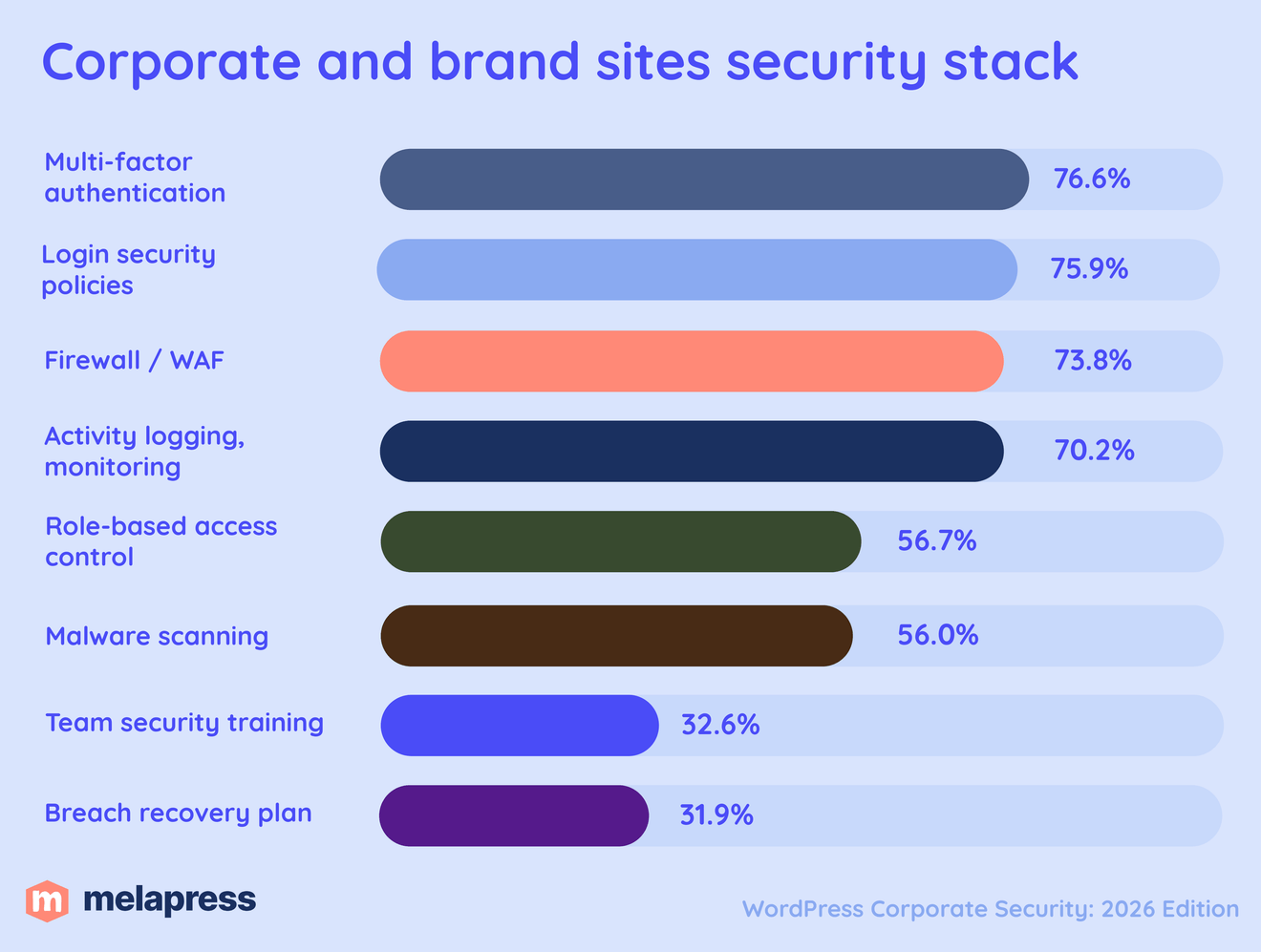
The most widely adopted control was 2FA or MFA, used by 76.6% of respondents. This was followed closely by login security policies at 75.9%, firewalls or WAFs at 73.8%, and activity logs or monitoring at 70.2%.
Adoption then drops for the other controls. 56.7% used role-based access control, while 56.0% reported malware scanning.
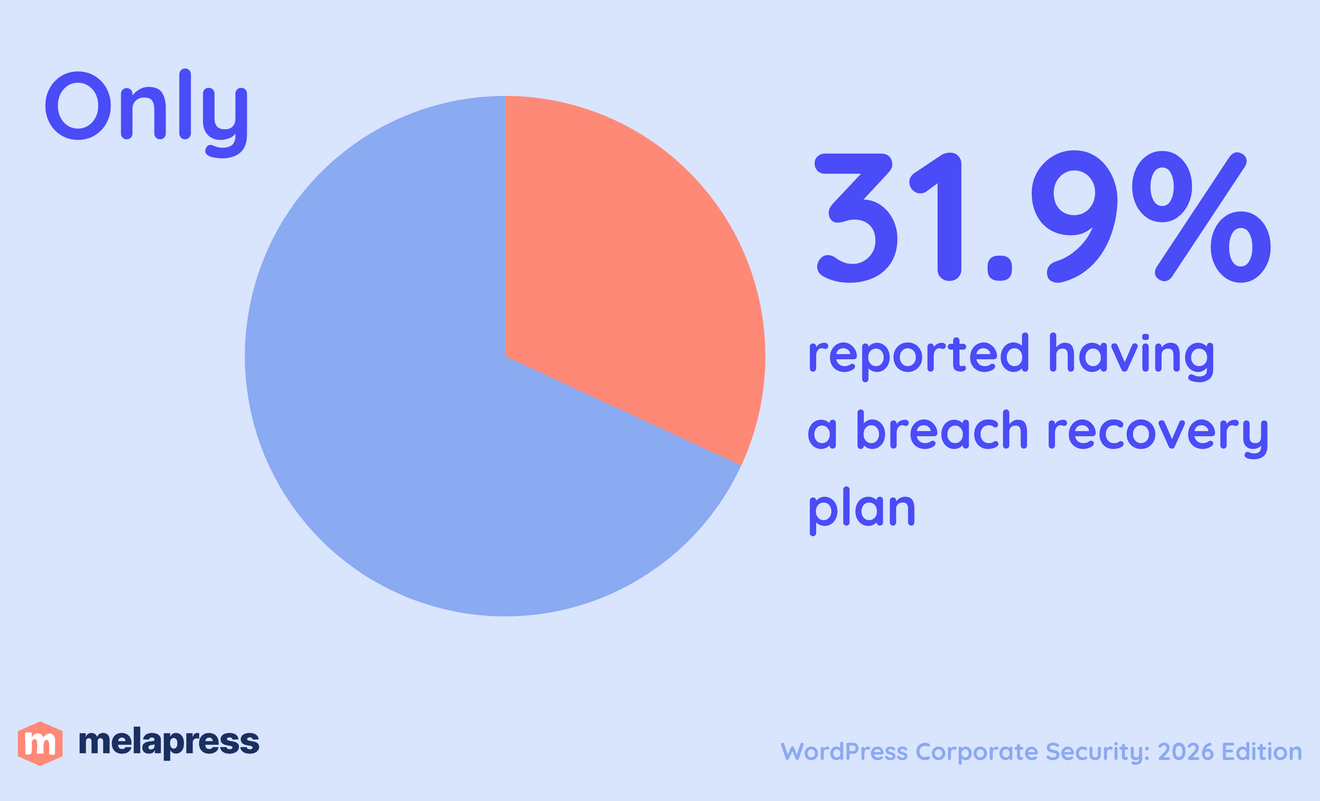
Similar to the broader survey, the biggest gap appears in the more organizational and recovery-focused measures. Only 32.6% reported team security training, while 31.9% had a breach recovery plan.
Corporate and brand websites report stronger controls than the rest of the survey
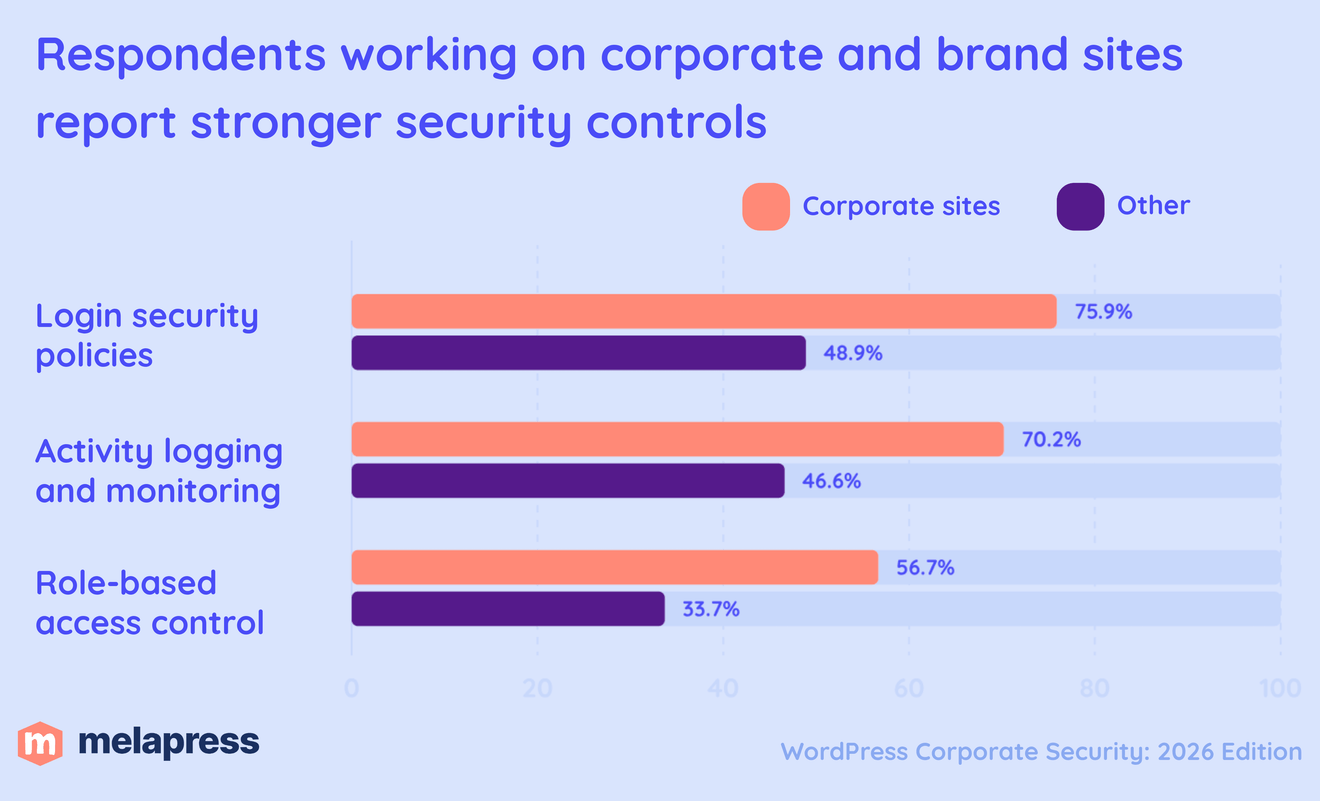
Corporate and brand website respondents were more likely to report almost every major technical control than respondents working on other types of WordPress websites.
The largest difference was in login security policies, used by 75.9% of corporate and brand respondents compared with 48.9% of the rest of the survey. That is a gap of 27 percentage points.
Activity logging showed a similarly large difference. 70.2% of corporate and brand respondents used activity logs or monitoring, compared with 46.6% of other respondents, a 23.6-point gap.
Role-based access control was 23 percentage points more common, used by 56.7% of corporate and brand respondents versus 33.7% of everyone else.
Other controls also showed meaningful differences.
- Firewall / WAF: 73.8% vs 61.2%
- Malware scanning: 56.0% vs 43.8%
- 2FA / MFA: 76.6% vs 68.0%
Overall, the benchmark suggests that corporate and brand WordPress environments tend to have a more developed security stack than the rest of the survey sample, especially when it comes to monitoring, login protection, and controlling user access.
That does not mean these sites are necessarily more secure just because more controls are in place. But it does provide a useful peer benchmark for organizations assessing whether their own WordPress security setup reflects the practices of similar corporate and brand websites.
The maturity gap: technical controls are ahead of organizational preparedness
As we saw in the previous section, corporate and brand WordPress websites generally report stronger technical security controls than other groups in the survey. But that maturity does not extend equally to what happens after an incident, or to how organizations prepare the people responsible for security.
Only 31.9% of corporate and brand website respondents reported having a breach recovery plan.
Team security training was almost identical, reported by just 32.6%.
That means that even within one of the more security-mature groups in the survey, less than one in three respondents reported all of these organizational preparedness measures.
More than seven in ten corporate and brand respondents reported using 2FA or MFA, login security policies, a firewall or WAF, and activity logs or monitoring. Yet adoption drops sharply when the focus shifts from preventing or detecting an incident to preparing the organization to respond and recover.
Corporate and brand sites still outperform the rest of the survey
These preparedness figures are low in absolute terms, but corporate and brand website respondents are still ahead of the wider survey sample.
32.6% reported team security training, compared with 20.8% among respondents not working on corporate or brand websites.
Likewise, 31.9% had a breach recovery plan, compared with 24.7% among the rest of the sample.
So the gap is not that corporate and brand WordPress teams are uniquely unprepared. In fact, they are more likely than other respondents to report both measures.
The more important finding is that organizational preparedness remains much less mature than technical security across the board.
In practical terms, this suggests that the next step in security maturity may not be another technical control. For many organizations, it may be improving incident response, recovery planning, and the way security responsibilities are communicated and practiced across the team.
Security incidents are the norm, not the exception
Among respondents working on corporate or brand websites, 72.1% said they had experienced at least one security incident.
For most of those respondents, it was not a one-off event either. 67.3% of corporate and brand website respondents with a confirmed incident reported experiencing two or more incidents.
However, this should not be interpreted as evidence that the controls they report to implement necessarily failed.
The survey records respondents’ current security setup, while their incident history looks backwards. Some organizations may have introduced stronger controls only after experiencing one or more incidents.
Corporate and brand environments may also face greater exposure in the first place. They can have larger attack surfaces, more users and integrations, higher-profile domains, or simply more websites under management. They may also be more attractive targets than smaller or less visible sites.
For that reason, the data does not tell us that respondents with more incidents were initially less secure. What it does show is that security incidents remain a common part of operating corporate and brand WordPress websites, even if this group currently reports comparatively mature security practices.
That makes the recovery gap particularly relevant. Among corporate and brand respondents with a confirmed incident, 67.3% did not report having a current breach recovery plan. Even among those reporting two or more incidents, 65.2% did not report one.
That reinforces the point that good security is not only about preventing every possible incident. It is also about detecting problems quickly, limiting their impact, and being prepared to recover when prevention is not enough.
How corporate and brand WordPress incidents are discovered
Preventing every incident is unrealistic, which makes how quickly an organization detects a problem an important part of its overall security maturity.
Among the 98 corporate and brand website respondents who had experienced a confirmed incident, the most commonly reported discovery method was a human. 45.9% said the incident was discovered after someone reported strange behavior on the website.
By comparison, 41.8% discovered an incident through logs or alerts from a logging tool, while 39.8% were alerted by their hosting provider or server.
Other detection methods were less common. 25.5% reported discovering an incident through a malware scanner, while 13.3% said a search engine warning played a role.
People noticing something is wrong remains the most common warning sign
The results show a mix of proactive detection and more reactive discovery methods.
Corporate and brand website respondents already report relatively high adoption of activity logs and monitoring, with 70.2% using these controls. The incident data also shows their practical role. Logs and logging alerts were the second most commonly reported way incidents were discovered, cited by more than four in ten respondents with an incident.
Even so, someone noticing strange website behaviour remained the single most common discovery method.
That matters because visible problems are often a later signal than an internal alert. If a customer, employee, or website administrator notices that something is behaving unexpectedly, the incident may already have progressed far enough to affect the normal operation or appearance of the site.
Hosting and server alerts also played a substantial role, reported by almost 40% of incident respondents. These can provide valuable early warnings, but they also mean organizations are relying partly on infrastructure providers to identify activity that their own website-level monitoring may not have surfaced first.
The benchmark therefore presents a mixed picture. For organizations benchmarking their own setup, the goal should not simply be to have monitoring tools installed. It should be to set them up in a way to ensure those tools are capable of making suspicious activity visible before the website itself becomes the warning sign.
The real impact of corporate and brand WordPress incidents
Security incidents can affect WordPress websites in very different ways, but the one consequence that stands out clearly among corporate and brand respondents is downtime.
Out of the respondents in this group that experienced an incident, 69.5% said their most serious incident caused website downtime.
That makes website availability the most common real-world consequence by a wide margin.
Other impacts were less frequent, but still significant. Reputational damage was reported by 31.6%. Loss of client trust was reported by 26.3%, compared with 14.9% of respondents who did not work on corporate or brand websites.
Direct commercial impacts were less common. 12.6% reported revenue loss, and the same proportion said the incident resulted in lost search rankings.
More severe outcomes such as data theft or loss were reported by 6.3%, while 1.1% reported compliance or legal issues.
Downtime is by far the most common consequence
The dominance of downtime is interesting when compared with what corporate and brand respondents said they were worried about.
58.2% identified website availability as a security concern, and nearly seven in ten respondents who described the impact of a confirmed incident said downtime was one of the consequences.
By comparison, 64.5% of corporate and brand respondents were concerned about website defacement or reputational damage, making it the most commonly selected concern overall. Reputational damage was still a significant real-world outcome, but it was reported by a smaller 31.6% of incident respondents.
The contrast is even larger for data theft. 53.9% said they were concerned about data theft or loss, while 6.3% of respondents describing an incident impact reported that data theft or loss had actually occurred.
Perceived risk and experienced impact are not the same thing
These comparisons should not be read as a direct measure of whether particular concerns are justified.
The survey asks respondents about their current security concerns, while the incident question looks at the impact of their most serious previous incident. A respondent may also be concerned about a low-frequency event precisely because its potential consequences would be severe.
Even with that limitation, the comparison is useful.
For corporate and brand WordPress websites, availability appears to be both a major perceived risk and the most common practical consequence when incidents occur.
Reputational damage is also clearly relevant, affecting almost a third of incident respondents, but it is feared by a much larger proportion of the group.
Data theft presents a different pattern again. It is one of the most widely cited concerns, even though it doesn’t appear very often among the reported impacts of respondents’ most serious incidents.
The benchmark therefore suggests that corporate and brand WordPress security teams need to think about both probability and consequence. The incident that happens most often may cause downtime, while less common outcomes such as data loss, legal exposure, or reputational damage can still justify significant preventative measures because of the potential severity if they do occur.
Who actually manages corporate and brand WordPress security?
Corporate and brand WordPress websites may belong to larger organizations, but that does not necessarily mean security is handled by a dedicated security team.
In fact, 58.2% of respondents working on corporate or brand websites said they manage WordPress security themselves.
A further 23.4% rely on an in-house developer or systems administrator, while 10.6% said security is managed by an agency.
Only 5.7% rely on a freelance developer or systems administrator, with the remaining 2.1% reporting a different arrangement.
Corporate WordPress security is still frequently owned by an individual
The standout figure is the proportion of respondents who said security is managed personally.
Even among corporate and brand websites, almost six in ten respondents are directly responsible for WordPress security themselves.
That is an important reminder that “corporate” does not necessarily mean there is a dedicated WordPress security function behind the website.
Responsibility may sit with a WordPress administrator, developer, member of the web team, marketing team, IT function, or another individual whose role extends well beyond security alone.
That can have practical consequences for how security is managed. A person responsible for the website may also be handling updates, content, development, integrations, performance, and day-to-day administration. Security therefore becomes one responsibility among many rather than a separate specialist function.
The 23.4% relying on an in-house developer or systems administrator represents the next-largest group, while outsourced management remains comparatively uncommon. Combined, agencies and freelance developers or systems administrators account for only 16.3% of corporate and brand respondents.
The management arrangements also showed a clear difference in training. Among respondents who said an in-house developer or systems administrator managed security, 51.5% reported team security training, compared with 24.4% of those who managed security themselves. Recovery planning did not show the same difference. 36.4% and 35.4%, respectively, reported having a plan.
The benchmark suggests that, for many organizations, the question is not simply whether appropriate security controls exist. It is also whether ownership is clear, responsibilities are realistic, and the person managing WordPress security has the visibility and processes needed to respond when something goes wrong.
What to do with this information
The corporate and brand benchmark shows a group that already uses many security controls more widely than the rest of the survey. But incidents are still common, and recovery planning and team security training remain much less widely adopted.
For teams responsible for corporate and brand WordPress websites, the findings point to a few practical priorities:
- Protect accounts with strong authentication and login policies
- Keep appropriate control over user roles and permissions
- Monitor activity so unusual changes can be investigated early
- Make sure there is a clear plan for responding to and recovering from an incident.


Keep track of activity across your WordPress site
As the developer and membership-site benchmarks also show, prevention is only one part of the picture – visibility, response, and recovery matter too.
Join the WordPress Security discussion on our Reddit community
Who we surveyed and methodology
- This report looks at a subgroup of the full 319-response 2026 WordPress Security Survey. It includes 141 respondents who said they worked on corporate or brand websites.
- Respondents could work across more than one type of WordPress website. As a result, “corporate and brand website respondents” does not mean these respondents worked exclusively on corporate or brand websites.
- Where an individual question was left unanswered or did not have a valid response, that answer was excluded from the calculation for that question. As a result, the number of responses used can vary slightly between findings.
- Questions about how security incidents were discovered and what impact they had allowed respondents to select more than one answer. Percentages for these questions can therefore total more than 100%.
- We also do not know whether respondents’ current controls were in place when previous incidents occurred. This follows the same methodology used in the developer and membership-site benchmarks.
Small disclaimer: The corporate and brand benchmark is based on 141 respondents from the wider 2026 survey who said they work on these types of websites. Because many respondents may also work on other types of WordPress sites, the results should be treated as a benchmark for this group rather than a complete picture of corporate WordPress security. Where comparisons use smaller subsets, they are most useful for highlighting broader patterns rather than drawing firm conclusions.