


Updated on 9 July, 2026
How to troubleshoot WP 2FA email delivery
By default, WP 2FA uses WordPress’s wp_mail function to send one-time password (OTP) emails. If you have configured an alternative mail delivery service, such as a third-party SMTP plugin, WP 2FA uses this to send the email.
OTP emails are sent as soon as they’re requested. However, for a number of reasons, email delivery may be impacted. Common causes include server misconfigurations, spam filters, and other settings.
If you are experiencing issues with OTP email delivery, this guide will walk you through a series of troubleshooting steps to resolve the issue.
Important: To prevent getting locked out, set up 2FA backup codes or a secondary 2FA method in WP 2FA. This ensures you won’t be locked out of your website if email issues persist or you have future problems.
Step 1: Check your spam folder
Spam filters can sometimes mislabel emails as spam. As such, before we do anything else, we need to confirm that 2FA emails are not being mistakenly redirected to the spam folder.
If you do find the email in the spam folder, make sure you whitelist the email address to help avoid emails being redirected to spam in the future. You might also want to tell your users to whitelist the email address so that everything flows more smoothly. The process for whitelisting addresses will depend on the email client (Gmail, Outlook, etc).
Step 2: Test WordPress email deliverability
We will first need to determine whether WordPress is able to send any emails at all. This will tell us whether we’re experiencing a WordPress issue or a WP 2FA issue.
- Install and activate the Check & Log Email plugin
- From the WordPress Dashboard, navigate to Check & Log Email > Test Email
- Send a test email by entering your email address in the provided field and clicking Send test email

Now, check the inbox of the email address you sent the email to and see if you have received the email.
Did you receive the email?
Yes: If the answer is yes, it means that WordPress is able to send emails, and we can move to the second part of the troubleshooting process.
No: If the answer is no:
- Confirm the email has been sent by navigating to Check & Log Email > Email Logs
- Confirm the email has not been redirected to the Spam folder
- Confirm DKIM and SPF records
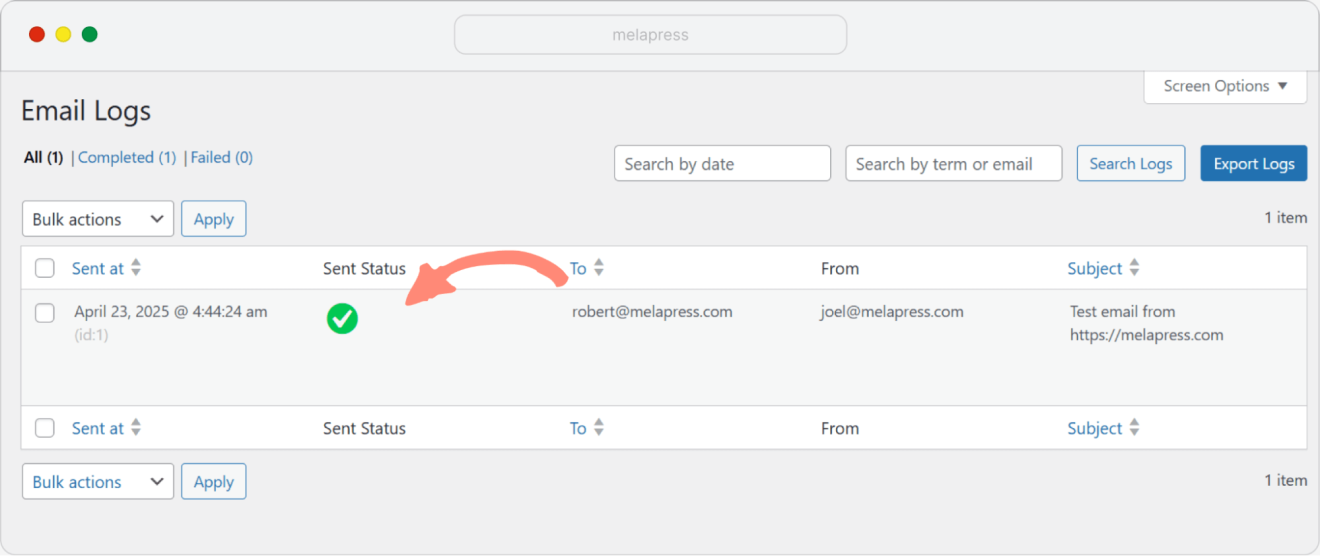
If all of the above checks out and you are still not able to receive emails sent from WordPress:
- If you are using WordPress’s default email functionality, consider getting in touch with your hosting service provider and explaining that emails are not being sent. Alternatively, use a third-party plugin such as WP Mail SMTP. By using a third-party plugin, you essentially side-step WordPress’s wp_mail() function, which is similar to PHP’s mail function, known for being somewhat unreliable.
- If you are using a third-party plugin but still can’t send emails successfully, get in touch with the plugin developer for further assistance.
Step 3: WP 2FA email deliverability
Now that we’ve made sure WordPress can send emails, we need to check what is happening with WP 2FA emails. Do note that for this procedure to work, you must have the email link or email code 2FA enabled for your WordPress account.
- Make sure you are logged in to WordPress using your administrator account
- Open a separate Incognito/Private browsing window in your browser. (Here’s how for Chrome, Firefox, and Microsoft Edge)
- Log in to your WordPress site using the Incognito/Private window
- When prompted for the 2FA code, switch back to the regular browser window where you’re logged in as an administrator
Navigate to Check & Log Email > Email Log and check whether the email has been sent or not:
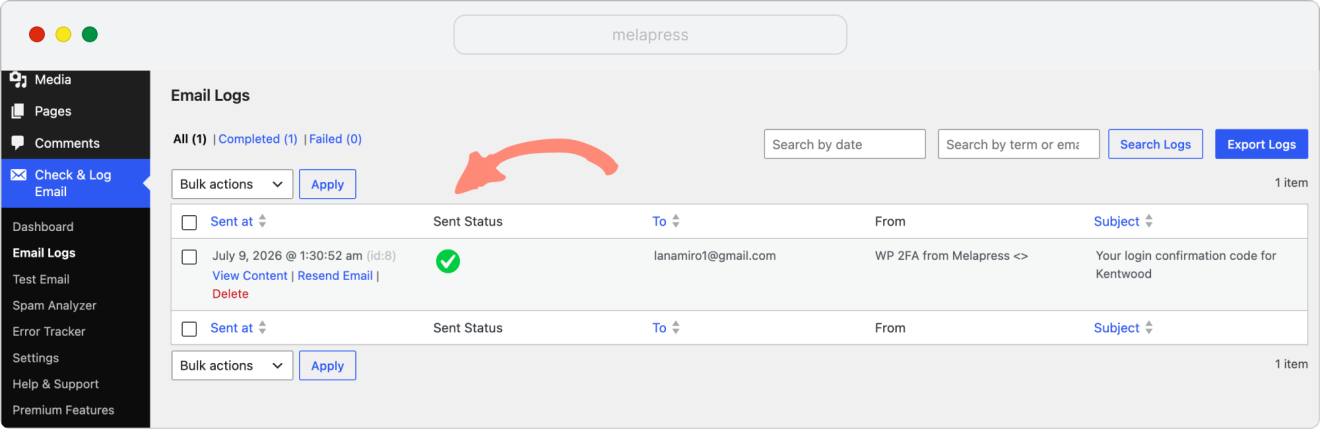
And you can View Content to check more information:
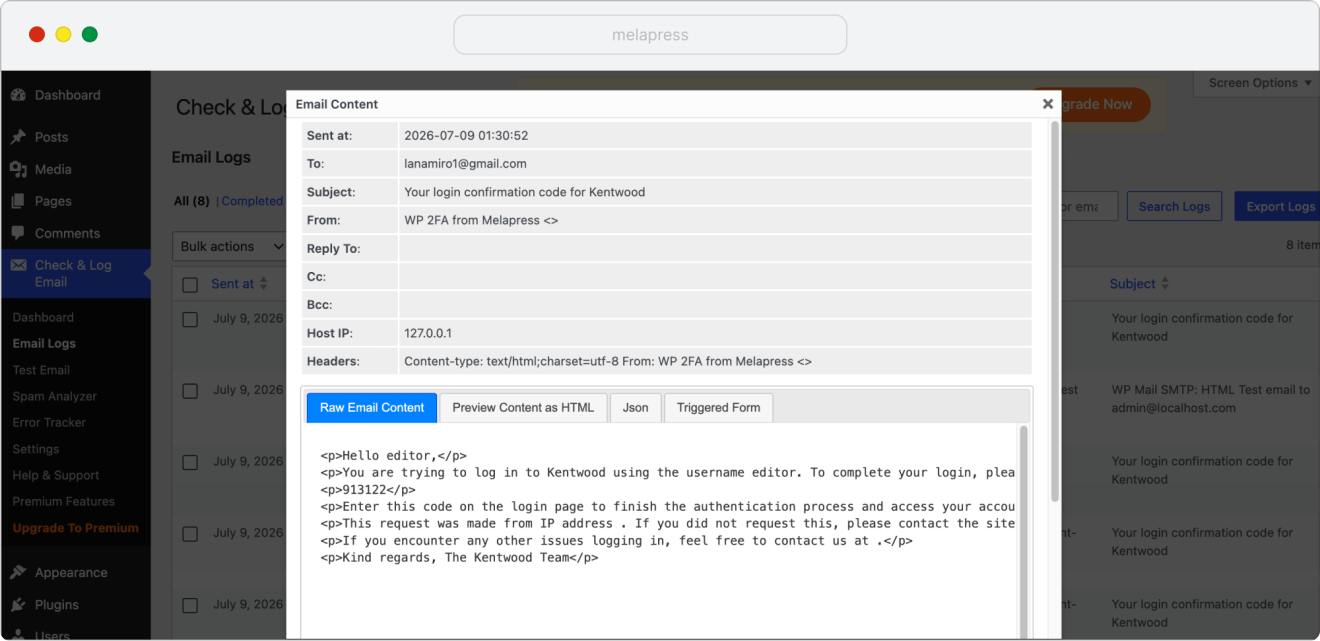
Does the email show up in the log?
Yes: If the answer is yes, it means that WP 2FA is successfully forwarding the email to WordPress, but WordPress is not sending it forward. We suggest contacting your web hosting provider for further assistance.
The message should provide them with all the context/information they need. So something like:
I am currently unable to receive emails sent by third-party plugins on my WordPress site. I have confirmed that the plugin is forwarding the emails to WordPress, as per the attached log. Unfortunately, it seems WordPress is not forwarding these emails to me. Kindly advise on how to resolve the issue.
(Remember to include the log export. You can get the file by navigating to Check & Log Email > Email Logs and clicking on the Export Logs button located in the top-right corner of the screen.)
No: If the answer is no, kindly send us your system information file, along with the answers to the following questions:
- Who is your web hosting provider? Have you contacted their support about this issue?
- Do you use the default WordPress email system, or do you use an SMTP plugin or service (e.g., SendGrid)?
