



WP 2FA release notes
On this page, you’ll find a highlight of what is new and improved with every update release of the WP 2FA plugin. Entries are listed in chronological order, starting from the most recent at the top. For a complete and detailed list of all changes, including bug fixes, please refer to the WP 2FA plugin change log.
Update 4.3.0
Release date: 4th November 2026
This update makes setup and login smoother. Administrators who skip the setup wizard now get a reminder, the wizard can be restarted from the plugin settings, and the one-time code field is focused automatically at login.
It also includes translation improvements and several bug fixes for login, 2FA setup reminders, WooCommerce on multisite and the email setup wizard.
Update 4.2.1
Release date: 14th October 2026
This is a maintenance update that includes an updated Freemius SDK, improvements to the Wordfence Login Security migration process, and minor bug fixes related to plugin settings and navigation.
Update 4.2.0
Release date: 6th October 2026
This update introduces an automatic migrator for the users of Wordfence Login Security, new smart tag controls for email and SMS templates, and a range of security, stability, and reliability improvements. More details follow;
Automatically migrate users from Wordfence Login Security
WP 2FA can now automatically migrate users’ 2FA configurations from Wordfence Login Security to WP 2FA, without requiring any action from the user. We have build this importating module because the plugin Wordfence Login Security has been discontinued.
The migration happens automatically when users log in, allowing them to continue using their existing authenticator app configuration with WP 2FA, and their backup codes as well. Administrators can track the migration progress and will be able to see when all users have been migrated.
This makes it easier to move your users to WP 2FA without requiring them to manually reconfigure their authenticator apps or regenerate the backup codes.
Easier email and SMS template customization
We’ve added smart tags to the email and SMS template editors in the White labeling.
The smart tags make it easier to see and use the available smart tags when customizing both your email and SMS templates, helping you include dynamic information such as login codes, and other user or website details without having to remember the tags.
Security, stability, and reliability improvements
This release also includes a security fix for a CSRF vulnerability, together with additional security hardening and improvements across the plugin.
We’ve also fixed a range of issues affecting multisite networks, email and SMS delivery, passkeys, settings import and export, reports, 2FA policies, and other areas of the plugin to improve overall stability and reliability.
Update 4.1.0
Release date: 21st July 2026
More control over zero-setup 2FA
This update introduces a new option that allows administrators to customize how long one-time passwords (OTPs) remain valid when using zero-setup two-factor authentication. This gives you greater flexibility to balance security and usability based on your organization’s requirements.
Improved reliability and user experience
We’ve made several improvements throughout the plugin to make managing and using two-factor authentication (2FA) even smoother.
Email delivery guidance and test email messages have been improved with clearer troubleshooting information, making it easier to diagnose and resolve email delivery issues. We have also refined several areas of the user interface, improved validation messages, and made a number of usability enhancements to the passkeys and white labeling settings.
Security updates
This update includes a security fix to an issue reported by Jakub Herman, and also several other general security improvements and fixes that make the plugin more stable and secure.
Update 4.0.0
Release date: 7th July 2026
A completely redesigned User interface (UI)
WP 2FA 4.0 introduces a completely redesigned user interface with a modern look and feel, improved navigation, and a more streamlined setup experience. Settings have been reorganized to make them easier to find, helping administrators configure and manage two-factor authentication more efficiently.
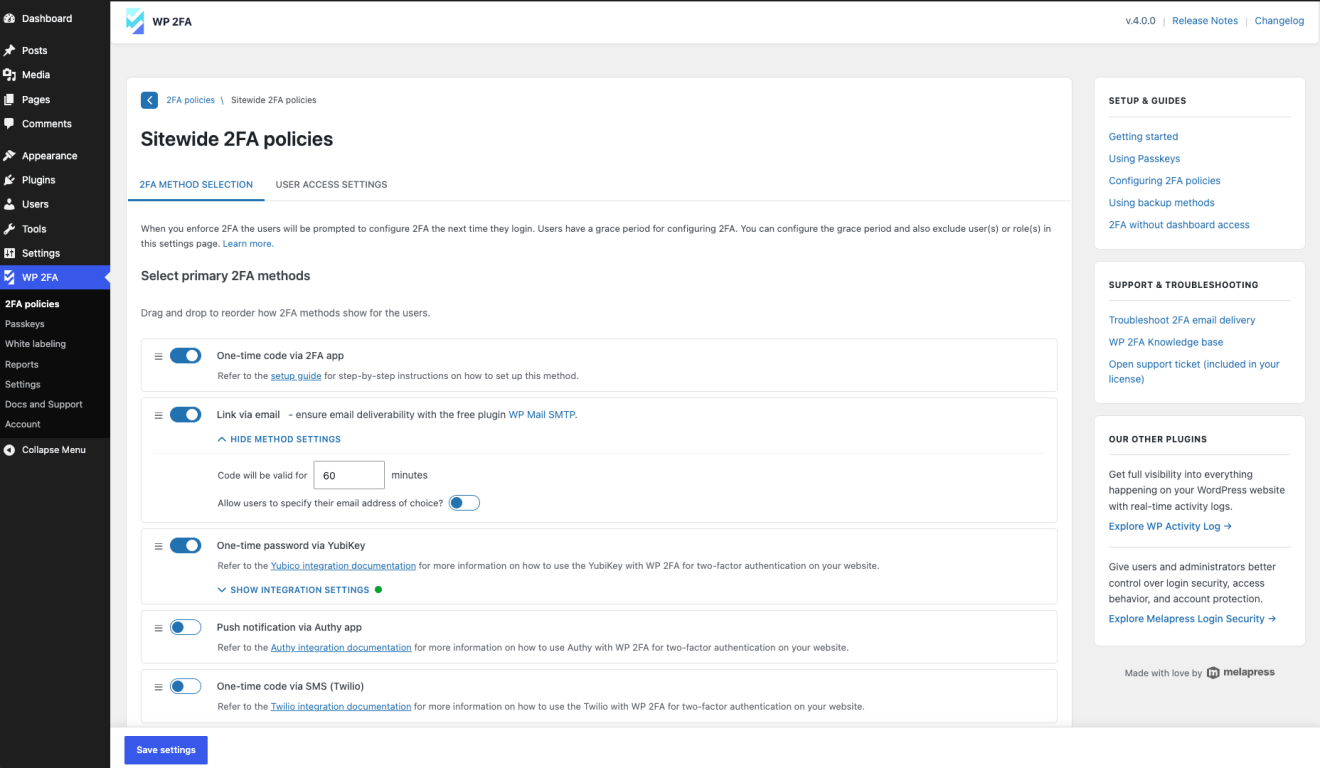
For existing installations, upgrading to the new interface is optional and can be done at any time from the plugin settings. Please note that once you switch to the new interface, the change cannot be reverted.
Other noteworthy changes
This release also includes two important changes. Settings export files created with versions earlier than 4.0 are not compatible with this latest update. Therefore, they should be recreated using version 4.0.
In addition, email template customization is now available as an Enterprise feature. Existing customized email templates will continue to work without interruption.
Major plugin performance and stability improvements
On top of the above changes in this release, the plugin also includes a good number of performance, stability, and scalability improvements, making it more reliable than ever. We’ve also fixed a long list of issues. Please refer to the changelog for more information.
Previous versions release notes: