



WP Activity Log version 4 release notes
WP Activity Log release notes for all version 4 builds and releases.
Update 4.6.4
Release date: 14th February 2024
This update was released to address a crash / error in the install wizard that occurs when the plugin is installed on a vanilla WordPress installed. We have also included a few other minor bug fixes.
Update 4.6.3
Release date: 8th February 2024
This update was released to include support for the new plans which will be introduced later on this year. In it we also included a number of bug fixes (mostly for WooCommerce and Gravity Forms sensors) and also included some more code refactoring.
Update 4.6.2
Release date: 9th January 2024
This is a maintenance update to address a number of broken links in the plugin’s UI,a Cross-site scripting security issue, and a number of bug fixes.
Update 4.6.1 – Free edition only
This is a maintenance update to address a crash users encountered when upgrading to 4.6.0 and their plugin was configured to use the Grid view mode.
On top of that we have also added some other minor bug fixes.
Update 4.6.0
Release date: 18th October 2023 (Free edition) and 25th October (Premium edition)
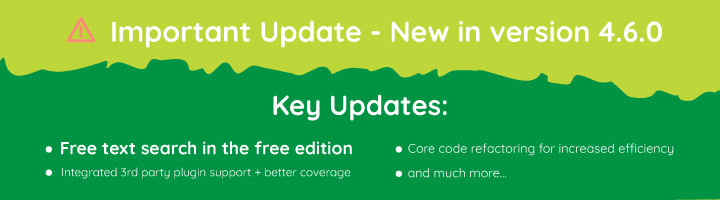
Update 4.6.0 is a major update, introducing a good number of new features and technical advancements. The most important addition however, is the free-text based search in the Free edition of the plugin. The community and free plugin users have been asking for this feature, and we have delivered.
Free-text based search available in the Free edition
Our business model is simple: the plugin’s free edition should include unrestricted access to all logging capabilities and it should be a tool that delivers value to its users. Any other feature that is considered non-essential, or an advanced tool, is included in the premium edition.
While the free edition lacked search functionality, it was still possible to find specific information by using the sorting feature. However, as many users pointed out, this can be a time consuming endeavour. We listened to the feedback and have now included the free-text based search in the free edition.
Activity log extensions for third-party plugins moved to core
To keep a log of changes that happen in popular third-party plugins such as WooCommerce and Yoast SEO, we developed a number of extensions. This means that anyone who wanted to keep a log of what their team is doing on their WooCommerce powered website, they had to install WP Activity Log and the Activity Log for WooCommerce extension.
We took this approach because not everyone who uses WP Activity Log was using or wanted to keep a log of what is happening on other third party plugins. However, with the major refactoring of the plugin’s core code that we started in the previous version, the plugin is now way more efficient at managing resources and can easily switch off non required sensors.
As such, from now onward, you do not need to install any extensions to monitor the activity on third party plugins. This functionality will be available out of the box.
Improved coverage of third-party plugins
As we merged the extensions for third-party plugins into the plugin core, we have taken the opportunity to also improve coverage. The plugin now supports the latest versions of WooCommerce, Yoast SEO, WP Forms, Memberpress, and many others.
For WooCommerce, we have also added a number of new events for the plugin to keep a log of changes in WooCommerce coupons. Refer to the complete list of activity log event IDs for more information on what can the plugin keep a log of.
Core code refactoring
In update 4.5.0, we started refactoring the plugin’s core code. In update 4.6.0 we continued working on this project and have completed phase 2. A lot has changed under the hood, but in short, this is what we have done:
- Removed a lot of redundant code and old files (there are now less files and less lines of code)
- Refactored the way the sensors load.
- Rewritten all the database connection and communication classes.
As a result, this version consumes way less resources and is much faster when compared to earlier versions.
Improved search filters
We have also added a new search filter for user email and now you can use the wildcard “*” in the search filters, making it much easier to filter the search results and find what you are looking for.
For example, you can use search filters such as 196.12.* to find any event with an IP address starting with 192.12. The same applies for user search filters and any other filters that accept strings.
Other worthy mentions
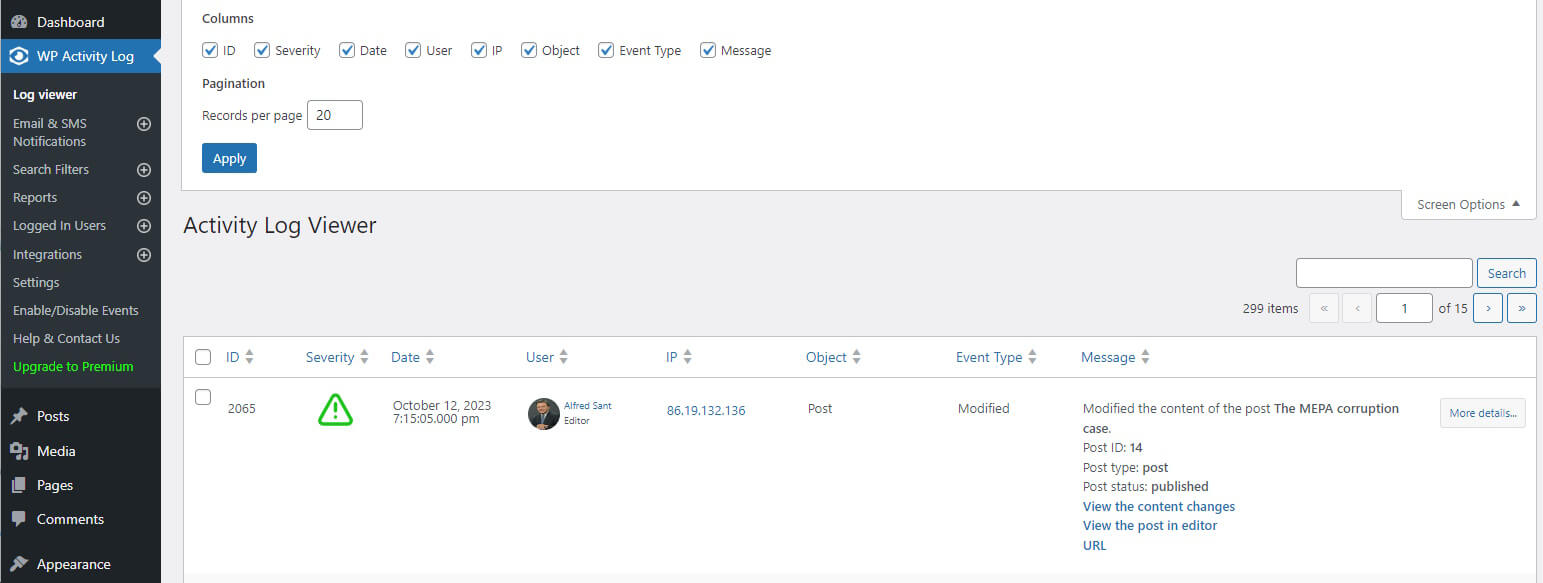
- The activity log viewer is now using the standard WordPress layout and settings. Instead of having options in the plugin’s settings you can configure the view by using the Screen Options, as highlighted in the above screenshot.
- Inclusion of a new option in the external database connector to write the logs directly to the database instead of passing the logs through the Action Scheduler buffer.
- Added a new filter in the activity log deletion tool to search and delete logs by date.
- We introduced support for WP CLI. You can now configure some of the plugin settings via WP CLI. In this update we have only added a small number of settings, but we will be adding more with future updates. Read WP CLI commands for WP Activity Log for more information.
- Applied a good number of UI and UX improvements to the plugin overall, especially in the connections wizard.
- And of course, we have fixed a long list of bugs, making this update, the most stable and reliable version release of WP Activity Log.
Update 4.5.0
Release date: 12th April 2023
Here are some of the biggest changes to look forward to in this update:
Core code refactoring
The developers have been hard at work refactoring the plugin’s code – increasing speed and efficiency inside and out. While this does not necessarily equate to any visible changes, it improves stability and ensures the plugin can continue to receive updates well into the future.
The code refactoring update is quite large, and as such, has been split over a number of updates. This is the first such update, with two more in the pipeline.
We have also added a number of small updates to improve the overall stability and compatibility of the plugin within different environments. One notable update in this regard is better compatibility with PHP version 8.
UI and UX improvements
We have also made a number of UI (user interface) and UX (user experience) improvements to the reports module. While there are no big changes, the look and feel of the reports module is now much smoother.
Speaking of reports, we have also added a link in report emails to the Saved Reports tab, allowing for easy access to all generated reports.
Other notable improvements
This update includes more improvements than you can shake a stick at, making for an essential update that all customers will surely benefit from. Here are some of the more notable ones to keep an eye open for:
- Event ID 2002 is now reported when a user changes something in a post for which the plugin does not have a specific event ID
- Improved the way database table changes are detected by the plugin, with all event IDs used for database changes now being enabled by default
- Improved support for RTL setups in the activity log viewer
- The Filters and Save Changes buttons in the top bar always float at the top when enabling/disabling events
Bug fixes
This version also includes a number of bug fixes, including edge-case issues with certain event IDs, an intermittent error when logging in from custom login pages, and a number of others.
Update 4.4.3
Release date: 12th August 2022
We’ve worked long and hard on this release, which comes packed with tons of new functionality, improvements, and fixes. Additionally, we recently released a brand-new WP Activity Log extension for MemberPress – so do check it out if you’re using this plugin.
We now turn our attention to the new features of 4.4.3.
One of the plugin’s most appreciated features is the ability to write the activity log to an external system. With several options supported, this feature can help you ensure better resource management and continuity. You can now configure Syslog connections to use TLS while writing to a log file can now be done directly without going through the Action Scheduler.
The Users Session Management module also received some TLC and now includes some productivity-enhancing improvements that can help you get more done faster.
Individual user sessions can now be selected and terminated. This latest version also allows administrators to set session policies for super admins in a multi-site environment. This, coupled with several UI and UX improvements, will surely make session management a breeze.
We have also added a new event ID, which allows you to track whenever an event has been enabled or disabled. An activity log for the activity log if you will. Nice!
What’s improved
This version also includes several improvements to increase efficiency, security, and user experience.
We have made improvements to the logic of the login sensor for better custom login page support. In addition, we have improved the internal logging class and system, resulting in better efficiency and performance.
Of course, these are only some of the improvements we have made. This release also includes several bug fixes and many new features, all of which are listed in the WP Activity Log change log.
Update 4.4.2
Release date: 23rd June 2022
This version includes many UX and functional improvements for better stability and operation in a wide range of environments. We have also added a host of new features, including additional reports, white labeling options, and mirroring tags, which we discuss in further detail down below:
Improved Reports
Some of the most significant changes in this release are related to the Reports module. We have improved the format and added a number of new statistic reports, and added new white labeling options for more control over the look and feel of reports generated through WP Activity Log.
New & improved statistics reports
Statistics reports are different from activity reports. Activity reports work as a partial/filtered export from the activity log, listing all activities chosen through the filter. On the other hand, statistics reports automatically work out how many changes of a specific nature happened on your website, making it that much easier to identify any abnormal activity.
For example, you can see how many user profile changes were performed during a specific week or month. You can also generate a statistics report to see how many new users have registered during a specific period on your website, among others.
Below are some of the new statistics reports being made available:
- Number of user profile changes
- Number of new user registrations and users with specific user role
- List of different IP addresses used by a user
- Number of page views per post
- Number of password resets
Reports white labeling
We have added more Reports white labeling options, including custom titles, headers, and the ability to add business name, contact details, and comments to every individual report. You can also add your business logo to the report’s header page and link the logo to a specific URL to improve the branding on reports.
With this update, the reports’ white labeling options have also been moved to a dedicated page in the Reports section, making them easier to find and manage.
Other release highlights
This release features many improvements and fixes, which we are sure our customers will appreciate. Even so, some of the biggest changes you’ll see in this version include:
Activity log tags for mirrored logs
If you use Loggly or Amazon CloudWatch mirroring, you will now be able to make use of tags. Tags are a metadata entry that effectively allows you to label activity log events for easier organization and filtering within the LMS (Log Management System). This makes it much easier to keep track of which logs are of which site when you have multiple websites writing to the same system.
Refactored import/export settings module
The module used to import and export the WP Activity Log plugin settings has been refactored and now covers more plugin settings. With this update, it is also possible to preview the settings before importing them.
Refactored plugin and database updating module
In update 4.4.0, we introduced a number of changes to the activity log database tables. Even though we thoroughly tested this update before releasing it, a number of technical issues and limitations were reported.
So in this update, we took the opportunity to refactor the update module and addressed some of the limitations. For example, before this update, administrators could only update to version 4.4.x from 4.3.6. Now, this is no longer the case, and updates can be installed from even older versions. However, we still recommend users avoid updating very old plugin installs directly to the latest version. To avoid issues, one should always keep the plugin up to date.
Other noteworthy improvements and fixes
Improved licensing SDK: One update that’s worth mentioning is an improvement to how licensing is handled on large deployments. Previously, some customers experienced time-out issues deploying WP Activity Log Premium on large multisite networks. To this end, improvements have been made to license verification that will ensure everything proceeds as smoothly as possible.
Improved sessions table schema: This update features another database table schema update. This time the update is for the sessions table. Now the plugin keeps a record of the session ID in the sessions table. This data is required to accurately apply the WordPress users’ session policies.
Improved WordPress activity log purging tool: The tool to purge WordPress activity log data now gives you the option to choose which data you want to purge. For example, if you search for a specific username, it gives you the option to choose between deleting the data generated by that user or deleting the data in which the user is mentioned. We have also added external database support, which allows you to purge activity log data saved in an external database.
Update 4.4.0
Release date: 28th February 2022
Over the past few months, the team has been hard at work developing the next update of WP Activity Log. After several weeks of testing and customer feedback, we are proud to release it to the public.
The most significant change in version 4.4.0 is the reports module. Completely rewritten from the ground up, it features performance and usability improvements while introducing several new features to increase report benefits.
Release highlights
Of course, the reports module is not the only thing to look forward to when installing version 4.4.0. Here are some of the release highlights being included in this version:
- New reports for WordPress and features
- New events
- See users’ activity from the user page at the click of a button
- New extension for TablePress
- New database scheme
- See the number of logged-in users per role in the Logged In Users section
What’s included in the new reports module?
Before we take a deeper look into the changes included in this module, we want to take a moment to thank our customers. You have been an invaluable part of the process, providing us with valuable feedback. While we honestly wish we could have taken all feedback onboard, this, unfortunately, is not possible. Either way, we thank you for your support and commitment – you rock!
We have added a plethora of new report selections, giving you even more control over reports while using fewer filters. Reports can now also be generated in JSON format alongside HTML and CSV. On the other hand, statistics reports can be generated as HMTL, CSV, or PDF.
Other new features in the reporting module include a fresh new UI, the ability to set the time at which reports are sent, white labeling options, and many more.
What else is included with the update?
While the new reporting module is the most significant change in the update, it is not the only one. We have added new events, database schema changes, text and layout improvements, code optimizations, and much more.
Update 4.3.4
This update, although not one of the biggest updates we’ve released, is an important update. It paves the way for a major release we have planned that includes, among many other things, a brand-new reports module that will truly be worth the wait.
Even so, update 4.3.4 includes a number of bug fixes and several new features, so updating to this version is strongly recommended.
Release highlights
As previously mentioned, 4.3.4 includes a number of new features and updates, including:
- Easily view users’ latest activity right from the users’ page at the click of a button
- Improved CSV reports with more data options available
- Inclusion of users’ role in logged-in users list
- Improved support for older versions of WordPress, starting from 5.6
The update also includes several other updates and bug fixes, helping you make the most out of WP Activity Log while getting you ready for the upcoming major update.
Update 4.3.3
Settings configuration import and export
This new feature lets you easily import and export WP Activity Log’s configuration settings at the click of a button.
This useful feature, which has been designed with ease of use in mind, can be used to back up your plugin’s configuration settings. It can also be used by agencies and businesses who want to standardize their WP Activity Log’s configuration across a number of websites easily.
Delete specific data from the activity log
This feature allows site admins to delete log data that originates from a specific user, IP address, or other criteria from the log.
This feature can be used to comply with users’ requests to delete all data about them in compliance with acts such as GDPR in Europe and CCPA in California, US. It can also come in handy in other situations, such as the deletion of noise created by a particular event or change.
Coverage for REST API requests
WP Activity Log now keeps a log of changes done via REST API by authenticated users.
With REST (REpresentational State Transfer) API continuing to gain popularity in automating and integrating software applications, there is no doubt that many will find this feature useful as we continue to expand the plugin’s coverage to make sure it meets the demands of today’s WordPress websites.
Other noteworthy improvements in this update
On top of the above, we have also included the following improvements in this version update or our activity log plugin for WordPress:
- A number of new event IDs to keep a log of settings, integrations, and notifications changes in the WP Activity log plugin
- The ability to terminate the users’ sessions that match a particular search criteria
- The hover-over prompt for users in the activity log viewer now displays more information about the users
- Improved coverage of changes done via the Members plugin (plugin by MemberPress)
- New hook (wsal_event_data_before_mirror) that allows you to filter what activity log data is sent before it is mirrored
Update 4.3.2
Following our previous update, which was released back in May, we have sought to address bugs and issues while elevating your experience working with WP Activity Log. To this end, we are introducing valuable features to make your life easier and your WordPress website more robust.
Updates worth shouting about
While all updates and fixes bring something to the table, here are some of the updates that are truly worth shouting about.
A brand new external database module
The external database module is something many WordPress administrators use to store activity logs in another database. The previous module had some issues when migrating activity log events from the WordPress database to the new external database. This mainly happened during setup after upgrading to WP Activity Log’s premium plan. While workarounds were possible, the new database module included in this release makes data migration a breeze, including scenarios where an external database is used.
The new module offers better performance and reliability and also includes explicit support for Microsoft Azure MySQL databases. It also has a new UI, which translates to a superior user experience.
WP Activity Log logging
One of the most requested features has been for WP Activity Log to log its own activity. We have now included this functionality in the new release.
You can easily access events from the Enable/Disable Events menu under the WordPress & System > Activity Log plugin tab. Below is a list of the new event IDs:
- ID 6046: enabled/disabled the Login Page Notification
- ID 6047: changed the text of the Login Page Notification
- ID 6048: changed the status of the Reverse proxy/firewall option
- ID 6049: changed the Restriction Access setting
- ID 6050: changed the list of users that can view the activity log
- ID 6051: enabled/disabled the Hide plugin in plugins page setting
- ID 6052: changed the activity log retention policies
- ID 6053: excluded/included back a user in the activity log
- ID 6054: excluded/included back a user role in the activity log
- ID 6055: excluded/included back an IP address in the activity log
- ID 6056: excluded/included back a post type in the activity log
- ID 6057: excluded/included back a custom field in the activity log
- ID 6058: excluded/included back a user profile custom field in the activity log
For a complete list of all the changes the plugin can keep a log of, kindly refer to the WordPress activity log event IDs.
Other noteworthy updates
Here are some other noteworthy highlights you can look forward to when installing the latest version of WP Activity Log.
Full support for PHP 8: The plugin now enjoys full support for PHP version 8.
New report filtering criteria: Previously, reports had the option of either including all or specifying what to include. We have now added a third option to include all but – which works similarly to exclude.
Better vendor support: An issue with reports where they failed to download correctly from WordPress sites hosted at particular vendors has been ironed out and will now work as expected.
Code optimization: Obsolete code that was no longer in use was removed from the free edition of the plugin.
Announcing new pricing model and plans for WP Activity Log
Today (May 20, 2021), we are adding a new Enterprise subscription plan and adapting the current plans, to best accommodate users’ growing needs. These changes will only apply to new purchases, so if you’re on an existing active subscription plan, nothing will change for you.
Introducing the new plugin plans
The introduction of the new plans aims to give more options and make it easier for users to choose the right plan that meets their requirements. With more options available, new users will be able to select the right plan without paying for something that they might not use.
What’s new?
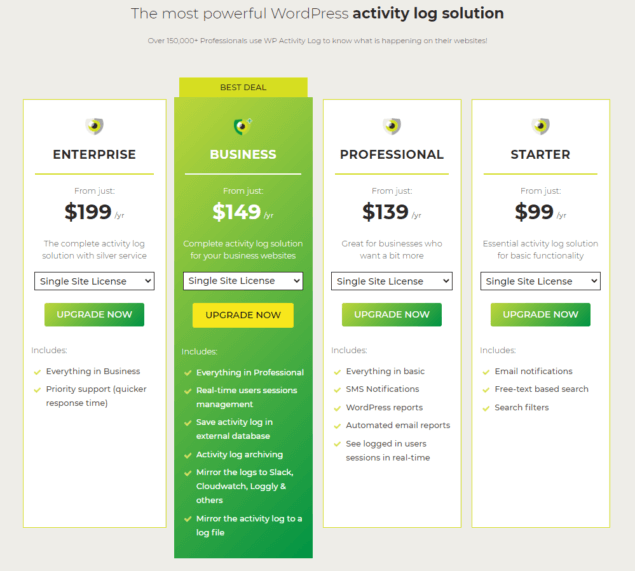
The new Enterprise plan is designed for bigger businesses and enterprises which require priority support ($199 / year for a single site license).
Other big changes in terms of included features in specific plans are the Activity logs in an external database, Integration with third-party services such as Slack and Amazon CloudWatch, and the Users sessions management features, which are now included in our updated Business plan.
For a complete overview of our new pricing plans and a detailed list of features, head to our updated pricing page.
These changes help us to continue offering you the best product, no matter the size of your business while ensuring that the level of service matches. We have lots of exciting things in store for WP Activity Log this year, including a new revamped Reports tool and much more.
Why are we changing the prices?
The last time we made changes to our prices was in 2018. Since then, the quality of our plugin improved drastically, and a number of new features have been introduced since then. Also, the coverage of the activity log plugin improved a lot; we enhanced support for third-party plugins and developed many other improvements. All of this allowed us to transform WP Activity Log from a simple activity log solution to a feature-complete WordPress monitoring & security activity log solution with the broadest coverage.
As we mentioned before, current customers will stay on the old pricing plans as long as they keep renewing.
With the latest WP Activity log update 4.3, we have introduced more features that allow for integrations with third-party services. We have received many requests for this feature from businesses and enterprises. Consequently, these new prices reflect the more technically challenging features.
Update 4.3.0
The highlight of this update is the much-improved mirroring feature that allows you to mirror the WordPress activity log to a centralized logging solution and services such as Amazon Cloudwatch and Slack.
We’ve also updated the format, text, and severity of the events following the RFC standards. So without wasting any more time, let’s dive right in to see what is new and improved in this exciting update.
The upgraded activity log mirroring module
With the WP Activity Log plugin, you can mirror the activity log to a number of third-party services, thus allowing you to have the websites’ logs in your central logging solution, and also ensuring that when something happens to the main activity log server, no data is lost, and it is still accessible.
Here’s the updated list of supported logging solutions:
It sounds impossible for admins to individually check every log on every website in their environment. By improving the mirroring module and the support for more third-party integrations, admins can easily monitor their environments and track key website changes. Log centralization can also help enable quicker anomaly detection, even as your infrastructure grows.
With centralized log management tools, WP Activity Log can help admins catch potential errors and suspicious traffic patterns by providing real-time visibility.
For more information on mirroring activity logs and benefits, refer to Mirroring the Activity Log – Everything you need to know.
Updated format, text, and severity of activity log events following the RFC standards
We have also updated the format, text, and severity of the events. Now we are following the RFC standards, which makes it very easy to parse and read the data with third-party solutions. For example, directly importing the logs to Splunk.
Update 4.2.1
Improved activity log coverage
We aim to improve activity log coverage with every plugin update. In this update, we have included these two new events:
- ID 6045: User changed the site language
- ID 4029: Admin initiated a user password reset
Refer to the complete list of activity log event IDs for more information on what changes can WP Activity Log keep a log of.
Preparing for update 4.3.0
The most important improvements in this update are how the event IDs are defined in the plugin and how each event and metadata are processed.
This preliminary work was needed, so the plugin has better support for Syslog, PaperTrail, Slack, and many other integrations with third-party services that will be featured in the upcoming release 4.3 of the WP Activity Log.
As expected, version 4.3 will introduce lots of new features and additional improvements, so make sure to stay tuned.
Update 4.2.0
With this update, the plugin and all its modules have been updated to support any type of date and time format that WordPress supports. We’ve also introduced a couple of new features, and of course, improved the coverage of the activity logs.
So, let’s dive right in for a highlight of what’s new & improved in this update.
Support for any type of date and time format
Previously, if you have used the WP Activity Log plugin on a website that has non-western time and date formats, such as Japanese formats, you might have noticed that the date and time were displayed incorrectly. Most probably, you have also encountered problems when trying to generate reports or adding date filters.
Starting today, this will no longer be a problem. With this update, WP Activity Log supports any type of date and time format that’s supported on WordPress. Therefore, if you can configure it in WordPress, WP Activity Log can read and understand that format.
Keep a log of date & time format changes
To complement the new feature above, we’ve added a number of new event IDs that can keep a log of changes to the date and time formats and the timezone settings as well. Here is the list of the new event IDs:
- ID 6040: Changed the Timezone in the WordPress settings
- ID 6041: Changed the Date format in the WordPress settings
- ID 6042: Changed the Time format in the WordPress settings
Improved activity log coverage of WordPress settings, multisite network settings & more
In addition to all the above, we’ve also drastically improved the coverage of the activity logs sensors with a number of new event IDs, focusing on WordPress settings, the application passwords, and several other areas. Here’s the list of new event IDs:
New event IDs for changes in posts
- ID 2129: User added / changed / removed a post’s excerpt
- ID 2130: User added / changed / removed a post’s featured image
New event IDs for application passwords
- ID 4025: User added / removed application password from own profile
- ID 4026: User added / removed application password from another user’s profile
- ID 4027: User revoked all application passwords from own profile
- ID 4028: User revoked all application passwords from another user’s profile
New event IDs for changes in WordPress settings
- ID 6035: Changed the Your homepage displays WordPress setting
- ID 6036: Changed the homepage in the WordPress setting
- ID 6037: Changed the posts page in the WordPress settings
- ID 6044: User changed the WordPress automatic update settings
New event IDs for multisite network settings
- ID 7007: Changed the setting Allow site administrators to add new users to their site
- ID 7008: The value of the Site upload space setting was changed
- ID 7009: The value of the file size allowed in the site upload space setting was changed
- ID 7010: Changed the list of allowed file types on the network
- ID 7011: Changed the value of the maximum upload file size network setting
Other new event IDs
- ID 1010: User requested a password reset.
Refer to the complete list of activity log event IDs for more details about each event ID and what change it represents.
Standardized all activity log messages
In this update, we’ve also standardized the text, format, and metadata formatting of all the activity log events.
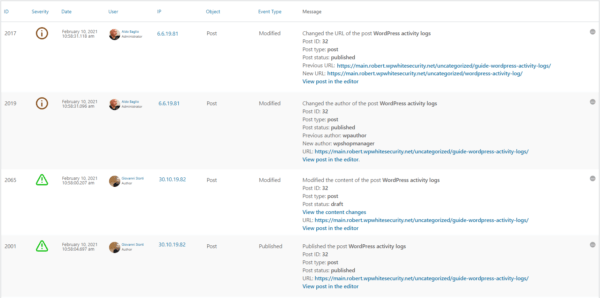
With this change, we aimed to optimize ease of use by further improving the readability of the WordPress activity log, thus making it neater and easier to understand when scrolling through the Activity Log Viewer.
As you can see in the screenshot below, from now on, the formatting and order in which the metadata is reported is always the same.
BREAKING CHANGE: mu-plugin method for custom event IDs no longer supported
Up until this update, users had two different methods available that they could use to add custom event IDs, via a mu-plugin or by developing their own extension. However, from this update onward, we will only support one method; adding custom activity log event IDs via an extension.
By dropping the old method, we were able to reduce the plugin’s code base, improve the plugin’s performance, have more manageable code, and, most importantly of all, can now focus on this method and further develop it to give the users more options.
Other noteworthy improvements
Like with every other update, we have also included a number of other improvements that are worth mentioning. Below is a highlight:
- Improved coverage of users’ login/logout / failed login activity on custom login pages.
- Consolidated the code that generates the activity log messages.
- Improved several database queries for much better plugin performance.
- Users who hide the plugin from the plugins page now get a notification when a plugin update is available.
- Support for URL rewrites and page names (correct page title reported even if the page is a URL rewrite).
- Added support for CloudFlare HTTP headers – plugin reports correct IP when website is behind CloudFlare CDN or firewall.
Update 4.1.5
We are excited to announce the release of three plugin updates:
- WP Activity Log 4.1.5
- Activity Log for MainWP 1.6
- Activity Log for WooCommerce extension update 1.2
We have to release these three updates at the same time because of a number of new features and changes that we have done in all plugins. So to use the features mentioned in this post, you have to use the latest version of each plugin. If you do not update the plugins, they will still work, but you can’t use the latest features.
Let’s dive right in for a highlight of what is new, improved, and changed in this update of the most comprehensive WordPress activity log plugin.
Support for configuration of activity log settings on child sites from the MainWP dashboard
The main highlight of this update is support for the new MainWP extension feature that allows MainWP users to configure the child sites’ activity log plugin settings from one central location, the MainWP dashboard.
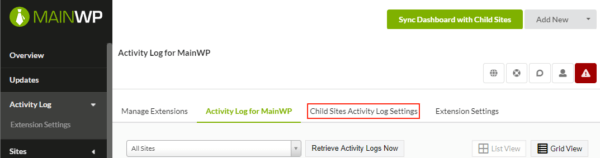
With this new feature, agencies and other MainWP users can easily standardize the environments and setups, thus saving ample time and money. Basically, users now have the ability to change various settings on the activity log plugins installed on the MainWP child sites with a single click.
To learn more about the new features, head to our latest Activity Log for MainWP announcement.
Activity logs and 404 errors
Also, in this update, we have a sort of breaking change. The WP Activity Log plugin will no longer keep a log of requests to non-existing resources or, as they are better known, 404 errors.
We stopped logging these requests for two reasons:
- Performance: by not having to hook in early into WordPress to keep a log of 404 errors, the plugin is now much faster and simpler to maintain. Also, it has an almost negligible effect on the front end of a website.
- Efficiency: there are many other more efficient ways of keeping a log of these errors. For example, the web server already keeps a record of such errors in the log files. Also, there are a number of plugins that are designed to specifically keep a log of 404 errors. Thus they have much more features that you might need for such a task.
If you would like to still keep a log of 404 errors, please read the article on how to keep a log of 404 errors on your WordPress site.
Other noteworthy updates
Like with every other update, we have also included a number of other updates and bug fixes that are worth mentioning:
- We fixed two SQL injections responsibly reported by WP Deeply (we have an interview with Slavco from WP Deeply coming out soon)
- Plugin now keeps a log of changes to multisite network registration settings with event ID 7012
- Improved the activity log coverage in general, especially in the logins and logouts sensor
Update 4.1.4
This update includes a lot of improvements and is particularly important for Yoast SEO plugin users. From now on, the activity log for Yoast SEO functionality will be available through an extension.
With this change, we are now able to further improve the plugin’s coverage. In fact, this update also means a faster plugin, and, most importantly of all, a comprehensive activity log for Yoast SEO plugin users.
The new Yoast SEO activity log extension
We have made the activity log for Yoast SEO available as a standalone activity log extension because not everyone who uses the WP Activity Log plugin uses Yoast SEO. Also, by transferring the Yoast SEO sensor from the main plugin to an extension, the code works more efficiently, and it will also be easier to improve the log’s coverage and troubleshoot technical problems.
Yoast SEO plugin users who want to keep a log of the changes in the Yoast SEO meta box or in the Yoast SEO plugin have to install the new Activity Log for Yoast SEO extension alongside the WP Activity Log plugin.
In this update, we have also increased the coverage of the changes that the activity log can keep track of. This means that the plugin now keeps a log of many other changes that previously it did not. Here is the list of the new activity log IDs the plugin is using:
- ID 8826: user has enabled/disabled the Redirect Attachment URLs in the Yoast SEO plugin.
- ID 8827: Usage tracking has been enabled/disabled.
- ID 8828: The REST API: head endpoint setting was enabled / disabled.
- ID 8829: The social profile URL was added/modified/deleted.
- ID 8830: User changed the taxonomies settings to show in search results.
- ID 8831: Changed the SEO title template for a taxonomy type.
- ID 8832: Changed the meta description template for a taxonomy type.
- ID 8833: Enabled or disabled the display of Author or Date archives.
- ID 8834: Configured the plugin to show the Author or Date archived in the search results.
- ID 8835: Changed the SEO title template for the Author or Date archive pages.
- ID 8836: Changed the Meta description template for the Author or Date archive pages.
- ID 8837: Enabled / disabled the setting to show SEO settings for specific taxonomy types.
Refer to the complete list of activity log event IDs for more information on which WordPress and Yoast SEO plugin changes can WP Activity Log keep a log of. For more information on the activity log for third-party plugins, check out our activity log extensions page.
Other noteworthy plugin updates & improvements
- Detection of plugin updates via zip file uploads.
- Better activity log & plugin privileges on multisite networks.
- Improver the users sessions’ database connector.
- Migrated all the bbPress code to the activity log extension.
- Fixed a validation security issue in nonces. Issue responsibly reported by Lenon Leite.
Update 4.1.3
BREAKING CHANGES: this update contains a number of breaking changes. Please upgrade to WP Activity Log 4.1.2 before upgrading to version 4.1.3.
We are happy to announce the launch of WP Activity Log 4.1.3. This update is particularly important for WooCommerce users. From this update onward, the activity log for WooCommerce functionality will be available through an extension and won’t be included in the main plugin.
Also, in this update, we have moved the plugin’s settings from a custom table to the WordPress settings table, and we have refactored the plugin’s privileges settings. Let’s dive right in to see everything that is new and improved in this update of the number one activity log plugin for WordPress.
The new WooCommerce activity log extension
WP Activity Log is a WooCommerce users’ favorite. It keeps a detailed log of the changes shop managers and other team members make in the WooCommerce store settings, orders, products, and much more! Up until version 4.1.2, the WooCommerce sensor was included in the plugin.
However, not everyone who uses the WP Activity Log plugin uses WooCommerce. So many plugin users are forced to have extra features without ever using them. To remediate this issue, we have created a WP Activity Log extension for WooCommerce. So to keep a log of the changes that happen on your WooCommerce store with WP Activity Log, you have to add the extension for WooCommerce.
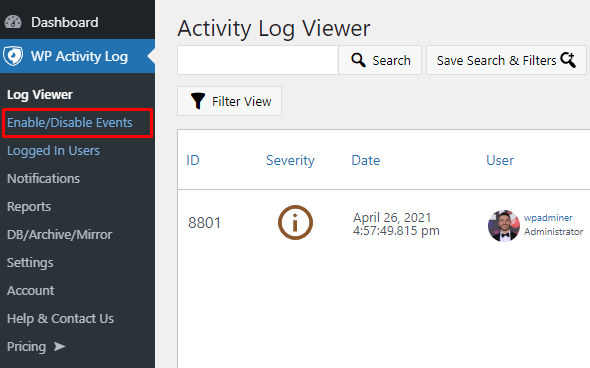
As a result of this change, we will be able to further improve the plugin’s coverage of WooCommerce changes. This change also means a faster plugin, and, most importantly of all, a more detailed activity log for WooCommerce.
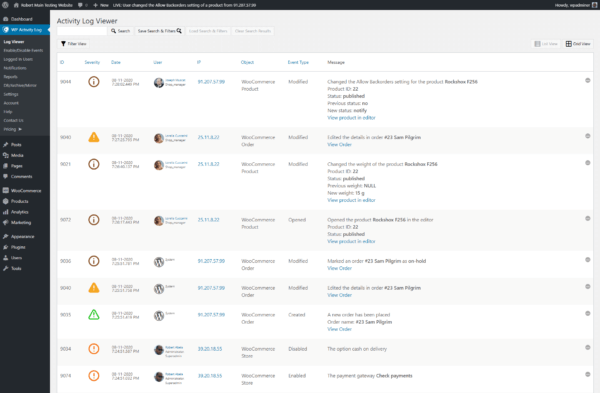
The launch of the activity log extension for WooCommerce
With the release of the new WP Activity Log for WooCommerce plugin extension, we have also included a number of new features and improvements:
- Added a number of new events to keep a log of product tag changes in WooCommerce. These are the new event IDs:
- 9101: Created new product tag
- 9102: Deleted a product tag
- 9103: Renamed a product tag
- 9104: Changed the slug of a product tag
- Fixed a number of issues for more detailed and accurate activity logs for WooCommerce.
Refer to activity logs for WooCommerce for more details on how you can keep a detailed log of all the changes you and your teammates do on your WooCommerce-powered eCommerce solution.
Moved the plugin settings to the WordPress options table
As part of our maintenance and improving the performance of the WP Activity Log plugin, we have also moved all the plugin settings to the WordPress options table. Up until version 4.1.2, the plugin settings were stored in a custom table.
This change allowed us to simplify the code base of the plugin. For you, this means that the plugin is now operating quicker on your site.
New plugin & activity log privileges
BREAKING CHANGES: we have improved the way the plugin and activity log privileges work. However, in some edge cases, this can be a breaking change. Please check your privileges settings after upgrading to version 4.1.3.
With the new privileges settings, super administrators can now specify if the administrators on child sites can see the logs of their own sites, and can also specify if super administrators on the multisite network can manage the plugin settings or view the logs only.
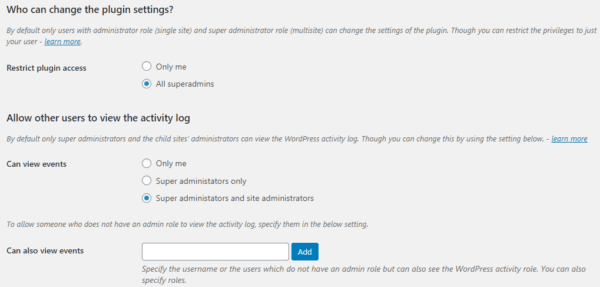
For more detailed information on this subject, refer to configuring the plugin and activity log privileges.
Update 4.1.0
The all-new user sessions management module
Up until version 4.0.4, WP Activity Log relied on WordPress to show you who is logged in to your website.
However, this method was slow and had a lot of limitations. WordPress saves the session data in the wp_usermeta table, alongside other user information. So for the plugin to show who is logged in, it had to parse too much data, most of which it did not use. This made the process very slow, and on big websites, it was impossible to retrieve the complete list of logged-in users.
So in this update, we have built an all-new users sessions management feature that uses its own data and does not rely on WordPress data. Even better, the new module maintains the WordPress session data and keeps the database cleaner.
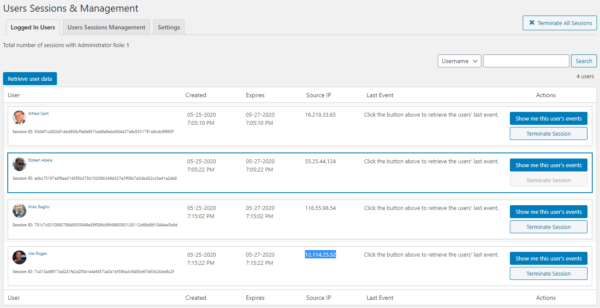
New configurable users sessions policies per role
Since the new users sessions module is much faster, now it is possible to configure users sessions policies per role. You can limit and block multiple users sessions based on their roles.

You can also configure a policy in the plugin to terminate idle users sessions after a certain time based on role.
Breaking change: with the introduction of the new policies, which can be configured differently for different roles, the old configured policies cannot be migrated. So if you are upgrading from an earlier version of the plugin, the previously configured policies will be lost. Please reconfigure them.
Other major improvements in update 4.1
In this update, we have also:
- Added a new setting to configure the log files folder (by default, the plugin saves log files in /wp-uploads/wp-security-audit-log/ ),
- We moved more of the plugin’s settings to the wp_options table, so it can load the settings much faster,
- Removed more obsolete code, which was used for when updating from versions prior to 3.2.3.
Update 4.0.4
Today’s announcement is very different from all the previous ones. We are renaming WP Security Audit Log to WP Activity Log. The plugin’s name change reflects the vision we have for the plugin, as explained in this post.
A bit of history
When we started WP White Security and released the first version of WP Security Audit Log back in 2013, we did not anticipate that our plugin would have such an impact in the WordPress community.
Within a short period of time our plugin became the #1 user-rated WordPress activity log plugin. This positive response is what encouraged us to continue developing the plugin.
Just two years ago, we also started developing other WordPress plugins, all of which are designed to better help you to manage your WordPress sites and users, and keep them secure.
We are always very happy to hear from our customers on how useful our plugins are to them. However, even though we have several different plugins, we have a soft spot for WP Security Audit Log, because it’s our very first plugin.
And today, we are excited to announce that we have renamed it as WP Activity Log. Read more below about why we have decided to rename it.
Why have we renamed the plugin to WP Activity Log?
As the #1 rated activity log plugin in the WordPress repository, we have gradually outgrown the label as being just a security plugin.
Sure, security is still a big element of what the plugin covers and we still focus on it. But it’s not 100% accurate, as the words ‘security plugin’ tend to be focused on defensive security solutions, such as malware detection, fixing vulnerabilities and firewalls.
And we don’t do any of that.
As we add more features and understand what our customers are using them for, we have noticed that they are using the activity logs for:
- Security and forensics
- User productivity
- Users accountability
- Managing ecommerce stores and the team
- Monitoring and managing subscriptions and users’ sessions
- Troubleshooting technical issues
- And much more!
And the core feature that is helping them to do that is naturally the activity log, hence why we wanted to make that clear within our own name too.
Plus, the name ‘security audit log’ is slightly misleading, and it’s a rarely used phrase within the tech and WordPress industry. This makes it difficult for people to understand what is the purpose of the plugin with the original name.
By renaming the plugin, it is now self-explanatory. The renaming will allow us to really focus more on the power of the activity log too. It is not just about security logging, but any type of activity logging, and that’s what we want to emphasize on.
Oh, and our new name is also a lot shorter to say too.
This is just a plugin rename; nothing else was changed.
Apart from changing the name of the plugin, everything is kept the same. The plugin that you are already familiar with (previously known as WP Security Audit Log) still operates in the exact same way, and we are still the most comprehensive activity log plugin available.
And just as important, our core values have not changed. We still strive to provide high-quality plugins, at excellent value and make your job easier when managing WordPress sites and users.
We also didn’t want to make any other changes apart from the name change so that we don’t overwhelm you with multiple changes. Don’t get us wrong, we still have exciting plans for the plugin and new features to add that are designed to make your work even easier.
Update 4.0.3
Support for WooCommerce 4.0
WooCommerce 4.0 has the new WooCommerce Admin, a modern JavaScript-driven admin interface. A new interface also means a lot of under-the-hood changes. So we updated our WooCommerce activity log sensor so it detects changes done via the new WooCommerce admin.
Increased coverage of WooCommerce store & products changes
In this update, we also increased the coverage of the store and product changes store managers do. This means that the plugin now keeps a log of many other changes that previously it did not. Here is the list of the new IDs the plugin is using:
- 9105: The product stock quantity has changed due to an order
- 9085: The WooCommerce setting “Selling location(s)” was changed
- 9086: List of excluded countries to sell to was changed
- 9087: List of countries to sell to was changed
- 9088: The WooCommerce setting “Shipping location(s)” was changed
- 9090: The WooCommerce setting “Default custom location” was changed
- 9091: The “Cart page” in the WooCommerce settings was changed
- 9092: The “Checkout page” in the WooCommerce settings was changed
- 9093: The “My Account page” in the WooCommerce settings was changed
- 9094: The “Terms & conditions page” in the WooCommerce settings was changed
Refer to the WooCommerce activity log event IDs for a complete list of all the WooCommerce store and product changes the plugin can keep a log of.
New bbPress activity logs add-on
Up until WP Activity Log version 4.0.2, the activity logs sensor for bbPress was shipped within the core plugin itself. However, not everyone who uses WP Activity Log also uses bbPress.
So in order to keep the main plugin light, we’ve taken out the bbPress activity log sensor from the main plugin and released it as a bbPress activity log add-on. If you use our WordPress activity log plugin to keep a log of changes on bbPress, upon updating to 4.0.3, install the bbPress activity logs add-on as well.
Note: in future updates of the plugin, we will also remove the WooCommerce and Yoast SEO sensors from the plugin and release them as activity log add-ons. Refer to the page activity logs for third-party plugins for a complete list of which other plugins we support and integrate with.
Breaking change: individual add-ons are no longer supported
In January 2018, we switched from selling multiple individual add-ons to a simpler freemium model; free and premium editions. You can read more about this in our 2018 license change announcement.
We have supported individual add-ons since then, i.e., they still worked with the free version of the plugin. However, we had to stop supporting them in order to continue developing our plugin. The backward compatibility support was holding us back since we had to work with legacy code that is at least 3 years old.
If you are still using the individual add-ons, please contact us so we can assist you with the upgrade.
Other noteworthy highlights in 4.0.3
- Performance enhancement: we started moving the plugin’s settings from our own table to the wp_options table. So far, we moved ten settings.
- The plugin now detects the multiple changes that are done at once (instead of only reporting the latest change).
- We removed the masking on errors in the activity log external database so when there are connection problems, you are notified of the actual error, thus easing troubleshooting.
- Plugin is reported instead of a username in the WordPress activity log when a change is done automatically by a plugin.
Update 4.0.1
Activity logs for WPForms
In my opinion, WPForms is the easiest to use WordPress forms plugin. I like everything about it, including its website and the team that has built it. I really enjoyed working with them; they are very enthusiastic and easy going – Robert Abela, WP White Security.
With the new add-on for WPForms, WP Activity Log can keep a log whenever someone:
- Adds a new form, modifies, duplicates, renames, or deletes it
- Adds a new field in a form, modifies, or deletes it
- Adds, enables, modifies or disables notifications in forms
- Deletes an entry (lead)
and more. For more details on this partnership and this add-on, refer to the activity logs for WPForms.
Activity log add-ons for third-party plugins
We are currently working to enable the plugin to keep a log of changes that happen in many other third-party plugins like we already do with WooCommerce, Yoast SEO, and others.
In order to support many other plugins, yet have a lightweight activity log solution, we introduced the activity log add-ons for third-party plugins. Add-ons are great because we do not have to include all the code in the main plugin. Users can choose which add-on to install, based on their requirements. So if, for example, someone is not using WPForms, they do not have to install the WPForms add-on.
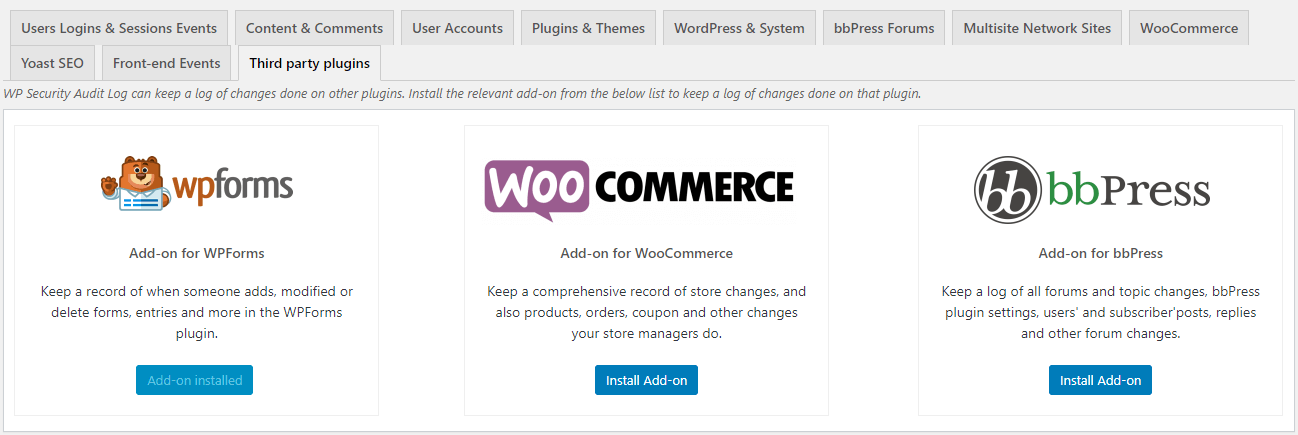
The installer for third-party plugins add-ons
Add-ons can be installed and activated with a single click from the Enable/Disable Events > Third party plugins section. Simply find the add-on of the plugin you want to keep a log of and click the Install Add-On button. Stay tuned as we announce new add-ons later this year!
IMPORTANT NOTICE: In the next releases, we will be migrating the plugin’s sensors for WooCommerce and bbPress as add-ons. If you are using our plugin to keep a log of changes in, for example, the WooCommerce store and products, please follow our news for when we announce the release of the relevant add-ons.
New event type “Renamed”
In WP Activity Log version 4, we introduced Event Types and Objects in the activity log. We added them to make the activity log easier to read. With them you also have more criteria to choose from when searching and using filters, configuring notifications, and generating reports.
With this update, we added a new event type: Renamed. This is used when an object is renamed, such as a post, WooCommerce product, or WPForms form. Event IDs 2123, 2062, 2084, 9077, and 9071 have already been updated to use this new event type.
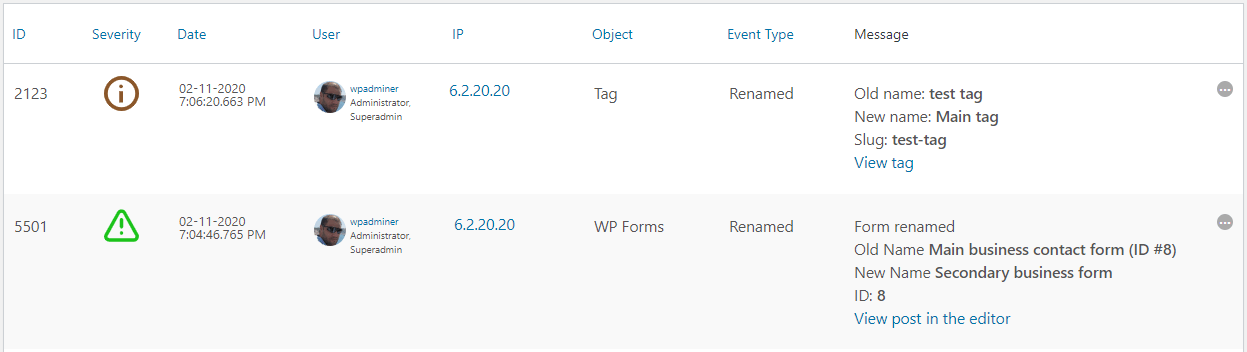
New events with Renamed event type
Refer to the activity logs metadata for more detailed information on Event Types, Objects and all the other metadata reported in the WordPress activity logs.
Other noteworthy updates
Version 4 was a major update, so naturally version 4.0.1 includes a few followup updates and bug fixes. Here are some of the other improvements that we have included and are also worth a shout:
Updated / improved some of the plugin’s help messages,
Optimized the logged in users view (now it does not retrieve the latest event automatically, so it loads much faster),
Localised the text in JS files,
Started removing some obsolete code (mostly code used for upgrades in older versions)
Fixed an issue in the file
Update 4.0
Easier to read yet more detailed WordPress activity logs
This section highlights all the user interface (UI) and user experience (UX) changes we added in version 4 to make the logs easier to read, and to also provide you with a better insight of all that is happening on your WordPress.
New metadata in the activity logs
We have added two new metadata types to the WordPress activity logs: event type and object.
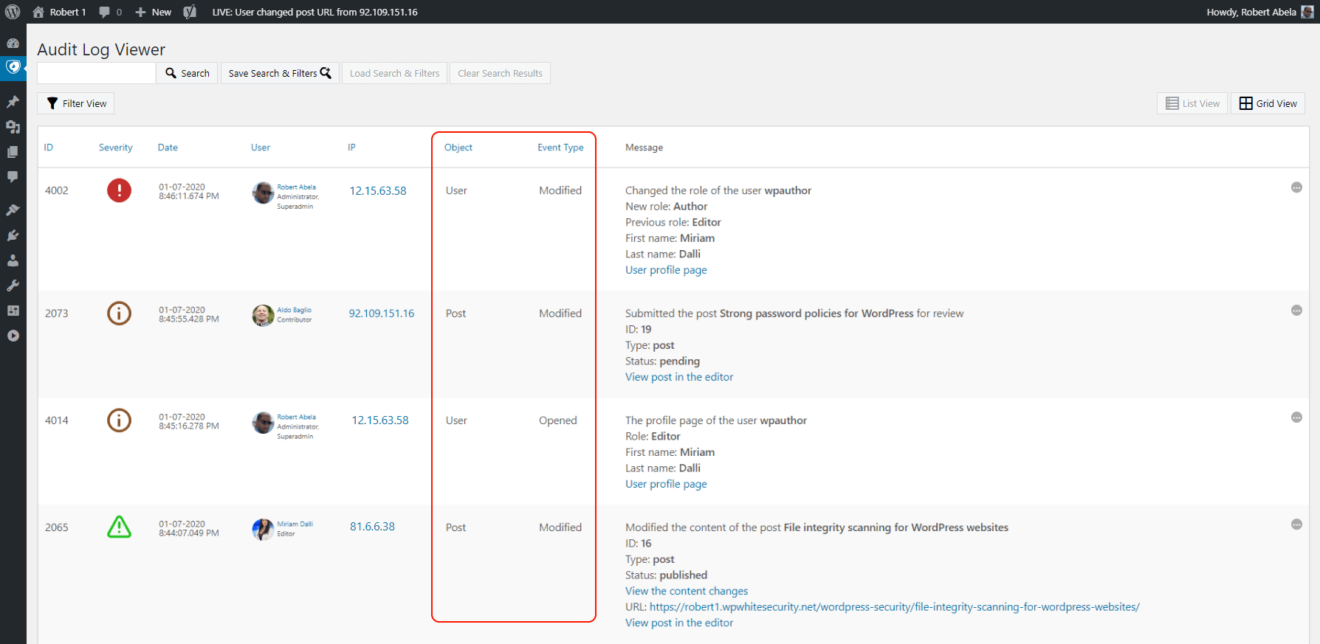
The event type describes the type of activity an activity log event is about. For example when a user logs in to the website, the event type is login. If a user installs a plugin, the event type will be install.
In the object metadata the plugin will report the object the activity log event is about. For example if a user logs in or changes the password, the object will be user. In case of a plugin install, the object will be plugin.
Refer to the WordPress activity log metadata for more detailed information about all the metadata you can find in the WordPress activity logs.
NOTE: upon upgrading to v4 the plugin will not add the event type and object to the older events. Use our activity log data updater plugin to add them.
Improved log message format
Data in point form format is easily scannable, and people can read it in much less time. Therefore we have changed the format of all the log messages to point form so you can get better understand the log in less time.
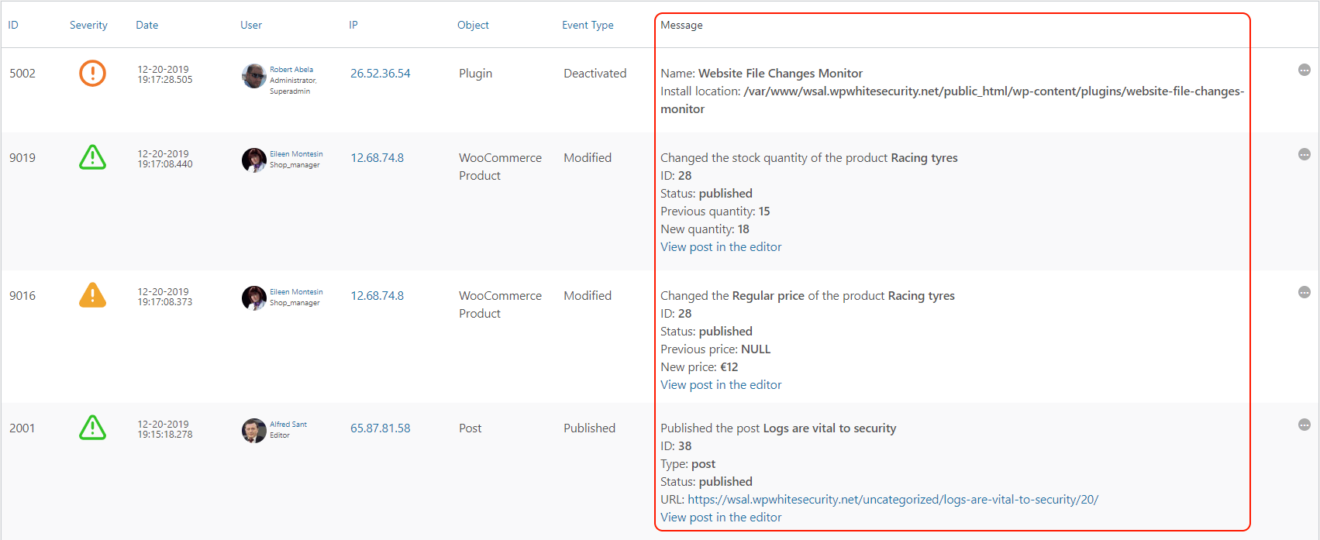
Now it takes you much less time to parse and understand the activity logs, especially with the addition of the new event type and object metadata types.
More activity log severity levels

In this update, we have also introduced new severity levels. In total, there are now five different ones:
- Critical
- High
- Medium
- Low
- Informational
Severity levels indicate the impact a particular change can have on the security, functionality and also performance of the website. An example of a critical severity event is when a user installs a new plugin. Refer to the WordPress activity log severity levels for a detailed explanation of every severity level used in the activity logs.
Improved activity logs granularity (and search filters)
With the introduction of the new event type and object metadata types the activity logs are now more granular.
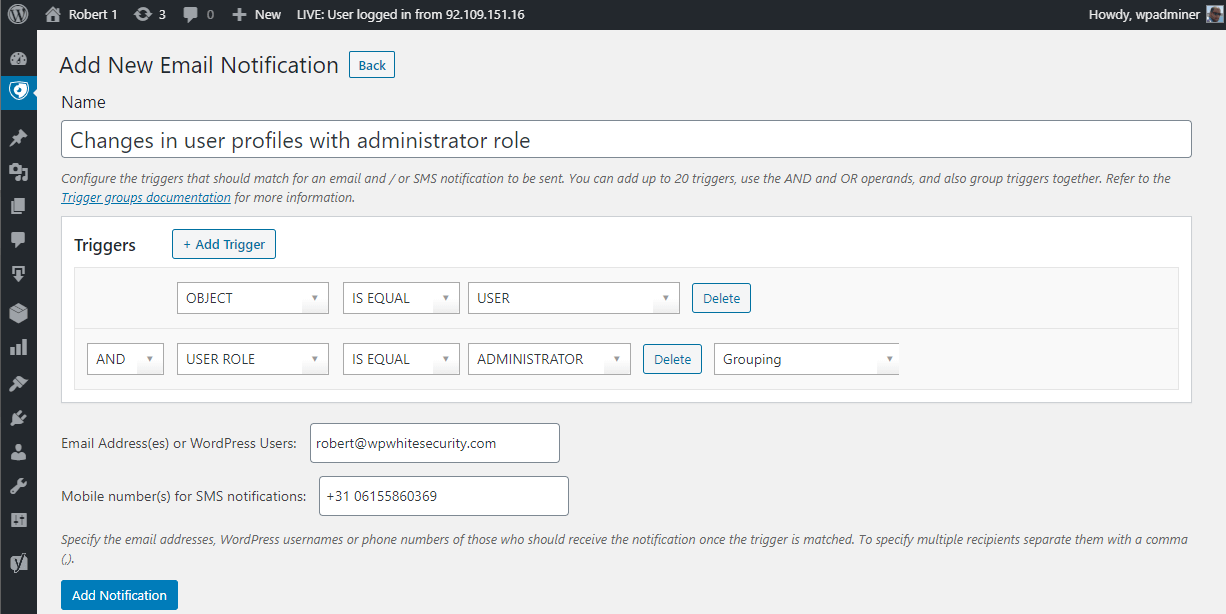
These metadata types can be used in email and SMS notifications. For example you can use the user object in a notification trigger instead of all the user profile changes event IDs to be alerted whenever there is a change in a user profile.
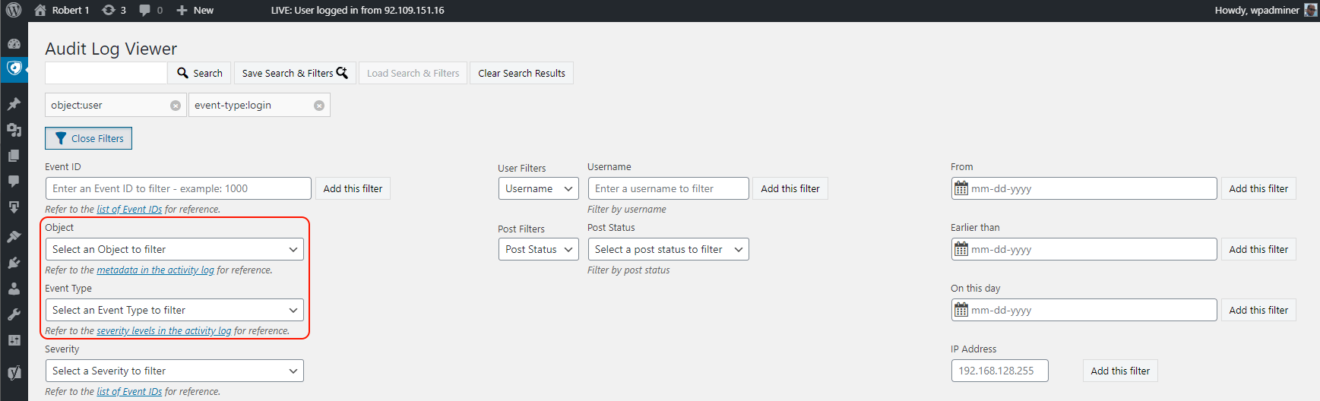
We have also added the new metadata types as search filters. This means that you can filter your activity log search results using either the event type or the object, or both.
Other notable updates in this version
Like with every other update, we have also included a number of other updates that are worth mentioning, such as:
- A new ergonomic search and filters UI,
- Added several new reference links in the plugin’s help text,
- Updated the Freemius SDK to version 2.3.2,