



WP Activity Log version 3 release notes
WP Activity Log release notes for all version 3 builds and releases.
Update 3.5.2
New filter hooks for plugin users
In this update, we have included three new filter hooks:
- wsal_filter_prevent_deactivation_email_delivery: this filter hook deactivates the email that is automatically sent to the administrator when the plugin is deactivated.
- wsal_filter_deactivation_email_delivery_address: this filter hook can be used to change the email address to where the automated email is sent when the plugin is deactivated.
- wsal_disable_user_switching_plugin_tracking: WP Activity Log keeps a log of changes users make even when switching to another user with the User Switching plugin. You can use this filter hook to disable this and keep a log of the actual user doing the change.
Refer to filter hooks in WP Activity Log for a complete list of all the filter hooks the plugin has.
Better support for custom post types on multisite networks
Up until this update, users could not exclude a child site specific custom post type from the activity logs. However, we have rewritten the code that keeps track of registered custom post types on a multisite network. This means that now you can exclude the monitoring of any custom post type from the activity logs, even if it is just available on a child site in the multisite network.
Other noteworthy updates in this version
In this update, we also have:
- Updated the database queries to support MySQL 8 better
- Fine-tuned the WooCommerce activity log sensor not to report non-relevant events when there are coupon changes
- Added a new setting to toggle the milliseconds in the WordPress activity logs
- Added wsal_ prefix to all cron jobs (standardization of code & elements)
- Updated the activity log custom events API to only require one sensor on a multisite network
Update 3.5.1
Filters and sorting for the Severity column
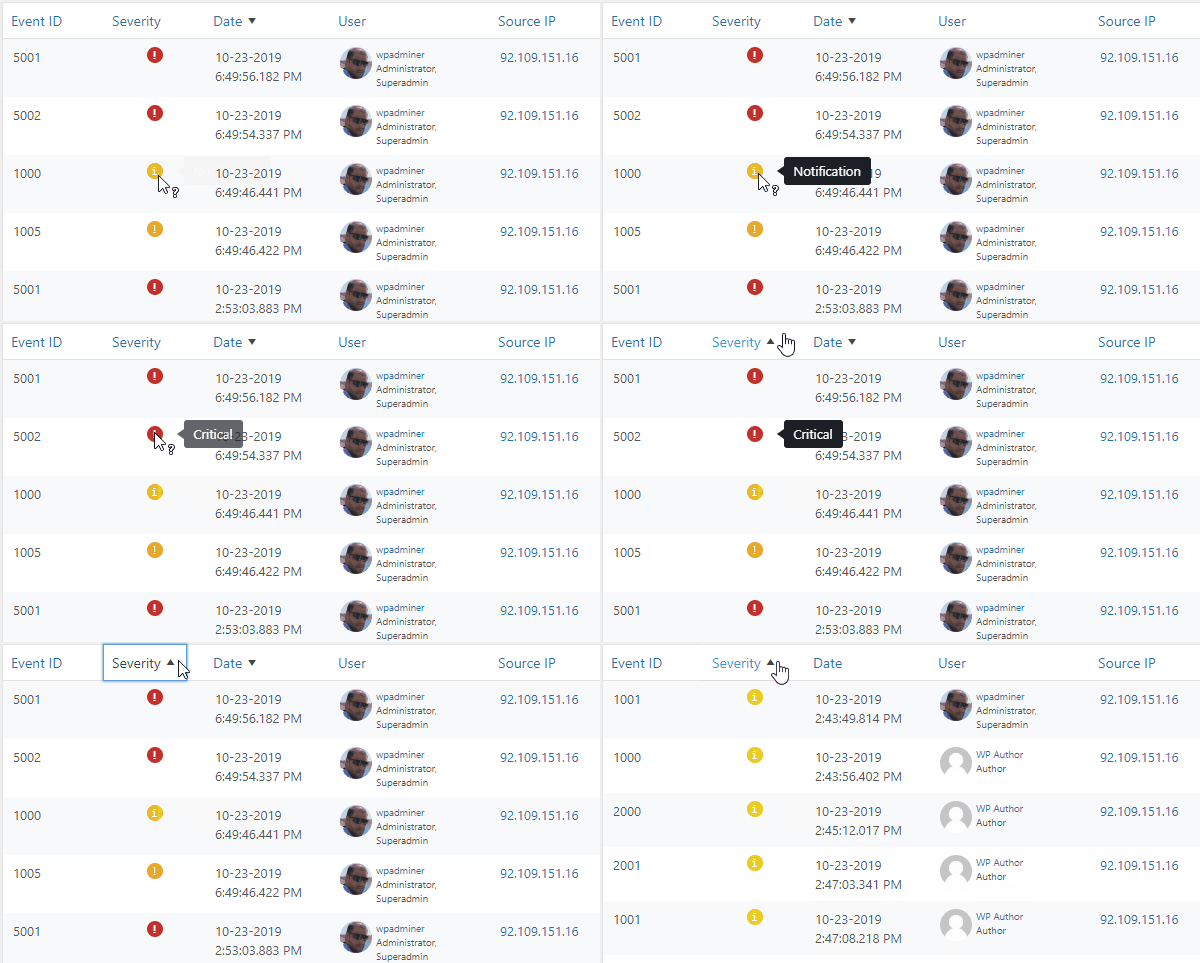
As shown above, it is now possible to sort the events in your WordPress activity log by the events’ severity. In WP Activity Log Premium you can also filter the activity log view by severity, as shown below.
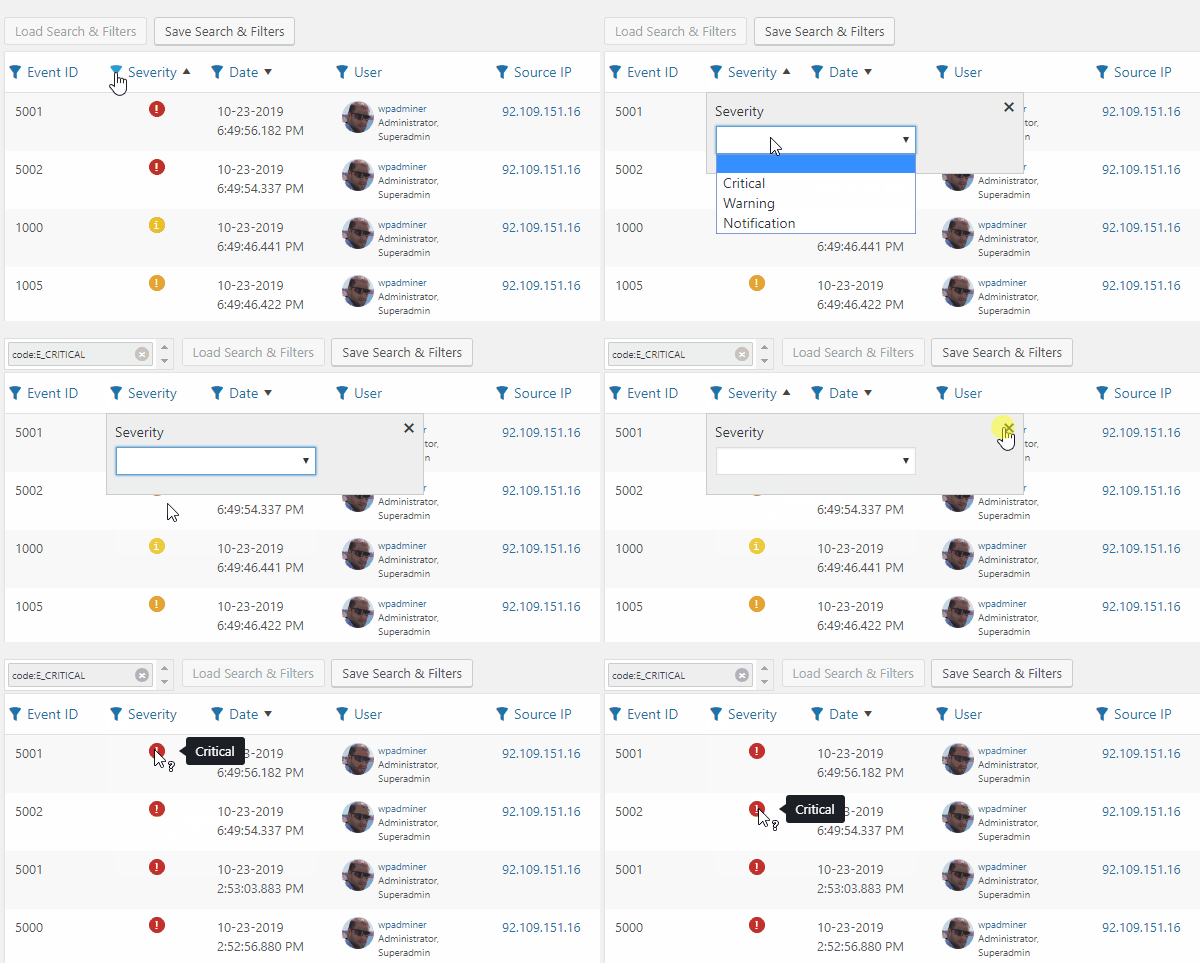
Until now, in WordPress Activity Log, there are only three different severity levels; Critical, Warning, and Notification. In the upcoming updates, we will include more severity levels, allowing you to have more granularity when filtering and sorting events. We will also write documentation in the plugin’s knowledge base explaining the different levels of severity and how they can help you better understand the logs.
Improved activity log sensors
In this update, we have also improved several activity log sensors so the data in the activity log is more relevant to you. Here are the highlights:
Improved content and post changes sensors: there were cases in which the plugin was keeping a log of trivial automated changes. For example, the plugin kept a log of a draft post date change when something else was updated in the post. Even though such change happens in the background, this is trivial information. There is no need to keep a log of it.
Improved logout detection: the plugin now detects user logouts at a much earlier stage in the process. This allows it to detect user logouts even when other plugins hook into the logout process and include additional functionality. For example, log out and redirect the user to another page.
Better support for the Classic Editor: when a post is published with the Classic Editor, the WP Activity Log was keeping a log of trivial under-the-hood changes. With this update, the plugin only keeps a log of the changes that are relevant to the administrators.
Other noteworthy plugin updates
In update 3.5.1 of the WP Activity Log plugin, we also have:
- Added more help text and links to the plugin knowledge base,
- Improved formatting of daily summary email to better support Microsoft Outlook,
- Fixed some compatibility issues with WordPress 5.4 (thank you Chris Van Patten),
- Updated the plugin to work on the upcoming WordPress 5.3
Update 3.5.0
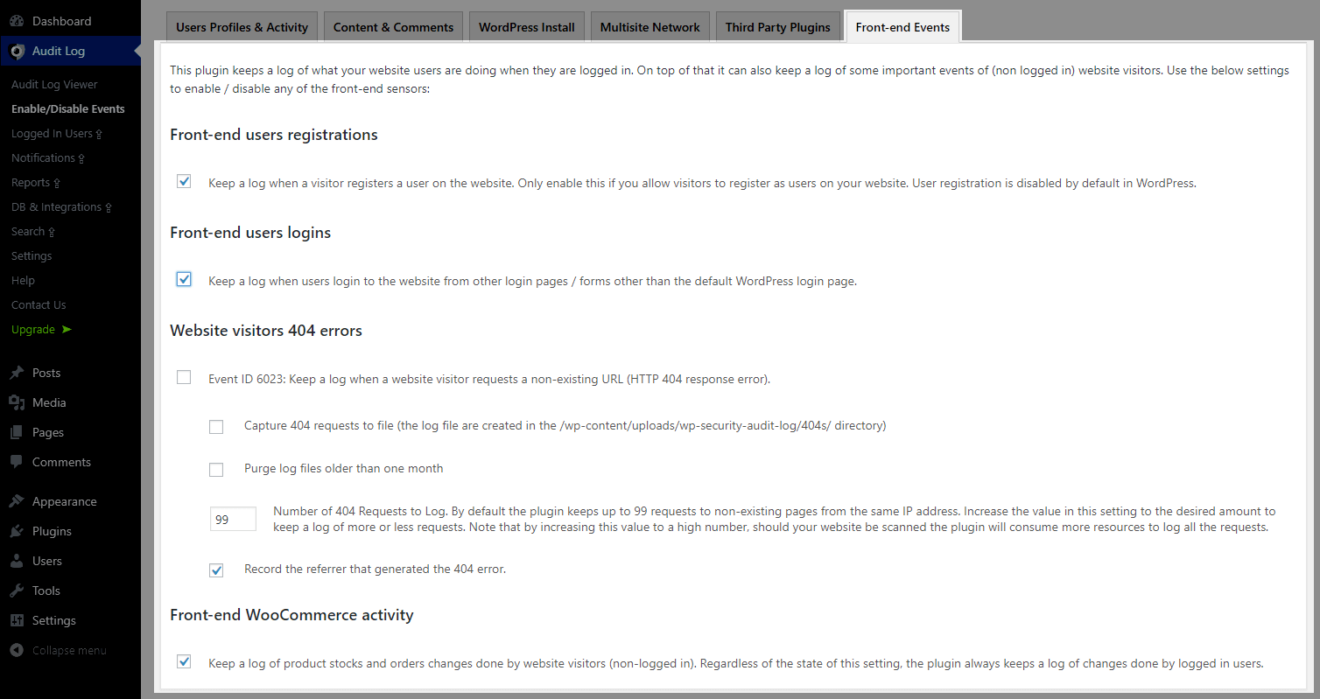
Individual front-end sensors
The plugin’s front-end sensors keep a log of some activities that happen on the front-end of your WordPress website. Mainly;
- User logins from custom login pages,
- Visitors request a non-existing URLs (404s),
- New users register on your website,
- New prospects make a purchase on your WooCommerce store.
In previous versions of the plugin you could enable or disable these sensors as group. In this update we have segregated the front-end sensors, so you can enable or disable these sensors individually. This give you more flexibility on what features you can enable and disable in the plugin. It also improves the plugin’s performance, i.e. you do not have to load sensors which you do not need.
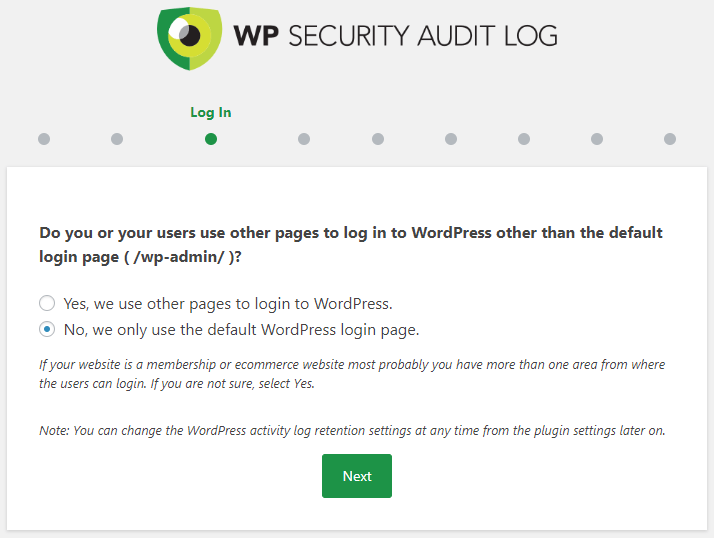
Improved first-time plugin install plugin wizard
We have also added new slides in the first-time install wizard so customers can configure these sensors when installing the plugin.
Other noteworthy updates
Better WooCommerce activity log coverage: with this update the plugin also keeps a log of stock changes when products’s stocks change because orders are placed manually, or when the number of items in the orders is changed by shop managers.
Support for WooCommerce Tab Manager plugin: when the WooCommerce Tab Manager plugin was installed, the plugin could not retrieve the correct product name. With the WooCommerce sensor update, we have also addressed this issue.
Improved hide plugin feature: the plugin also updates the number of installed plugins when the hide plugin in the plugins page setting, so there are no indications that the WP Activity Log plugin is installed on the website.
Update 3.4.3
(Another) very big and final plugin performance update
In 2019 we set out to improve the plugin’s performance. We have included performance improvements in almost every update we released in 2019. With this update, we continued on what we have done so far this year.
However, we went a step further in this update: we’ve worked closely with Mark Jaquith, one of the five lead WordPress developers, to help us conclude this performance project.
Thanks to his valuable input, this version of the plugin is at least 5.5 times faster than the previous one. Its footprint on a WordPress website is negligible. The following statistic highlights how much the plugin’s performance has improved this year:
Version 3.4.3 is at least 15 times faster and uses just 10% of the resource that version 3.3.1 used!
We compared version 3.4.3 to version 3.3.1 because 3.3.1 was the first update released in the beginning of this year.
Search and reports for MainWP activity logs extension
Soon, we are to release the premium edition of the Activity Logs for MainWP extension. In the premium edition of the MainWP extension, users can search in the activity logs of all the child sites on the network. They can also also generate reports from the child sites activity logs.
Since the premium edition of the MainWP extension depends on WP Activity Log, in this version we have included updates to support this remote functionality.
Other notable plugin improvements
In this version, we have also improved the following:
- WooCommerce activity log coverage (e.g., plugin now keeps a log of product changes done through quick edit)
- Improved the coverage of draft posts (plugin reports the details of draft post changes)
- The plugin also mirrors the IP address of the event when mirroring WordPress logs to Slack
- We shortened the text of the event in the dashboard widget for better readability
- Added the title of the report in HTML reports
Update 3.4.2
30x Faster Database Queries, Search & Filters
Your WordPress activity log is stored in a database. This means that when you view the activity log or filter the views, WordPress retrieves data from the database. By optimizing the database queries, the plugin uses fewer resources and also:
- Browsing the activity log is much faster
- Search results and filters work much faster
- The plugin uses much fewer resources
We are very happy with the optimization results; a search query in an activity log with one million records used to take 350ms. Now it takes less than 1ms!
Improved User Experience (UX)
We are planning a major UX and UI update to the activity log viewer for version 3.5. Though in this version, we focused mostly on minor UX improvements, which together make a big difference:
- MySQL server responses are displayed when the configuration of the external database connection is not correct
- The plugin now shows detailed errors when there are problems with the Twilio integration and sending SMS notifications, allowing admins to troubleshoot easily.
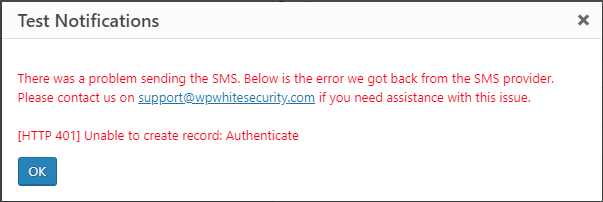
- Added warning message and the plugin is automatically disabled when the plugin is installed on a MainWP dashboard instead of the Activity Log for MainWP
- Several plugin prompts are now responsive and have better text
Update 3.4.1
Import & Export plugin configuration feature
Large businesses are always adding new websites to their web farm, especially WordPress agencies. Whenever they build a new website they also manually configure the WP Activity Log plugin.
However, that is no more! We developed a feature with which you can easily export and import the plugin settings. Now WordPress agencies and other businesses can easily deploy a standard plugin configuration to all the sites they add to their web farm with just a few mouse clicks.
New Hooks for theme developers
The plugin displays warning messages on the login page when you manage and limit users sessions and a user’s session is blocked. However, these messages do not show up on custom login pages.

In this version we have included some new hooks in the activity log plugin that your theme developer can use to display the plugin’s warnings on your custom login page.
Other highlights & improvements3
Also, in this update:
- Option to exclude a range of IP addresses from the activity log
- The Reports for WordPress support more date and time formats
- An updated content sensor that does not log events of legit background processes
- New hook to add logging of hidden custom fields to the activity logs
- Removed hard-coded paths in the WordPress file integrity scanner
Refer to the plugin’s changelog for a complete list of what is new, improved, and fixed in update 3.4.1 of the WP Activity Log plugin.
Update 3.4.0
SMS Notifications In the WordPress Activity Log
The WP Security Audit log plugin has had email notifications since the beginning. Email notifications are good to have. However, they are not instant and as reliable as SMS messages. They tend to slip through your inbox.
SMS notifications are the way to go if you want to be instantly alerted of a change or a user action. If someone logs from an exotic location into your WordPress site outside office hours using an administrator account, you want to be instantly alerted, even if it is the middle of the night. Hence why we added SMS notifications in the plugin.
You can enable any of the built-in notifications or create your own notification criteria to receive SMS messages. The SMS message template is editable, and you can shorten the URLs in the messages with Bit.ly, which is also supported out of the box. The WP Activity Log plugin sends SMS notifications via the Twilio service.
For more detailed information, refer to configuring SMS and email notifications in the WordPress activity log.
Better Coverage Of WordPress Changes
In this release we’ve also focused on improving the coverage of the plugin. Prior to this update, the plugin had somewhat limited coverage of site changes that were not done directly via the WordPress admin pages.
So we enhanced the plugin’s sensors and now the plugin keeps a log of changes done via third party customization. If you are using custom code or applications that automatically apply changes to your site, or you do site changes via them instead of the admin pages, the plugin will keep a log of such changes.
Other Plugin Update Improvements
In this release, we have also included quite a few plugin functionality improvements as well. Here is a high-level overview of what has been improved:
- New event ID 1008 to keep a log of user switching (support for User Switching plugin).
- New event ID 9083 to keep a log of a user’s billing address (WooCommerce).
- New event ID 9084 to keep a log of a user’s shipping address (WooCommerce activity log).
- Added several new pre-configured SMS & Email notifications.
- Optimized the database queries that retrieve the list of logged-in users.
- Optimized some metadata database queries (reduced queries by 75%).
- Removed the limit of five criteria in the notifications trigger builder.
Update 3.3.1.1
Infinite Scroll in the Log Viewer
Up until this version, you could browse through the events in the WordPress activity log via pagination. However, because of pagination, the plugin had to count all the events in the database every time, which meant the rendering of information was slow and needed additional resources. With the introduction of the infinite scroll, browsing through the activity log is way faster and needs much fewer resources!
Should you wish to switch back to pagination navigation, you can do so from the plugin setting, as explained in the FAQ, switching the WordPress activity log viewer view mode.
Much Faster Search Filters
The other major performance enhancements in this update are in the Search filters. We have improved the database queries the plugin uses to do IP, user and role searches and improved the search performance by more than 600%. Now it takes the plugin just a few seconds to apply a filter and display the results on a database with more than 1,000,000 events.
Update 3.3.0
Mirroring WordPress Activity Logs to Slack
Slack has become really popular with teams. It offers one central source of information about everything that is happening on the networks, applications, and services that users use.
Now, WP Activity Log users can mirror the activity log of WordPress sites to a channel on Slack. Setting up the mirroring of activity logs to Slack is really simple and will only take you two minutes. Also, when configuring the mirroring, you can also configure filters to specify which of the event types should be reported to the Slack channel.
New UI for the External Databases & Services Integration Module
In this update, we gave the UI of the External Databases and Services Integration module a facelift, making it much easier to use. We have also changed the concept of how connections are set up etc. So with the new interface, you can:
- Configure multiple mirroring destinations
- Better manage all the archiving and mirroring connections
- Test the connection status with just a click of a button.
Refer to our Setting up external database and services connections in the WordPress activity log for more detailed information on how these features work.
Mirroring WordPress Activity Logs to a Remote Syslog Server
In previous versions of the plugin, you could only mirror the WordPress activity log to the local syslog, i.e. the one running on the web server where the website is hosted. From this version onward, you can mirror the WordPress activity log to a remote syslog server.
We have also mapped the severity of the WordPress activity log events to the severity levels in syslog, making things much easier and standard.
Improved Users Sessions Management
In this update, we have improved the WordPress users sessions management module, specifically the feature that limits multiple user sessions. WordPress clears users’ session data once every 24 hours, so there were cases where a user’s session expired, yet they were not allowed to log in because there was still session data.
The plugin has now been optimized to handle such situations. The plugin now also checks the session status, so it no longer locks out users whose session is expired.
New Configurable Maximum File Size for File Integrity Scanner
In previous versions of the plugin, the WordPress site file integrity scanner was restricted to only scan files that are smaller than 5MB. From this update onward, WordPress site admins can now configure the maximum file size themselves, giving them more flexibility to scan any files they need.
Major Performance Improvement of the Activity Log Plugin
In this version update, we also worked on a major performance improvement. Now the plugin is more than 50% faster; hence it requires much fewer resources to run. We have also segregated the activity log event IDs used to keep track of activity from non-logged-in users, such as requesting non-existing URLs. By segregating these types of events, you can now disable them altogether, from the Enable / Disable Events section.
Breaking Change – Old Premium Add-Ons No Longer Supported
At the beginning of this year, we switched to a new licensing model. We stopped selling the old premium add-ons and switched to a single premium version. This allowed us to better manage the code and introduce more features. When we announced the new licensing model, we also sent an email to all paying customers with information on how to migrate to the new edition of WP Activity Log. If you still have not migrated, you might encounter problems. If you do, contact us.
Update 3.2.4
In this update, we included several new features and improvements.
Activity Logs for Gutenberg
Comprehensive activity logs is what sets WP Activity Log apart from other activity log plugins for WordPress. And the same value proposition was kept for Gutenberg. So the plugin will not just keep a log that a post has been updated, but it will keep a log of what exactly changed.
Whether you are using the Gutenberg or the Classic editor, the activity log plugin will keep a log of what has changed. So in the activity logs you can see the post content changes the user has done, or if they changed the URL, visibility, status, added tags, changed categories or any other type of post change.
Daily Activity Log Highlights Email from Your WordPress Site
The activity log of a busy WordPress site or multisite network can have thousands of events per day, so it is not possible to get a high level overview of what has happened during the day. So in this new update of WP Activity Log we included a new daily WordPress activity log digest email, which is sent automatically to the administrator.
The email notification can be disabled and the list of recipients can also changed. For more detailed information on this feature refer to the daily activity log digest email from your WordPress sites.
New UI and Settings for Users Sessions Management Module
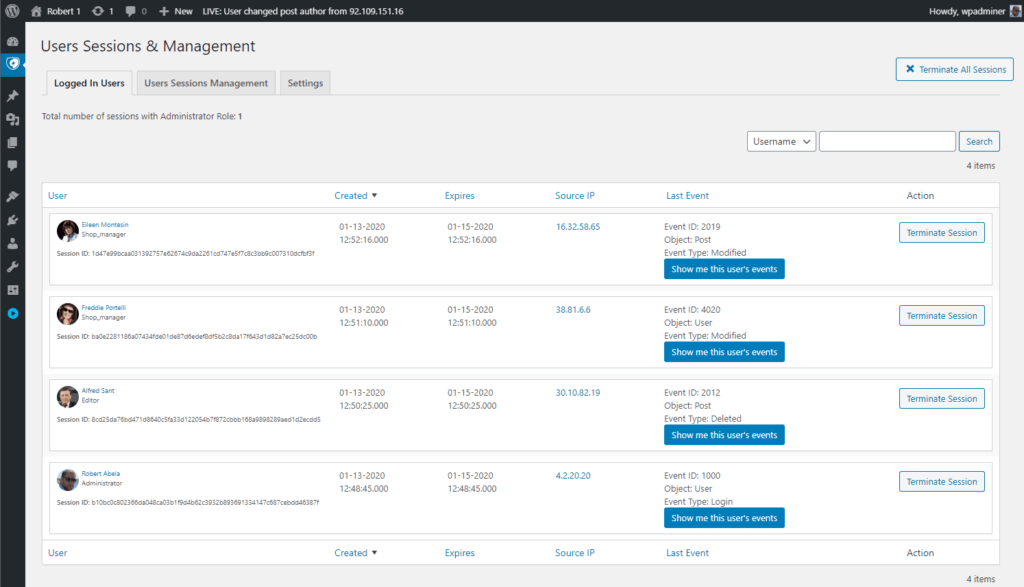
Since version 2.3 we have been focusing on making WP Activity Log plugin easier to use, so users do not have to be familiar with security and activity logs to use the plugin. So far we have updated all the plugin’s settings, added new help text, developed a new startup wizard and much more.
In this update we have revamped the settings and the UI of the users sessions management features for WordPress. We have changed the settings text and added new help text, making the settings much easier to understand.
Other highlights in this update
In this update of our activity log plugin for WordPress we have also included the following features and updates:
- New admin bar notification with the latest event from the activity log
- Updated the order of the entries in the plugin menu
- Improved the MainWP Child Site Stealth mode in the premium edition
- Improved the WordPress menus sensor (improved coverage and accuracy)
Update 3.2.3
This is a hotfix release, which includes some bug fixes but also a number of improvements that make the plugin easier to use. Here is a highlight of what is included in this version update.
New Activity Log Events
As our commitment to continuously improve the coverage of the WordPress activity log plugin, in this update we included three new events:
- Event ID 6006: user reset the plugin’s settings to default
- Event ID 6033: the WordPress file integrity checks has started or stopped
- Event ID 6034: user has purged the WordPress activity log
Refer to the complete list of WordPress activity log events for more information on what the plugin can keep a record of.
MainWP Child Site Stealth Mode
Since we announced our support and integration with the MainWP WordPress management platform, we have received a lot of good feedback. One thing we’ve learned is that many MainWP users do not necessarily want their clients to see the messages in the activity log because, in most cases, they cannot understand them, thus creating confusion.
To address this issue, we developed the new MainWP Child Site Stealth Mode setting, which is automatically enabled when the plugin is installed on a site on which there is the MainWP Child Site plugin. For more information on how this feature works, refer to What is the MainWP Child Site Stealth Mode setting.
Plugin Improvements
- Added subcategories in the Enable/Disable Events section
- Improved the sensor for the detection of plugins activations and deactivations
- Added response notifications for when old data is purged from the activity log
- Added a pop-up to confirm the chosen log level was applied successfully
Breaking Change – Removed Mcrypt Support
In version 2.6.5 of the plugin, which was released on the 18th of July 2017 we replaced Mcrypt with OpenSSL. We previously used Mcrypt to store the connection details of the external database and other activity log integrations, but replaced it because it was superseded by OpenSSL. Since then we have kept backward compatibility for Mcrypt to give users enough time to migrate to the newer versions of the plugin.
It has been more than a year since we replaced Mcrypt, so in this update we are removing Mcrypt support completely. You should not be affected by this change unless you are using a version of the plugin that is earlier than version 2.6.5. If you are using an earlier version of the plugin, update it to version 3.2.3.2 before updating to this version.
Update 3.2.3
In this plugin update, we focused on making the plugin easier to use and improving the user experience. Version 3.2.3.0 of the WP Activity Log plugin is the first of a number of updates which will focus on improving the user experience. Here is a highlight of what is new and improved in this version.
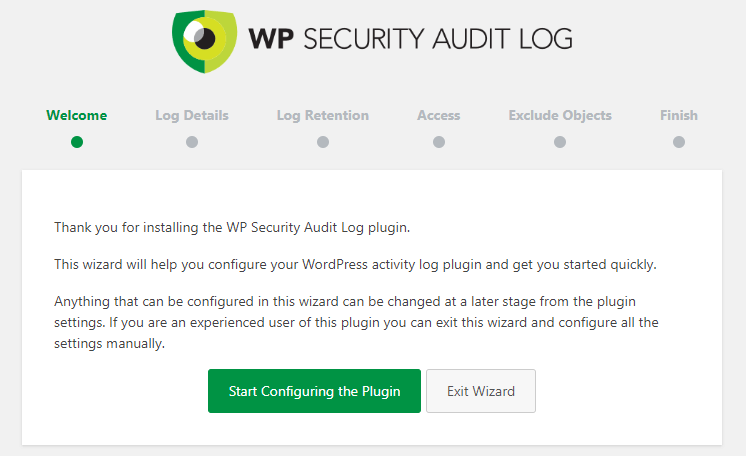
WordPress activity log plugin startup wizard
When you install the the WP Activity Log plugin you will be greeted with a wizard. It will run you through a few things that you should consider configuring, such as WordPress activity log retention, privileges and more. The wizard will allow you to configure:
- WordPress activity log detail level
- Retention policies for the WordPress activity log
- Privileges for the activity log
- Exclusion rules for the WordPress activity log
WordPress activity log detail levels
The WP Activity Log plugin has the most extensive WordPress activity log in terms of details and coverage. Though we understand that not every WordPress website owner is interested in knowing that a post custom field automatically modified. So we introduced two WordPress activity log detail levels; Basic and Geek.
The Basic level is for those who want to keep a log of generic user activity such as logins, logouts and posts modifications but not of under the hood changes such as custom field changes. In the Geek log level detail the plugin will keep a log of everything it can.
Read the Configuring the WordPress activity log detail level for more information and refer to the complete list of WordPress activity log events for more details on which events are included in which detail level.
New WordPress activity log search filters
As part of our plugin user experience improvements we have added several new search filters to the WordPress activity log. Also, we made the search filters to a more intuitive location, on top of the activity log columns.
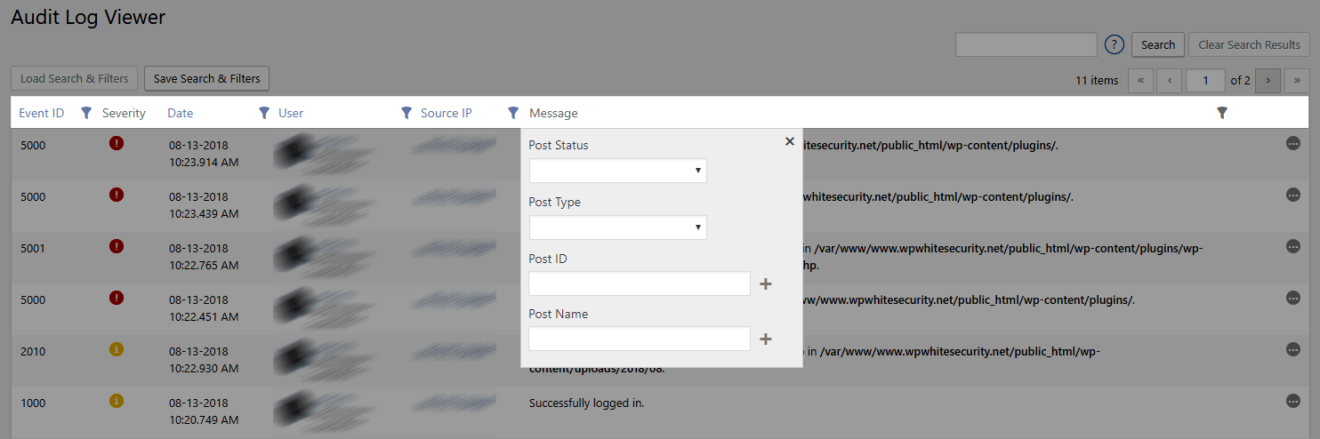
Now users can easily use any filter to fine tune their search results. Filters and search terms can also be saved for later use. Refer to the How to search in the WordPress activity log for more details.
New plugin settings pages and help text
We have rearranged and rewritten all the text of all our settings pages. We have also added much more help text and where possible linked the help text to the relevant information in the plugin’s knowledge base.
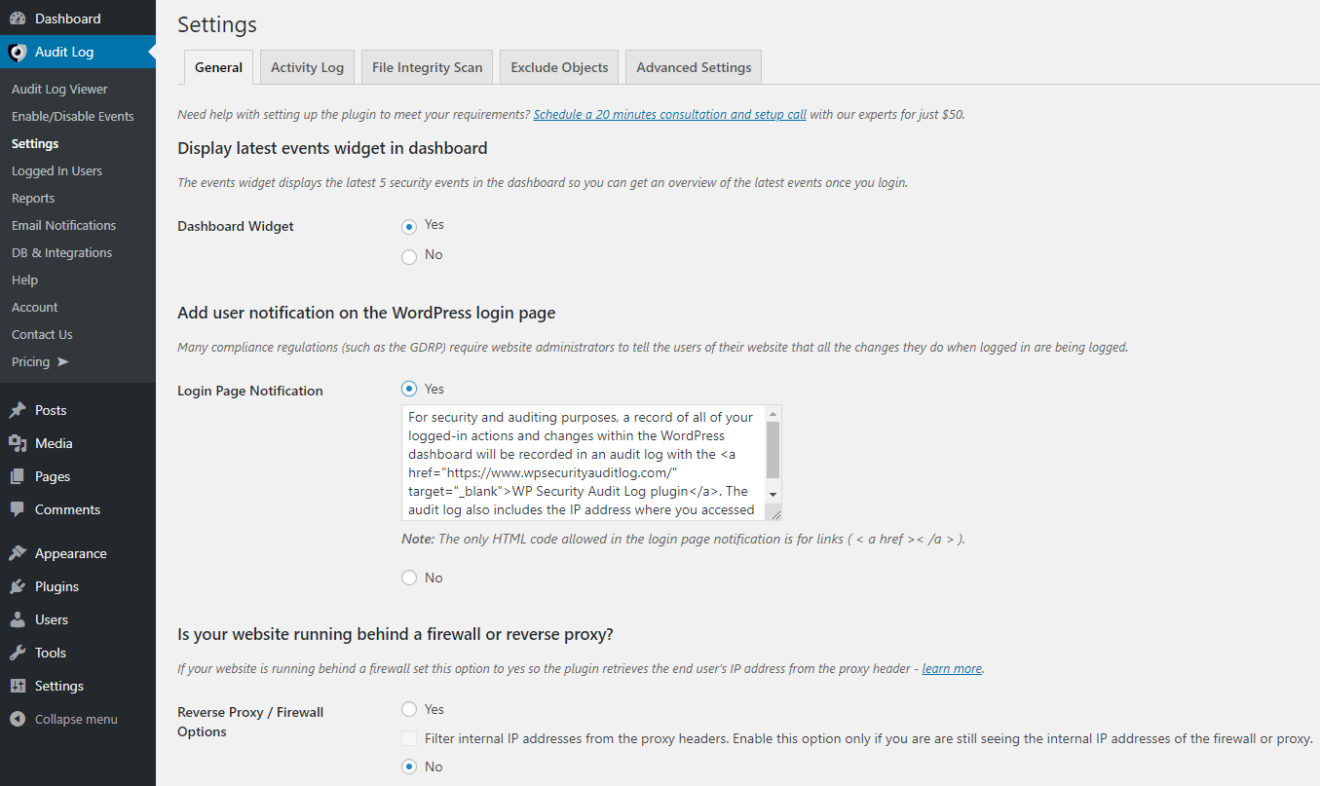
By explaining in detail all the technical terms the settings can now be easily understood by WordPress user of all levels.
Performance improvement in plugin’s sensors
We have also continued our work on improving the plugin’s performance. In this update we have applied several improvements to the plugin’s sensors logic.
The plugin has a sensor for different type of changes. For example to keep a log of all content changes, the plugin has a dedicated sensor for content. In previous versions, all sensors were being loaded with every user action.
In this update only the sensors that log changes that can be done from the page the user is accessing are loaded, hence the plugin will run faster and consume less resources.
Other plugin updates and improvements
There have been several other updates and enhancements in this version update.
Update 3.2.2
The main highlight of this update is support for MainWP, a WordPress plugin that allows you to manage multiple WordPress installs from one central dashboard. This update also includes several other new features, improvements, and bug fixes, which are highlighted in this post.
Support for MainWP

We are working on a full integration between Main WP and the WP Activity Log plugin, with which users can view the WordPress activity log of all child websites from the central MainWP dashboard. This integration is split in two phases.
In phase one, which we are announcing today, the WP Activity Log plugin will keep a record in the WordPress activity log of any changed done to a website from the MainWP dashboard. In phase two of the partnership, which we will be announcing in the near future, we will release a MainWP add-on that can be used to view the WordPress activity logs of all MainWP child websites from the central MainWP dashboard.
A shout out to Ivica Delic of Freelancers Tools and all our beta testers from the MainWP Users Facebook group who offered to beta test the plugin and this integration.
Buffer for external WordPress activity log database
In this version we introduced a buffer for the WordPress activity log external database. This means that should the external database connection be slow or unavailable, the events will be stored in the WordPress database and sent to the external database once the connection is restored. Therefore if the connection is slow or dropped, the website and its performance are not affected.
Retention settings for archived events in the WordPress activity log
WordPress activity log archiving allows you to archive events that are older than a specific time, so there are not a lot of events stored in the main activity log database. Previously it was not possible to configure WordPress activity log retention when archiving was enabled.
In this version, we introduced retention settings for archived activity log events as well. Therefore when archiving is enabled, the retention settings of the activity log are moved to the archiving settings.
Exclusion of logs of requests to specific non-existing URLs
By default, the WP Activity Log plugin keeps a log in the WordPress activity log when a user or website visitor requests a non-existing URL (404 errors). Such logs allow you to identify automated scans and other forms of possible automated malicious attacks.
Though you may not want to keep a log of all requests to non-existing URLs. For example, if you change the WordPress login page URL the plugin will keep a log of bots requesting such URL, which are useless for you. In such case you can easily exclude the logging of such requests to non-existing URLs from the Exclude options in the plugin’s settings.
Performance Improvements
In this update of the plugin and the next few ones we will be announcing several performance enhancements. The WP Activity Log plugin is already optimized to run on any type of WordPress and web server configuration without affecting the website’s performance. Though our aim is to reduce even further the resources footprint of the plugin to the lowest possible level while still improving its performance. In this update we have:
- Improved the sensors loading mechanism so sensors for third party plugins that are not installed will not be loaded
- Changed the plugin’s loading scripts so views are only loaded when requested
Stay tuned by subscribing to the WP Activity Log plugin newsletter so you are informed when new updates are released.
Other notable Improvements
In this update of the most comprehensive WordPress activity log plugin, we have also included the following:
- Option to exclude directories from the WordPress file integrity scans
- Updated the 404 detection sensor to use a more accurate source to capture the requested non-existing URLs
- Added a new setting to exclude the changes of automated changed to product stocks in WooCommerce
- Plugin now allows administrators of sites on multisite networks to view who is logged in to their sites
- Updated the exclusion settings to allow users to exclude any post type from the logs, including the default post and page
Update 3.2.0
WordPress website file changes warnings in the WordPress activity log
Most probably this was the most asked for feature – keep a record of any file added, modified or deleted on a WordPress website in the WordPress activity log. The plugin uses three different event IDs to report file changes in the activity log, which are:
- Event ID 6029 to report newly created files,
- Event ID 6028 to report that an existing file was modified,
- Event ID 6030 to report that a file was deleted from the website.

The scanning for website file changes, also known as WordPress file integrity check, is enabled by default and runs once a week. You can configure the scanning frequency and other scan settings from the plugin settings. You do not have to worry about performance because the scanning process is heavily optimized, and on a low spec’d test web server, the plugin can scan up to 21,000 files per minute!
Read the WordPress file changes warnings and file integrity checks in the activity logs for all the technical details on how the WP Activity Log plugin file changes scanning technology works and how you can configure it.
MySQL database connections over SSL & Client Certificates
The External database module in the plugin, which allows you to store the WordPress activity log in an external database, mirror it or archive it now supports SSL and client Certificates. So now you configure a connection with an external database and you can encrypt the communication between your WordPress activity log plugin and the remote MySQL database server.
Other plugin improvements & bug fixes
In this update, we have also made some other improvements and fixed a number of issues reported by our users, whom we’d like to thank for their cooperation.
Update 3.1.7
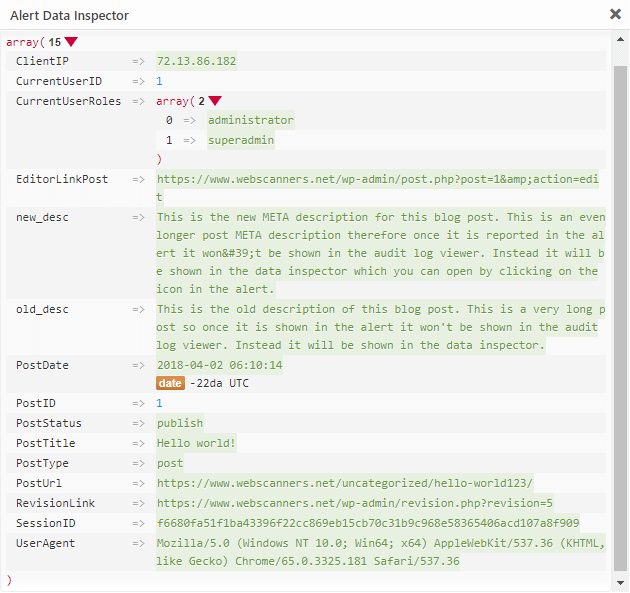
New Data Inspector for the WordPress activity log
When the WP Activity Log plugin keeps a log of a change, it records a lot of technical details, though most of them are not reported in the WordPress activity log. For example, when a user makes a change in a blog post the plugin records the post type, ID, user session and more.
To view all these details you can use the all new Data Inspector, which we introduced with this version update. In previous versions of the plugin we had a less informative Data Inspector, and was not enabled by default.
Buffer for Alerts when using an external database
When using the WP Activity Log plugin you can store the WordPress activity log in an external database. Though what happens if the external database is not available?
We have developed a buffer so when the external database is not available the website operations are not stopped. Instead the plugin will keep a buffer of the WordPress activity log in the WordPress database. Once the external database is available again the plugin will automatically migrate the alerts from the buffer to the external database.
All of these operations are done automatically and do not require any user interaction, though certainly worth a mention, especially if one of your requirements is high availability!
Other notable highlights for this version update
In this update we have also:
- Converted the HTML WordPress reports template to responsive,
- Improved the support for Ultimate Member Pro and WooCommerce,
- And much more!
Update 3.1.5
The two big highlights of version 3.1.5 of the most comprehensive activity log plugin for WordPress are:
- Detailed activity Log for YOAST SEO plugin
- A new fully blown users sessions management module
This post explains in detail the two new features and what else is improved in this plugin update.
Activity Log for Yoast SEO Plugin
The WP Activity Log plugin can now keep a log of SEO changes users do on posts (post/page/custom post type) and when administrators change the Yoast SEO plugin settings. Let’s dive a bit into the details.
Changes in Yoast SEO Meta Box
If you have used the Yoast SEO plugin before, you are certainly familiar with the SEO metabox shown in the below screenshot.
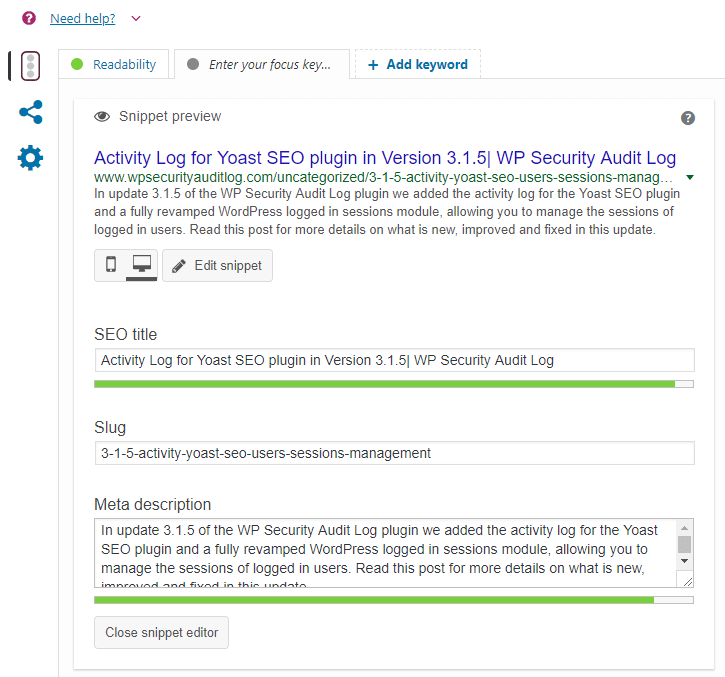
When a user changes any of the SEO details or settings, the WP Activity Log keeps a record of the change in the WordPress activity log. The plugin keeps a record of what was updated as well. So for example in case the title was changed, it will keep a log of the title change which also includes the old and new title. Below is the list of Alert IDs the plugin uses to keep a record of such changes:
- 8801: Changed the SEO title
- 8802: Modified SEO description
- 8803: Changed the option Allow Search engine to show post in search results
- 8804: Changed the option Search Engine follow links
- 8805: Set the Meta Robots Advanced setting
- 8806: Changed the canonical URL
- 8807: Changed the focus keyword
- 8808: Enabled / disabled the option cornerstone article
Refer to the complete list of all the Alert IDs the WP Activity Log plugin uses to keep a record of what has changed on WordPress for more detailed information.
Changes in Yoast SEO Plugin Settings
The WP Activity Log plugin also keeps a record of the settings changes WordPress administrators do on the Yoast SEO plugin, for example when the home page meta description is changed, or when the XML sitemap is enabled or disabled.
Here is the list of Alert IDs the WP Activity Log plugin uses to keep a record of the Yoast SEO plugin settings changes in the WordPress activity log:
- 8809: Changed title separator
- 8810: Changed the Homepage Title
- 8811: Changed the Homepage Meta description
- 8812: Changed the Knowledge Graph setting
- 8813: Changed the option Show Posts / Pages / Attachments in Search Results
- 8814: Changed the Posts / pages / Attachments title template
- 8815: Changed the SEO Analysis setting
- 8816: changed the Readability analysis setting
- 8817: Change the cornerstone content setting
- 8818: Changed the Text link counter setting
- 8819: Changed XML Sitemaps setting
- 8820: Changed Ryte Integration setting
- 8821: Changed the Admin bar menu setting
- 8822: Changed the Posts / Pages / Attachments meta description template
- 8823: Changed option Date in Snippet Preview for Posts / Pages / Attachments
- 8824: Set the option Yoast SEO Meta Box for Posts / Pages / Attachments to Disabled
- 8825: Changed the setting Security: no advanced settings for authors
Refer to the complete list of all the Alert IDs the WP Activity Log plugin uses to keep a record of what has changed on WordPress for more detailed information.
WordPress Users Sessions Management Module
In this update of the WP Activity Log plugin we also included the fully revamped WordPress Users Sessions Management module, which you can use to:
- Terminate all logged in users sessions with just one click (in case you notice suspicious behavior)
- Limit the number of multiple sessions per WordPress user (ideal for all those subscription websites that want to ensure paid users do not share their login details)
- Automatically terminate idle logged-in WordPress sessions
- Configure logged-in session override settings
- Use text search and search filters to search for logged-in users
- And much more!
Read managing logged-in WordPress users sessions for more detailed information on this powerful module and how to configure it.
Other Improvements & Bug Fixes in this version
We have also added other improvements and bug fixes. For example, now the plugin can also keep a log of automated changes to WooCommerce products’ stock quantities which are done via a plugin or when an order is placed.
Update 3.1.1
Better Support for WordPress Multisite
Prior to this version update of the plugin, sites on a WordPress multisite network were considered as individual sites by the plugin when it comes to licensing etc. So even when purchasing the premium edition of the plugin, administrators had to manually enter and activate the license keys on every individual site on the multisite network.
We have changed all of this In this version – now multisite network administrators can opt-in and opt-out, and activate license keys from a central Account page in the multisite network dashboard, as shown in the below screenshot.
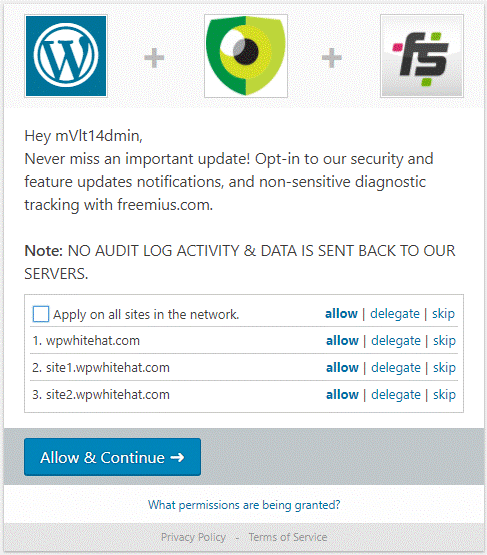
Central account page for all sites on the multisite network
When the premium edition of the plugin is installed on the multisite network, the super administrators can also see the licensing details and activations for every individual site on the multisite network.
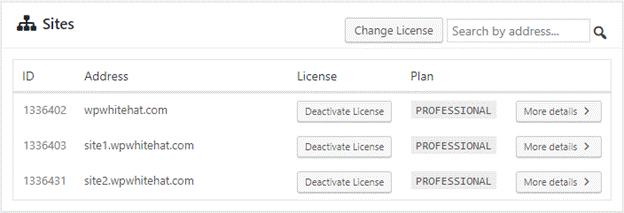
Managing plugin site licenses on multisite
Improved Logging of Users & Visitors Comments
In this new version, the plugin uses two different alerts to keep a log of posting of comments on a WordPress website:
- Alert 2099 – Logged in user posted a comment
- Alert 2126 – Website visitor posted a comment

Logging of comments activity in WP Activity Log plugin
Prior to version 3.1.1 the plugin only used alert 2099 to log the posting of comments. Now that these activities have been segregated, websites that have a high volume of visitor comments can still keep a log of comments posted by logged-in users without having their WordPress activity log full of alerts about comments posted by website visitors.
Refer to the list of WordPress activity log alerts for a complete list of changes that the WP Activity Log plugin can keep a log of.
Other Noteworthy Updates in 3.1.1
As usual, we managed to fit in some other updates in this version. Here are a few of them:
- Logging of user role change at the multisite network level
- Improved the content sensor to log multiple content changes done at the same time on a post/page / post with custom post type
- Improved the plugin menu node on multisite network sites
- Post Type selection menu in Email Notifications is not automatically populated on multisite network install so users can specify their custom post type
- Changed severity of alerts 6007 and 6023 (404 errors) from High to Notification
Update 3.1.0
Consolidation of WordPress Content Alerts
The plugin now records the Post Type and Post Status of the content so we could consolidate all the content alerts. Post Type can be a post, page, or any other custom post type you are using. WordPress has a standard list of post statuses, such as draft and published, though custom ones can also be created.
This new functionality means that now we have one alert that covers all post types and statuses instead of individual ones. For example, in the previous versions of the plugin, we had six different alerts to log that a post, page, or post with custom post type were modified:
- 2002: Modified the published post.
- 2003: Modified the draft post.
- 2006: Modified the published page.
- 2007: Modified the draft page.
- 2031: Modified the published post with custom post type.
- 2032: Modified the draft post with custom post type.
In version 3.1 of the WP Activity Log plugin, we have changed this completely. The plugin now just uses one alert to log all of these WordPress changes. For this particular example, the alert is 2002, and the message’s format is:
Modified the %status% %type% titled %post_title%.
So if you modify a draft post titled Joy Division that has a custom post-type movie, the following record will be logged in the WordPress activity log:
Modified the draft movie titled Joy Division.
Below is a screenshot with some of the new content alerts.
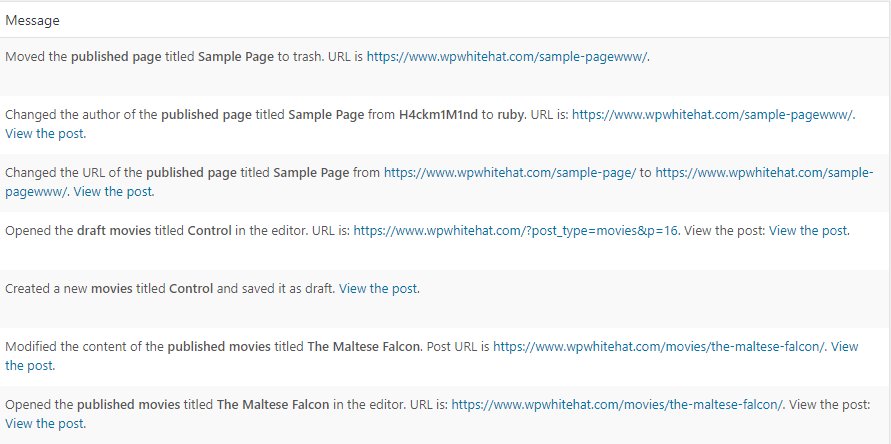
Content alerts in the WordPress activity log
This change gives the users more flexibility when it comes to searching for alerts, creating reports or building email notifications, as explained in the next section of this post. Refer to the complete list of WordPress security activity log alerts for a complete list of all the WordPress changes the plugin can keep a log of.
New Search Filters and Improved Reports & Email Notifications
The new content alerts system allowed us to build even more robust premium functionality, giving the users more tools to work with.
New Filters in Audit Log Search
We introduced two new filters in our search, one for Post Type and one for Post Status. Therefore now you can search for logs about draft posts or published posts that have a custom post type cars.
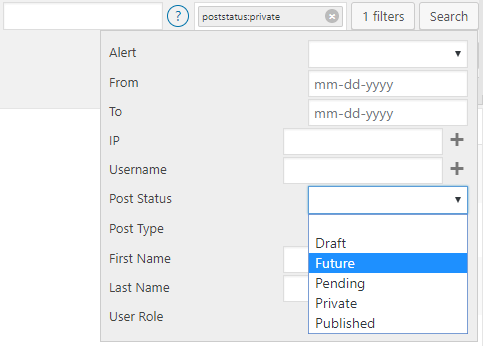
Post Type and Status Filters in Search
Improved Criteria Content Reports
We have included the new Post Type and Post Status as criteria in the new WordPress reports. So in the below example, a report can be generated about all Movies posts that are Private.
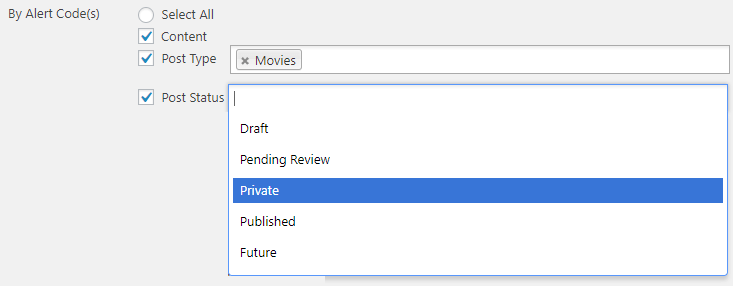
Use the Post Type and Post Status criteria in reports to create reports for content of a specific type, or that has a specific state.
Use the Post Type and Post Status criteria in reports to create reports for content of a specific type, or that has a specific state.
New Criteria in Email Notifications Trigger Builder
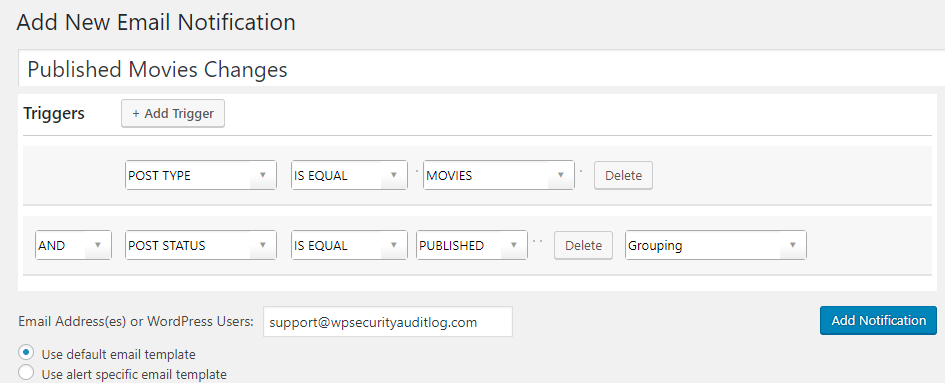
We have also included the new Post Type and Post Status in the Email Notifications builder. So, for example, you can now create an alert so that every time an entry in the WordPress activity log contains information about a published post with a custom post type Movies you are alerted via email.
Other Notable Changes in Version 3.1
Apart from the big announcement above, we also improved a good number of things in this version of the WP Activity Log plugin. Here is a highlight:
- Improved the priority of the plugin’s hooks so logins from custom forms are captured (e.g. better support for Restrict Content PRO and similar plugins).
- Developed a new fallback system for display names so when users do not have a first and last name configured, the username is displayed.
- Improved the tabs / UI of the Enable/Disable Alerts
- Consolidated Post ID, Page ID and Custom Post ID in just Post ID in Email notifications trigger builder.
- Improved the look & feel of the login page notification (GDPR compliance).
- Improved the UI and queries used for the Users Sessions management.
- Added the IP address requesting the non-existing page in the 404 log files.
Update 3.0
New Licensing Model
As announced a few days ago, from version 3.0 onward, we will no longer sell individual add-ons. Instead, the WP Activity Log will be available in four editions:
- Free – as it currently is,
- Starter – includes Email Alerts and Search,
- Professional – includes Email Alerts, Search, Reports, Users Sessions Management, Database Management, and Integrations module,
- Business – the same as the Professional Edition but also with priority support and an account manager.
For more details on the new licensing mechanism, such as when the existing customers will be migrated, read the post; 2018 – New Licensing Model for the WP Activity Log WordPress Plugin. If you have any questions about the new licensing mechanism please do not hesitate to contact us.
Insert table from – https://melapress.com/wordpress-activity-log/releases/
Integration with Freemius
In this release of WP Activity Log plugin, we also included Freemius, which will allow us to provide free trials, better manage our licensing program and accept credit card payments via a new payment gateway, not just PayPal payments.
Freemius will also give us the functionality to better understand our customers and how they are using our plugin, thus helping us in continuously improve the plugin and make sure it meets all of our customers’ requirements.
Note that opting in is optional. Should you choose not to opt-in, the plugin will still work. Also, when you opt-in to send us diagnostic data, NO activity log and user activity are sent to us
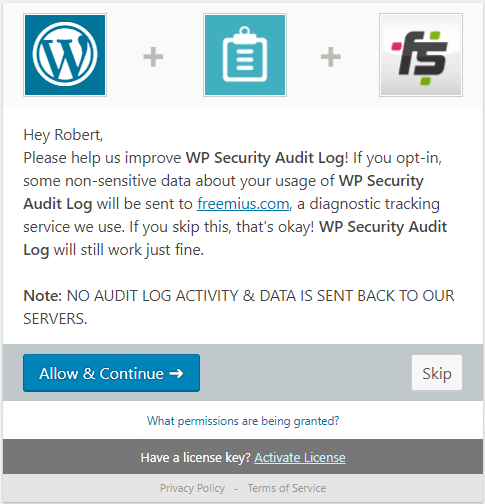
Freemius & WP Activity Log
Other Noteworthy Features
Apart from the two big changes above, which took most of the development time for this release, we also managed to fit in some other new features, which are:
- New Alerts for change of WordPress URL (6024) and site URL (6025),
- Fixed a number of coding issues to make the plugin WP Engine compliant,
- Plugin now also captures the status and created date of a post. This data is needed to implement new features in future versions.
- Updated the Italian translation files.